

Calendar 366 · Events & Tasks
Vincent Miethe Productivity iPhoneiPadiPod touchMacApple Watch
Calendar 366 · Events & Tasks is a free Productivity app for iPhone and iPad by Vincent Miethe. Rated 3.5/5 from 45 ratings. Requires iOS 17.6.
- Rating
- 3.5
- 45 ratings
- Price
- Free
- on the App Store
- Size
- 188 MB
- Age 4+
- Updated
- Oct 16
- 2026 · v4.0
Screenshots

About Calendar 366 · Events & Tasks
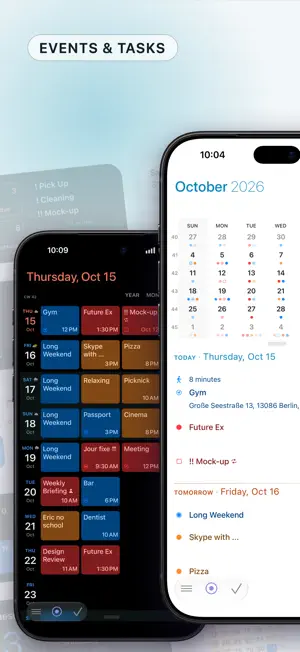
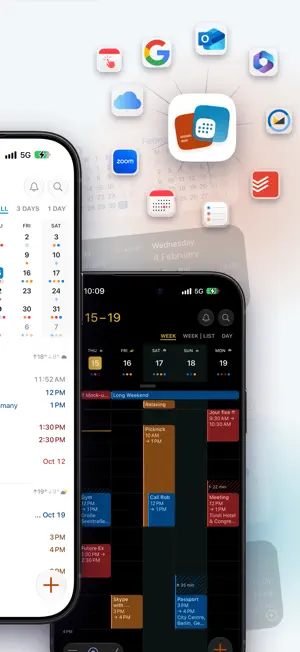
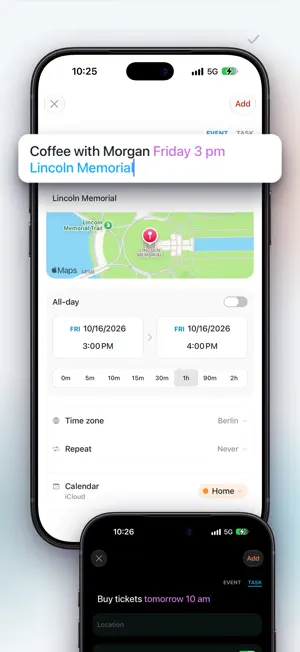
For all your plans! Your events and tasks, everywhere. On iPhone, iPhone Duo, iPad and Apple Watch. Create events as fast as you think them. Just type "Coffee with Morgan Friday 3 pm" – Calendar 366 takes care of the rest. Switch between views to plan your week, check the weather and keep your tasks in sight – even from your home screen with widgets. Choose from 3 themes and 9 color accents – light, dark or black, combined with your favorite accent. EVENTS • Create with natural language • Set the duration with a tap • Time zones, reminders, recurrences, categories, attachments, attendees, notes and more • Drag & drop to reschedule • Quickly duplicate, copy, paste, edit and share events and tasks TASKS • Plan and organize your tasks right inside the calendar • Reminders, location-based alerts, priorities, notes • Filter by today, overdue, important or all • Sort by title, due date or priority VIEWS • 13 different views with options (Year, Month, Agenda, Month | List, Week, Week | List, Day) • Any view, any combination (iPad) • Week view with 3 to 14 days • Portrait and landscape in every view • Quick switch by swipe and tap • Customizable layouts MEETINGS • Create Zoom, Google Meet and Microsoft Teams meetings and invite attendees • Join meetings directly from any view • Supports Webex, Skype, FaceTime and many more CALENDAR SETS • Group calendars and lists into sets • Quickly switch what's visible • Default calendar and list per set • Automatically synced across all your devices ATTENDEES • Invite people to your events and meetings • See their status at a glance • New invitations land right in your inbox • Accept or decline with a tap • Email attendees — all at once or individually CATEGORIES • Color-code your events and tasks • Works with categories and labels • Easy to distinguish, easy to find NOTIFICATIONS & BADGE • Choose which calendars notify you • Notification sound • App icon badge — date, calendar week, events, tasks or overdue items • Set to Events & Tasks, Events only, or Tasks only • Location-based reminders NAVIGATION & TRAVEL TIME • Never miss the time to leave • Automatic updates based on your location • By car, by bike or on foot • Supported maps apps: (Apple Maps, Google Maps, HERE WeGo, Waze, Organic Maps, OsmAnd, MAPS.ME, TomTom Go, Magic Earth, Sygic) WIDGETS • 20 home screen and desktop widgets in Small, Medium, Large and Extra Large • 6 lock screen widgets • Interactive – filter tasks, open events and more • 10 watch complications • 3 themes and weather INTEGRATIONS All your calendars and tasks in one place. • System (Apple Calendar & Reminders) • iCloud • Google (Calendar & Tasks) • Outlook & Microsoft 365 • Todoist • Zoom • Fastmail • CalDAV • Calendar subscriptions APPLE WATCH • Month view, event list, task manager • Create and delete events • Complete tasks • Open location directly in Maps • Complications for your watch face AUTOMATION & CONTROL • Apple Shortcuts support • Focus filters for Calendar Sets • URL scheme for automation • Siri AI — create, change and delete events and tasks with Siri (iOS 27) • Keyboard shortcuts (iPad) MORE • Search across events, tasks, locations, notes, categories and time periods • Weather in all views, widgets and the watch • Weather preview – today by the hour plus the next 7 days • Birthdays and anniversaries from your contacts • No account required – no analytics, no tracking, no data sent to our servers Terms of Use: https://www.apple.com/legal/internet-services/itunes/dev/stdeula/
Ratings & reviews
3.5
45 ratings
What’s new
Version 4.0 · Updated October 16, 2026
Calendar 366 4.0 is here — with full support for iPhone Duo, redesigned event and task details, a new app icon and many improvements. **New** • iPhone Duo support — the layout adapts to the fold, the camera strip and the rounded display corners; when unfolded, the main view sits left of the fold with tasks on the right • Redesigned event and task details — a cleaner preview with more ways to edit directly (e.g. removing reminders), and a tidier edit view • New app icons — choose your favorite, plus the new "Sunrise" accent • Weather in the preview — for the event's own location if it's more than 25 km away • Attachments now accept any file type • Tap a day in the week header to open it in day view **Improved** • More reliable invitations — reply to "Only This Event" or "Entire Series" for recurring invitations, and answer on behalf of the owner as a delegate (Microsoft, Google) • Glass toolbar buttons, refreshed list headers and highlighted weekends • Weather shows high and low temperatures everywhere — app, widgets and Apple Watch • Apple Watch shows event details in the new card style, with countdown and duration • Week and day view: events at the end of the day grow upward instead of being cut off • Multi-day timed events show start and end time in the bar • The inbox now covers the next year; recurring series show only the next occurrence • The badge now also counts overdue tasks • Temporary server errors no longer discard your changes • Microsoft "Away" and "Working elsewhere" are synced correctly; Google default reminders are kept • Shared calendars show their owner or who they're shared with • Unsaved changes are confirmed before closing • Simplified appearance settings • Improved search **Bug Fixes** • Fixed an issue where your own participation was not always recognized, e.g. with alias addresses • Fixed an issue where not all events were found across large time ranges in Apple Calendar • Fixed an issue where attendees added to an existing event were not saved • Fixed an issue where some symbols were not shown on iOS 17 • Minor bug fixes
App privacy
The developer, Vincent Miethe, reported these privacy practices to Apple.
Data Not Collected
The developer does not collect any data from this app.
Alternatives to Calendar 366 · Events & Tasks
Looking for apps like Calendar 366 · Events & Tasks? Here are 6 similar apps on the App Store. The highest rated is Planote - Daily Planner Tasks (5.0/5), and all 6 are free to download.
-
 TapCal
4.8
TapCal
4.8
-
 Planote - Daily Planner Tasks
5.0
Planote - Daily Planner Tasks
5.0
-
 Prazo: Calendar & To-Do List
5.0
Prazo: Calendar & To-Do List
5.0
-
 Eventual Calendar
4.6
Eventual Calendar
4.6
-
 Hibi Calendar: Daily Journal
4.9
Hibi Calendar: Daily Journal
4.9
-
 Pulse Calendar: Daily Planner
4.1
Pulse Calendar: Daily Planner
4.1
| App | Rating | Price | Last updated | Compare |
|---|---|---|---|---|
| Calendar 366 · Events & Tasks | 3.5 / 5 (45 ratings) | Free | October 16, 2026 | |
| TapCal | 4.8 / 5 (10) | Free | Jul 16, 2026 | Compare |
| Planote - Daily Planner Tasks | 5.0 / 5 (23) | Free | Oct 16, 2026 | Compare |
| Prazo: Calendar & To-Do List | 5.0 / 5 (1) | Free | Oct 16, 2026 | Compare |
| Eventual Calendar | 4.6 / 5 (9) | Free | Oct 15, 2026 | Compare |
| Hibi Calendar: Daily Journal | 4.9 / 5 (52) | Free | Oct 17, 2026 | Compare |
| Pulse Calendar: Daily Planner | 4.1 / 5 (8) | Free | Oct 16, 2026 | Compare |