

Tempo Calendar: Daily Planner
Rocky Lim Productivity iPhoneiPadiPod touchMac
Tempo Calendar: Daily Planner is a free Productivity app for iPhone and iPad by Rocky Lim. Rated 5.0/5 from 8 ratings. Requires iOS 26.0.
- Rating
- 5.0
- 8 ratings
- Price
- Free
- on the App Store
- Size
- 69 MB
- Age 4+
- Updated
- Sep 29
- 2026 · v2.0.0
Screenshots
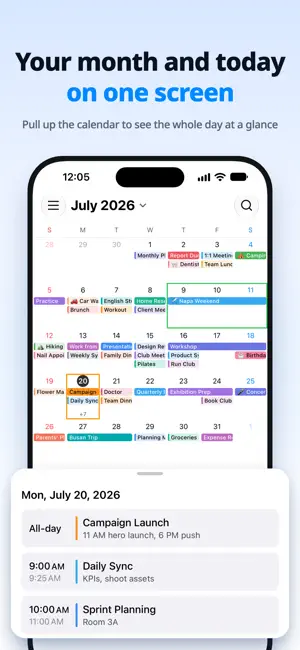


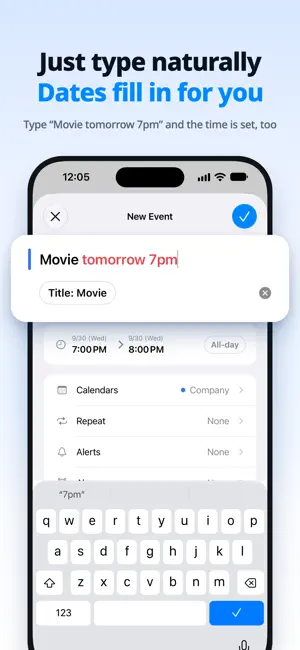
About Tempo Calendar: Daily Planner
Tempo. A calendar in tune with your day. Tempo is a clean, lightweight calendar designed to make everyday actions quick and easy. We focus on a natural feel over flashy features, an at-a-glance view over complicated settings, and a clean interface. - A minimal layout that’s easy to read - Seamless integration with Apple Calendar - Automatic iCloud sync Key features [Full Apple Calendar integration] Tempo lets you view and edit events from every account connected to your device’s system calendar, including iCloud, Google, and Naver. There’s no need to move your data or create a new account. [Automatic iCloud sync] Events added on your iPhone automatically appear on your iPad and Mac. Events sync through your connected calendar accounts, while individual event colors, date ranges, and other details set in Tempo sync through iCloud. Add an appointment on your iPhone during your commute, then organize your schedule on your Mac at the office. Switch devices and pick up with the same events, without any extra steps. [Monthly and weekly Home Screen widgets] Add a large monthly calendar widget to your iPhone or iPad Home Screen. See a whole month of events at once, switch months, and add events right from the widget. Tap a date to open that day in your calendar. [Lock Screen widgets] Check a two-week calendar that includes today, or see upcoming events, right from your iPhone Lock Screen. Spot the days with plans or view up to three upcoming events to get a quick sense of your day without opening the app. [Custom colors for individual events] While the system calendar assigns colors by calendar, Tempo lets you choose a color for each event. Use red for important meetings, yellow for family plans, and green for study time to see what matters at a glance. [Date range highlights] Outline multi-day periods such as time off, business trips, vacations, or exams with a visual border on your calendar. Unlike a regular event entry, this makes the entire date range easy to see at a glance. [30-day event recovery] Accidentally deleted an event? Don’t worry. Tempo safely keeps snapshots of deleted events for 30 days. Bring them back at any time during that period from "Restore events" in Settings. [Notifications and quick access] Get notified at the time you choose so you don’t miss an important appointment. Tap a notification to go straight to the event. Tempo integrates smoothly with Apple’s notification system for a simple, familiar experience. [Event search] Quickly find events by title. Search ignores differences in case and diacritics, so even part of a word can help you find a matching event. What Tempo stands for [Smooth interactions] Every interaction should feel instant. Tempo focuses on natural, lightweight responses rather than heavy animations or complicated screen transitions. [Minimal design] Essential information is clear, and unnecessary elements are left out. By reducing visual clutter, Tempo helps you focus on your events. [At home in the Apple ecosystem] Tempo follows the design language of iOS, iPadOS, and macOS. It makes natural use of Apple’s built-in calendar, notifications, widgets, iCloud, and more. On the move or at your desk, keep your day flowing with Tempo. Tempo. A calendar in tune with your day.
Ratings & reviews
5.0
8 ratings
What’s new
Version 2.0.0 · Updated September 29, 2026
- You can now set an alarm for an event. It rings even in silent mode or when a Focus is on, and you can snooze it for 5 minutes. - Turn on Countdown to see the time left before the alarm on the Lock Screen and in the Dynamic Island. - In Settings > Alarm, you can add repeating alarms that ring on the days you choose, without creating an event. - In Settings > App Icon, you can choose from 8 icon colors. - When you edit an event, Calendar now appears at the top.
App privacy
The developer, Rocky Lim, reported these privacy practices to Apple.
Data Linked to You
The following data, which may be collected and linked to your identity, may be used for the following purposes:
- Identifiers: Device ID
- Usage Data: Product Interaction
- Diagnostics: Crash Data
Used for: Analytics, App Functionality
Alternatives to Tempo Calendar: Daily Planner
Looking for apps like Tempo Calendar: Daily Planner? Here are 6 similar apps on the App Store. The highest rated is Glance — Daily Calendar (5.0/5), and all 6 are free to download.
-
 Glance — Daily Calendar
5.0
Glance — Daily Calendar
5.0
-
 Calendar 2026 & ToDo Planner
4.8
Calendar 2026 & ToDo Planner
4.8
-
 Agendo Week Calendar
4.9
Agendo Week Calendar
4.9
-
 minical — Minimal Calendar
5.0
minical — Minimal Calendar
5.0
-
 Daylog - All-in-One Calendar
-
 Linear Calendar - Chronos
4.2
Linear Calendar - Chronos
4.2
| App | Rating | Price | Last updated | Compare |
|---|---|---|---|---|
| Tempo Calendar: Daily Planner | 5.0 / 5 (8 ratings) | Free | September 29, 2026 | |
| Glance — Daily Calendar | 5.0 / 5 (1) | Free | Sep 29, 2026 | Compare |
| Calendar 2026 & ToDo Planner | 4.8 / 5 (5) | Free | Mar 25, 2026 | Compare |
| Agendo Week Calendar | 4.9 / 5 (11) | Free | Sep 21, 2026 | Compare |
| minical — Minimal Calendar | 5.0 / 5 (1) | Free | Sep 22, 2026 | Compare |
| Daylog - All-in-One Calendar | – | Free | Sep 30, 2026 | Compare |
| Linear Calendar - Chronos | 4.3 / 5 (4) | Free | Apr 29, 2026 | Compare |