

Planera: Day Planner & To-do
Ivan Verevkin Productivity iPhoneiPadiPod touchMac
Planera: Day Planner & To-do is a free Productivity app for iPhone and iPad by Ivan Verevkin. Requires iOS 26.5. Updated November 14, 2026.
- Price
- Free
- on the App Store
- Size
- 44 MB
- Age 4+
- Updated
- Nov 14
- 2026 · v2.0.1
Screenshots
Save to Pinterest


About Planera: Day Planner & To-do
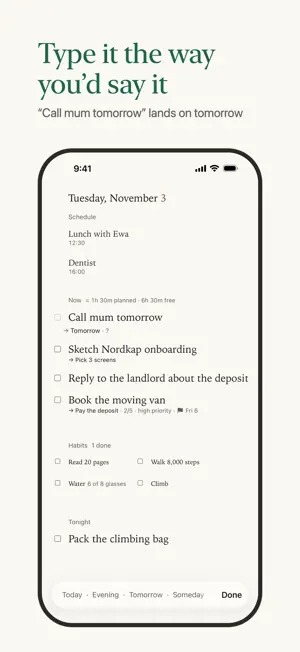
Your to-dos, your habits and today's calendar on one page, on iPhone, iPad and Mac. Type a to-do the way you'd say it, and Planera puts it on the right day. No account, no tracking. TODAY, ON ONE PAGE Your to-dos, their times, today's calendar events and your habits sit on one page under the date. Tonight has its own place at the bottom. WRITE IT THE WAY YOU'D SAY IT Type "call mum tomorrow" or "water the plants every Friday" and the to-do lands on the right day. Planera reads dates, repeats and deadlines in all 7 of its languages. On Mac, Quick Entry opens from any app with one shortcut. HABITS NEXT TO YOUR PLAN Tick a habit where you plan the rest of the day: every day, on chosen days, or a few times a week. A dose reminder can ring through Focus. THE WEEK, THE MONTH, THE YEAR Upcoming shows your week hour by hour, then the month and the year. On Sunday the weekly review takes about 15 minutes and ends with one thing for Monday. GOALS AND MONEY, IF YOU WANT THEM Projects can count toward a goal that shows its pace. Spending sits beside each area, with a budget. WORKS WITH WHAT YOU HAVE • Your Apple Reminders lists come into the Inbox • Calendar events show in Today and Upcoming • Siri, Shortcuts and widgets • Share a project with someone over iCloud • On Mac, an AI assistant can write to your plan through a local helper, with undo. It stays off until you turn it on. PLANERA PRO Everything above is free. Planera Pro is an optional one-time in-app purchase. It adds the weather on each day, on Today and in the calendars, and every Pro feature that comes later. Family Sharing is on. YOURS No account and no tracking. Your library syncs through your own iCloud, and Planera keeps a daily backup on the device. You can export everything at any time. In English, Deutsch, Svenska, Español, Français, 日本語 and Русский.
What’s new
Version 2.0.1 · Updated November 14, 2026
You can change calendar events in Planera now. Open an event to change its title, day, time, calendar, location, alert, repeat or notes. You can make new ones too. On the Mac, drag an event in Week to move it or change its length. A to-do with a day can become an event. A List can keep a Reminders list. Pick Keep in Reminders and that list shows on the List's page, and a tick there ticks it for everyone the list is shared with. A tag on a List, project or area now counts for every to-do inside it, so the tag's page shows all of them. Today is always the whole day. Finished to-dos leave the page, and a count of them at the end opens the Logbook. An area, a project or a goal has its own page. Energy, Group by Priority and a project's By time view are gone. Writing a line that's already on a List no longer adds it twice. One you've already got comes back to the list instead. Week, Month and Year read better. Repeats show on every day of the month, and Year starts with this month. A paste of more than 100 lines keeps the rest in the field. When Undo brings to-dos back on another page, it tells you where. Update Planera on all your devices. An older version may still take reminders out of a list you keep in Reminders.
App privacy
The developer, Ivan Verevkin, reported these privacy practices to Apple.
Data Not Collected
The developer does not collect any data from this app.
Alternatives to Planera: Day Planner & To-do
Looking for apps like Planera: Day Planner & To-do? Here are 6 similar apps on the App Store. The highest rated is Aura: баланс и цели (5.0/5), and all 6 are free to download.
-
 Tomorrow: Night Before Planner
-
 Aura: баланс и цели
5.0
-
 Taskvale:To-do List & Reminder
5.0
-
 Daywrap: To Do List & Calendar
-
 RePlan: Daily Planner & To-Do
5.0
-
 Time Blocking Planner: Datvi
| App | Rating | Price | Last updated | Compare |
|---|---|---|---|---|
| Planera: Day Planner & To-do | – | Free | November 14, 2026 | |
| Tomorrow: Night Before Planner | – | Free | Nov 15, 2026 | Compare |
| Aura: баланс и цели | 5.0 / 5 (2) | Free | Oct 24, 2026 | Compare |
| Taskvale:To-do List & Reminder | 5.0 / 5 (5) | Free | Oct 4, 2026 | Compare |
| Daywrap: To Do List & Calendar | – | Free | Nov 26, 2026 | Compare |
| RePlan: Daily Planner & To-Do | 5.0 / 5 (1) | Free | Oct 30, 2026 | Compare |
| Time Blocking Planner: Datvi | – | Free | Nov 23, 2026 | Compare |