
Daily Planner: Time Blocking
Cengiz Darian Hanci Productivity iPhoneiPadiPod touchApple Watch
Daily Planner: Time Blocking is a free Productivity app for iPhone and iPad by Cengiz Darian Hanci. Requires iOS 18.0. Updated September 21, 2026.
- Price
- Free
- on the App Store
- Size
- 26 MB
- Age 4+
- Updated
- Sep 21
- 2026 · v1.4
Screenshots


About Daily Planner: Time Blocking
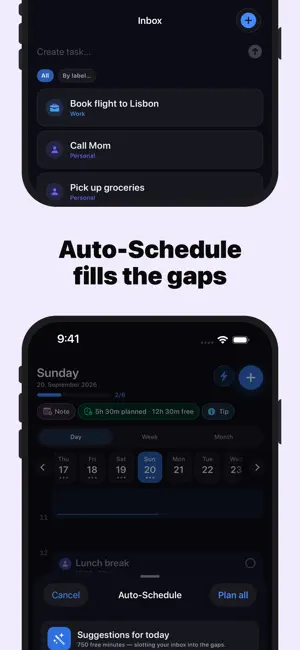
Plan your day with the time-blocking method — the proven approach focused people use to get more done in less time. DayPlan turns your empty calendar into a clear plan. Drag tasks onto a visual hourly timeline, group them by colored category, and see exactly where your time goes. CORE FEATURES • Day timeline with drag-and-drop scheduling • Recurring tasks (daily, weekly, monthly, yearly) • Routines — save reusable templates and insert them with one tap • Colored categories for work, fitness, personal, and more • Auto-Schedule — fills free time slots intelligently with your inbox tasks • Local reminders for upcoming tasks • Apple Calendar integration (read-only) — see appointments alongside tasks • Lock-screen Live Activity for the running task • Siri & Shortcuts: "Add a task to DayPlan" • This week and this month — week grid and month overview, free • Works completely offline PREMIUM • iCloud sync across all your devices • Any other week and month — plan ahead and look back • "Available Time" metric on the day overview • Custom categories with your own colors and icons • Day notes • Home Screen widgets • Apple Watch app — what's next, tick tasks off, your inbox and your week PRIVACY-FIRST DayPlan is built data-minimal: no account, no sign-in, no advertising, no tracking, no analytics SDKs. All tasks are stored locally on your device. If you enable iCloud sync, data is mirrored only into your own private iCloud database — we have no access. PRICING • Monthly subscription • Yearly subscription with a 7-day free trial • Lifetime — one-time payment, no subscription Subscriptions auto-renew unless cancelled 24 hours before the end of the current period in your Apple ID settings. — Terms of Use (EULA): https://www.apple.com/legal/internet-services/itunes/dev/stdeula/ Privacy Policy: https://dayplan-app.web.app/datenschutz
What’s new
Version 1.4 · Updated September 21, 2026
• Apple Watch: what's next, tick tasks off, your inbox and your week — right on your wrist • This week and this month are now free. The week grid and month overview no longer need Premium; Premium is now any other week and month. • DayPlan now speaks 15 languages • iPad: lists no longer stretch across the whole screen • Many small fixes, including readable icons on every category colour
App privacy
The developer, Cengiz Darian Hanci, reported these privacy practices to Apple.
Data Linked to You
The following data, which may be collected and linked to your identity, may be used for the following purposes:
- User Content: Other User Content
Used for: App Functionality
Alternatives to Daily Planner: Time Blocking
Looking for apps like Daily Planner: Time Blocking? Here are 6 similar apps on the App Store. The highest rated is Morning Club - 5 AM Alarm (4.4/5), and all 6 are free to download.
-
 DayBox: Time Blocking Planner
-
 RePlan: Daily Planner & To-Do
-
 Hour by Hour: Color Planner
-
 Time Blocks: Weekly Planner
3.0
Time Blocks: Weekly Planner
3.0
-
 Time Blocking: Day Planner
1.0
Time Blocking: Day Planner
1.0
-
 Morning Club - 5 AM Alarm
4.4
Morning Club - 5 AM Alarm
4.4
| App | Rating | Price | Last updated | Compare |
|---|---|---|---|---|
| Daily Planner: Time Blocking | – | Free | September 21, 2026 | |
| DayBox: Time Blocking Planner | – | Free | Sep 5, 2026 | Compare |
| RePlan: Daily Planner & To-Do | – | Free | Oct 7, 2026 | Compare |
| Hour by Hour: Color Planner | – | Free | Aug 29, 2026 | Compare |
| Time Blocks: Weekly Planner | 3.0 / 5 (1) | Free | Mar 26, 2026 | Compare |
| Time Blocking: Day Planner | 1.0 / 5 (2) | Free | Aug 19, 2026 | Compare |
| Morning Club - 5 AM Alarm | 4.4 / 5 (5) | Free | Sep 15, 2025 | Compare |