

RePlan: Daily Planner & To-Do
Leonid Merkulov Productivity iPhoneiPadiPod touchMacApple Watch
RePlan: Daily Planner & To-Do is a free Productivity app for iPhone and iPad by Leonid Merkulov. Rated 5.0/5 from 1 ratings. Requires iOS 18.2.
- Rating
- 5.0
- 1 ratings
- Price
- Free
- on the App Store
- Size
- 18 MB
- Age 4+
- Updated
- Oct 30
- 2026 · v2.0.1
Screenshots
Save to Pinterest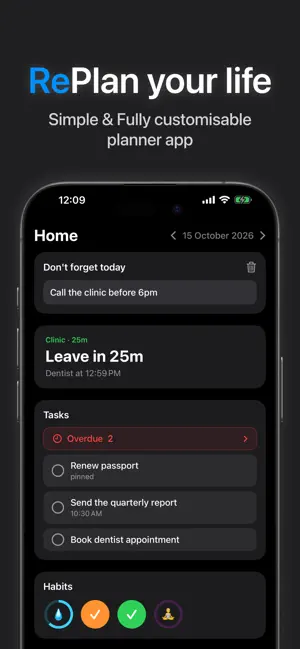


About RePlan: Daily Planner & To-Do
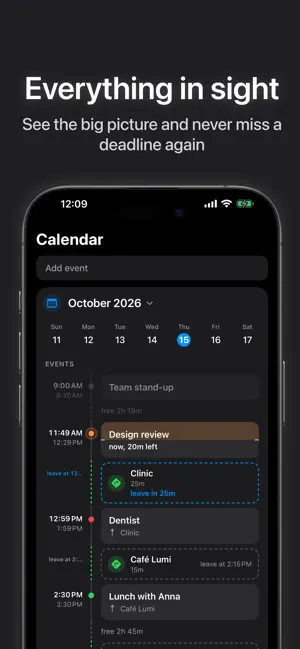
RePlan puts your whole day on one screen: the note you must not forget, what is on now, your tasks and your habits. It is a daily planner, a to-do list and a habit tracker. Free, with no ads and no subscriptions. Your day at a glance • A day line shows your events, the free time between them and the way there • Add a place and the travel time, and RePlan tells you when to leave • A Live Activity counts down on the Lock Screen and in the Dynamic Island • Events from Apple Calendar appear right in your day Don't forget today • Pin one short note to your Lock Screen and see it all day • It is also in a widget, on Apple Watch and in the Mac menu bar Tasks in their place • Folders, pinned tasks and tasks without a date • Overdue tasks come first, ready to reschedule • Subtasks, repeats and reminders • Finished tasks go to the archive, where you can search them Habits in your colors • Daily habits with rings that fill up as you go • Any color and emoji you like • Daily targets, like 5 of 8 glasses of water • Streaks and a daily reminder Widgets wherever you look • Widgets for your day, tasks, events, habits and the note, on the Home Screen and Lock Screen • Check off a task or a habit right in the widget • Control Center buttons for a new task, event or habit • Today and your note in CarPlay iPhone, iPad, Mac and Apple Watch • Everything stays in sync through your iCloud • On Mac: tasks, calendar and habits side by side, the note in the menu bar and widgets on the desktop • On Apple Watch: when to leave, your note, tasks and habits, plus widgets in the Smart Stack. Add a task by voice Make it yours • Keep only the sections you need • Light, dark or system theme • 45 languages, and you can switch the app language in Settings Questions • Is it free? Yes. There are no in-app purchases. • Do I need an account? No. RePlan syncs through your own iCloud, so there is nothing to sign up for. • Does it work offline? Yes. Changes sync when you are back online. • Where is my data? On your devices and in your iCloud.
What’s new
Version 2.0.1 · Updated October 30, 2026
• Live Activities now use the system glass on the Lock Screen • The intro course is clearer: it blurs the background, scrolls to each step and closes with a tap outside • Small fixes
App privacy
The developer, Leonid Merkulov, reported these privacy practices to Apple.
Data Not Collected
The developer does not collect any data from this app.
Alternatives to RePlan: Daily Planner & To-Do
Looking for apps like RePlan: Daily Planner & To-Do? Here are 6 similar apps on the App Store.
-
 Daily Habit Tracker & Streaks
-
 RePLAN
-
 Time Blocking Planner: Datvi
-
 Daily Organizer
-
 Leeway: Time Blocking Planner
-
 Zrima: Daily Planner & Todo
| App | Rating | Price | Last updated | Compare |
|---|---|---|---|---|
| RePlan: Daily Planner & To-Do | 5.0 / 5 (1 rating) | Free | October 30, 2026 | |
| Daily Habit Tracker & Streaks | – | Free | Oct 15, 2026 | Compare |
| RePLAN | – | Free | Aug 31, 2026 | Compare |
| Time Blocking Planner: Datvi | – | Free | Nov 23, 2026 | Compare |
| Daily Organizer | – | Free | Jan 2, 2026 | Compare |
| Leeway: Time Blocking Planner | – | Free | Nov 11, 2026 | Compare |
| Zrima: Daily Planner & Todo | – | Free | Oct 30, 2026 | Compare |