

Leeway: Time Blocking Planner
Innovatism LLC Productivity iPhoneiPadiPod touchMacApple Watch
Leeway: Time Blocking Planner is a free Productivity app for iPhone and iPad by Innovatism LLC. Rated 5.0/5 from 1 ratings. Requires iOS 18.0.
- Rating
- 5.0
- 1 ratings
- Price
- Free
- on the App Store
- Size
- 75 MB
- Age 4+
- Updated
- Oct 29
- 2026 · v1.3.2
Screenshots


About Leeway: Time Blocking Planner
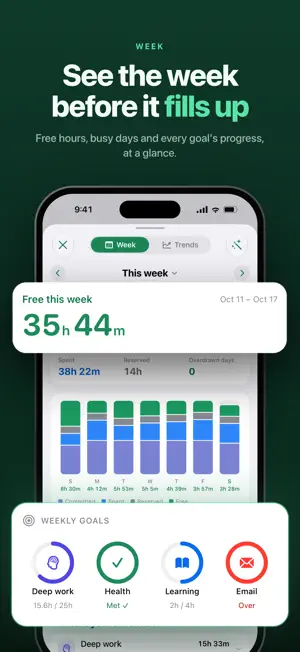
Leeway shows how much free time you really have today, then fits your tasks into it. Your calendar events, reminders and routines go on the timeline first. Leeway counts the hours that are left. Tap Plan and your tasks land in the open gaps, around everything that's fixed. When the day changes, Leeway moves the rest and shows you what moved. PLAN THE DAY IN ONE TAP • Plan my day places your tasks in the free time you actually have, and says where anything that won't fit goes. • Plan the week spreads work across the days ahead. • Running late? Make it fit reshuffles the rest of today. WORKS WITH YOUR CALENDAR AND REMINDERS • Apple Calendar events and Reminders appear on your timeline. • Move a task to another day and its reminder or event moves with it. SEE THE WHOLE DAY • A timeline from wake-up to bedtime, every hour in its place. • Your free time, counted live as the day goes on. • The week at a glance, before it fills up. KEEP TIME FOR WHAT MATTERS • Goals with a floor for what matters and a cap for what drifts. • A focus timer on your Lock Screen and in the Dynamic Island. • Widgets, an Apple Watch app, and iPad, in sync over iCloud. SAY IT ALL, GET A PLAN (LEEWAY PRO) • Type or speak a messy list, and Leeway picks out the tasks, times and deadlines and plans them. With Apple Intelligence, it all runs on your device. PRIVATE BY DESIGN • No account and no sign-up. • Your data syncs through your own iCloud. LEEWAY PRO Planning, the timeline, goals, focus, widgets, the Watch app and iCloud sync are free. Leeway Pro adds the AI planner, voice capture, unlimited projects and milestones, custom categories, trends and history, and themes. Monthly, yearly with a free trial, or a one-time lifetime unlock. Give yourself a little leeway. Terms of Use: https://leeway.innovatism.app/leeway/terms/
What’s new
Version 1.3.2 · Updated October 29, 2026
New - Repeating tasks and events: pick the days (every Monday, every other week, the 1st of the month) and when the repeat ends. - Times a week: say how often, like "3 times a week", and Leeway puts each one on the days with the most room. - After done: the next one comes some days, weeks or months after you finish the last. - Repeats stay in step with Calendar and Reminders, and the ones you made there show up in Leeway. - Say a repeat the way you'd say it out loud, like "swim every Tuesday and Thursday", when you type, dictate, ask Siri or use a brain dump. - Skip one day of a repeat to get its time back. Changing or deleting one asks whether you mean just this one or this and future ones. Improvements - New things land as soon as they can: a task with no day goes on today, or tomorrow late in the evening, and a time like "at 9" never lands in the past. - Giving a task a time starts at the best open slot of its day, not 9 AM. - Tasks added with Siri, on Apple Watch or in a project go on the soonest day with room and take as long as similar tasks have taken you. - Moving a task to today moves a time that has already gone to the next open stretch. Fixes - A Someday task given a day always comes back to your plan. - Typing a task title no longer makes the editor jump. - An Apple Watch or notification action no longer changes a task that's already done. - A task on Someday stays there when Reminders syncs, and a task finished on one device stays finished everywhere.
App privacy
The developer, Innovatism LLC, reported these privacy practices to Apple.
Data Not Collected
The developer does not collect any data from this app.
Alternatives to Leeway: Time Blocking Planner
Looking for apps like Leeway: Time Blocking Planner? Here are 6 similar apps on the App Store.
-
 TimeBlock - Planner for ADHD
-
 Focura: ADHD Time Blocking
-
 168: Time Budget
-
 TimeLog: Personal Time Tracker
-
 DayBox: Time Blocking Planner
-
 Current: Planner To Do Routine
| App | Rating | Price | Last updated | Compare |
|---|---|---|---|---|
| Leeway: Time Blocking Planner | 5.0 / 5 (1 rating) | Free | October 29, 2026 | |
| TimeBlock - Planner for ADHD | – | Free | Sep 24, 2026 | Compare |
| Focura: ADHD Time Blocking | – | Free | Jul 22, 2026 | Compare |
| 168: Time Budget | – | Free | May 6, 2026 | Compare |
| TimeLog: Personal Time Tracker | – | Free | Aug 8, 2026 | Compare |
| DayBox: Time Blocking Planner | – | Free | Oct 20, 2026 | Compare |
| Current: Planner To Do Routine | – | Free | Oct 31, 2026 | Compare |