

Time Blocking: Day Planner
Phuc Pham Productivity iPhoneiPadiPod touch
Time Blocking: Day Planner is a free Productivity app for iPhone and iPad by Phuc Pham. Rated 1.0/5 from 2 ratings. Requires iOS 17.0.
- Rating
- 1.0
- 2 ratings
- Price
- Free
- on the App Store
- Size
- 7 MB
- Age 4+
- Updated
- Aug 19
- 2026 · v1.2.1
Screenshots
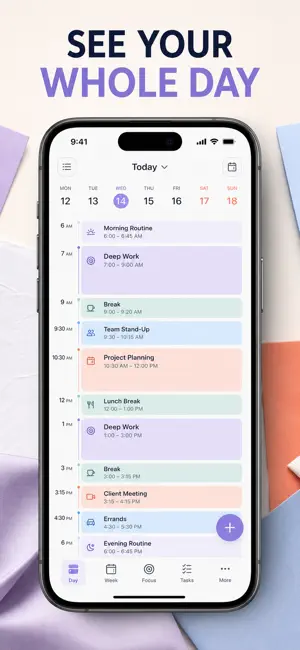
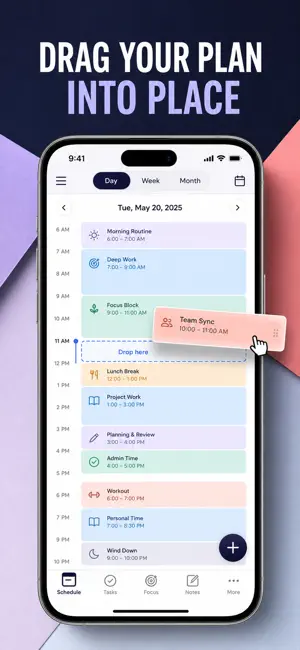
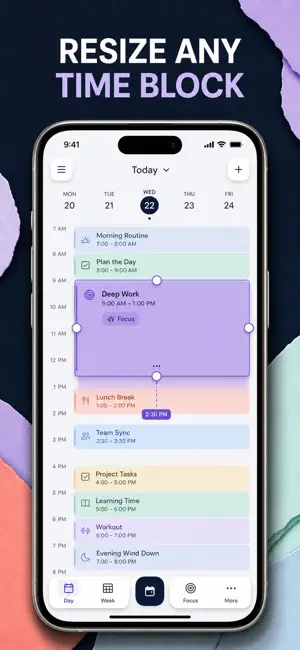

About Time Blocking: Day Planner
Time blocking, done properly: give every hour of your day a name, a color, and a place on a real timeline — then find out where those hours actually went. Most planners hand you a list and hope for the best. A list has no width, so it never warns you that your "quick morning" is already seven hours long. TimeBlock puts your day on an hour-by-hour timeline you can see: each block sits at its real start time, at its real length, in its own color. The moment your day is overbooked, the timeline shows it — before the day starts, not after it collapses. WHAT YOU GET - A day you can actually see: blocks sit on an hour-by-hour timeline with a live "now" line, so you always know what you should be doing this minute - Realistic plans instead of wishful lists: set a start time and a duration, and an overloaded day becomes obvious at a glance - A planned day in one tap: pick Deep Work Day, Study Day, Creative Day, or Balanced Day and the whole timeline fills in - The truth about your week: donut and bar charts, a 7-day activity map, hours planned, and your most-repeated blocks - A finish rate you can defend: tick blocks off and watch your daily completion score in the Coach tab - A nudge every evening so tomorrow gets planned tonight, plus coaching on time boxing, buffer time, theme days, and strategic breaks PERFECT FOR - Deep-work professionals protecting long, uninterrupted focus windows - Students building study sessions with breaks that are planned, not accidental - Freelancers and creatives who need work, admin, and rest to coexist in one day - Anyone whose to-do list keeps growing while the day keeps disappearing WHY NOT JUST USE A TO-DO LIST OR YOUR CALENDAR? A to-do list is infinite; your day is not. A calendar is built for meetings other people booked, not for the focus time you owe yourself. TimeBlock does one job only — laying out your own hours, in color, and showing you afterwards how you really spent them. Nothing to invite, nothing to negotiate, no meeting requests in the way. PRIVACY Every block, note, and template you apply stays on your iPhone. No account, no sign-up, no ads, no third-party analytics, no tracking. Nothing you plan ever leaves the device. FULL ACCESS Full access unlocks everything in the app: unlimited time blocks, all eight block colors and per-block notes, the full day-template library, the Insights dashboard with charts and your 7-day activity map, and the Coach tab with your daily score, tips, and planning methods. Available as a weekly subscription, a yearly subscription, or a one-time lifetime purchase. Subscriptions renew automatically unless cancelled at least 24 hours before the current period ends; manage or cancel anytime in your App Store account settings. Open the Today tab, add your first block for tomorrow morning, and see how much day you really have. Terms of Use (EULA): https://web-levi.web.app/terms Privacy Policy: https://web-levi.web.app/privacy-policy Questions? [email protected]
What’s new
Version 1.2.1 · Updated August 19, 2026
Bug fixes and performance improvements.
App privacy
The developer, Phuc Pham, reported these privacy practices to Apple.
Data Not Collected
The developer does not collect any data from this app.
Alternatives to Time Blocking: Day Planner
Looking for apps like Time Blocking: Day Planner? Here are 6 similar apps on the App Store. The highest rated is 24 Block: Day Planner (5.0/5), and all 6 are free to download.
-
 24 Block: Day Planner
5.0
24 Block: Day Planner
5.0
-
 Time Block: Hourly Day Planner
4.0
Time Block: Hourly Day Planner
4.0
-
 Timlin: Time Blocking&Tracking
-
 Dayblok Daily Schedule Planner
-
 Time Blocking+
-
 Time Block Planner - DayBlock
| App | Rating | Price | Last updated | Compare |
|---|---|---|---|---|
| Time Blocking: Day Planner | 1.0 / 5 (2 ratings) | Free | August 19, 2026 | |
| 24 Block: Day Planner | 5.0 / 5 (2) | Free | Oct 9, 2026 | Compare |
| Time Block: Hourly Day Planner | 4.0 / 5 (1) | Free | Oct 7, 2026 | Compare |
| Timlin: Time Blocking&Tracking | – | Free | Aug 18, 2026 | Compare |
| Dayblok Daily Schedule Planner | – | Free | Jan 10, 2026 | Compare |
| Time Blocking+ | – | Free | May 27, 2026 | Compare |
| Time Block Planner - DayBlock | – | Free | Oct 13, 2026 | Compare |