

24 Block: Day Planner
JAMGO LABS LTD Productivity iPhoneiPadiPod touch
24 Block: Day Planner is a free Productivity app for iPhone and iPad by JAMGO LABS LTD. Rated 5.0/5 from 3 ratings. Requires iOS 16.4.
- Rating
- 5.0
- 3 ratings
- Price
- Free
- on the App Store
- Size
- 39 MB
- Age 4+
- Updated
- Oct 9
- 2026 · v1.1.2
Screenshots

About 24 Block: Day Planner
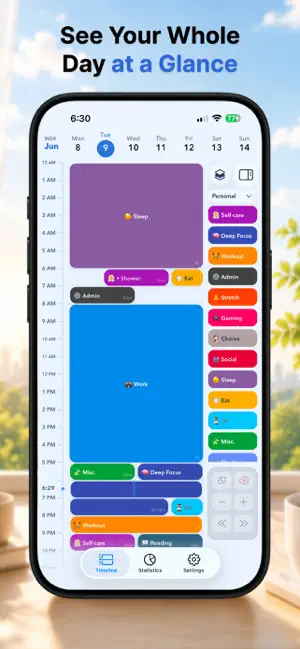
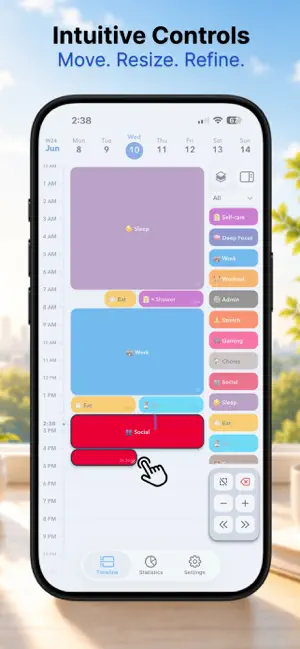
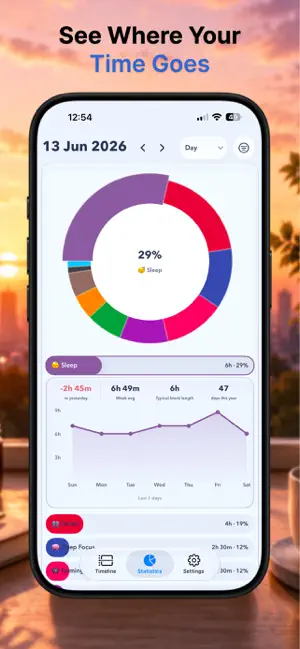
Plan your day, one block at a time. 24 Block helps you turn your plans into colourful blocks, see how your day fits together, and adjust things as you go. Make space for work, study, self-care, and a little breathing room. • Your day, at a glance. Explore your timeline or switch to Schedule for a full 24-hour overview. • Easy to plan, easy to adjust. Drag blocks to move them, resize them, or enter exact times. Add titles and notes to keep the details close. • Keep the little things together. Break bigger activities into subtasks, tick off your checklist, and create recurring routines for the parts of your day that repeat. • Your calendars, alongside your blocks. See events from your device’s calendars directly on your timeline. Your original calendar events stay unchanged. • Your plans across devices. Enable optional iCloud sync through your own Apple account. • More ways to make it yours. Choose colours, emojis, or Apple’s SF Symbols, and start your week on Monday or Sunday. • A quick look at what’s next. Add the Today widget or turn on a Lock Screen Live Activity to keep your current and upcoming blocks close. • Look back at your day. Explore your stats by day, week, month, or year. Start planning offline, with no separate 24 Block account to create. The in-app tour will help you get settled in. Website: https://24block.app Privacy Policy: https://24block.app/privacy/ Terms of Use: https://24block.app/terms/
What’s new
Version 1.1.2 · Updated October 9, 2026
Your Home Screen widgets now stay up to date, with clearer times and more room to see what’s coming next.
App privacy
The developer, JAMGO LABS LTD, reported these privacy practices to Apple.
Data Not Collected
The developer does not collect any data from this app.
Alternatives to 24 Block: Day Planner
Looking for apps like 24 Block: Day Planner? Here are 6 similar apps on the App Store. The highest rated is Plander: Planner & Calendar (5.0/5), and all 6 are free to download.
-
 Plander: Planner & Calendar
5.0
Plander: Planner & Calendar
5.0
-
 Time Blocking: Day Planner
1.0
Time Blocking: Day Planner
1.0
-
 Time Block Planner - DayBlock
-
 Time Block: Hourly Day Planner
4.0
Time Block: Hourly Day Planner
4.0
-
 My Nest : Daily Planner App
4.3
My Nest : Daily Planner App
4.3
-
 Daily Planner Pro
2.5
Daily Planner Pro
2.5
| App | Rating | Price | Last updated | Compare |
|---|---|---|---|---|
| 24 Block: Day Planner | 5.0 / 5 (3 ratings) | Free | October 9, 2026 | |
| Plander: Planner & Calendar | 5.0 / 5 (1) | Free | Oct 27, 2026 | Compare |
| Time Blocking: Day Planner | 1.0 / 5 (2) | Free | Aug 19, 2026 | Compare |
| Time Block Planner - DayBlock | – | Free | Oct 26, 2026 | Compare |
| Time Block: Hourly Day Planner | 4.0 / 5 (1) | Free | Oct 7, 2026 | Compare |
| My Nest : Daily Planner App | 4.3 / 5 (6) | Free | May 27, 2026 | Compare |
| Daily Planner Pro | 2.5 / 5 (2) | Free | Apr 1, 2025 | Compare |