

Daywrap: To Do List & Calendar
Naegyeotui Productivity iPhoneiPadiPod touchApple Watch
Daywrap: To Do List & Calendar is a free Productivity app for iPhone and iPad by Naegyeotui. Requires iOS 17.0. Updated November 26, 2026.
- Price
- Free
- on the App Store
- Size
- 152 MB
- Age 4+
- Updated
- Nov 26
- 2026 · v1.2.3
Screenshots
Save to Pinterest


About Daywrap: To Do List & Calendar
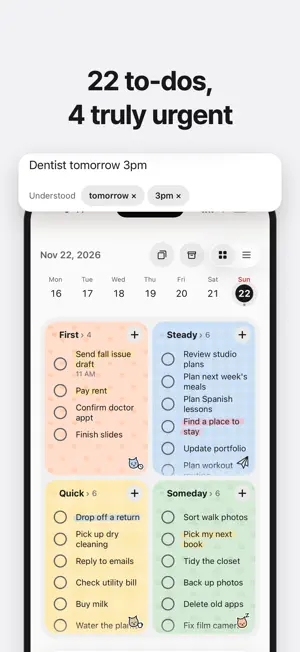
Keep your tasks, plans and daily routines together in Daywrap. Add a little color, choose a calm pattern or fill your calendar with favorite stickers. Make it feel like your own planner. Four boxes for today Sort tasks by importance and urgency with the Eisenhower Matrix. Rename and decorate each box, drag tasks into order or switch to a list. Your plans in one calendar See tasks and events in month and week views. Decorate a date or a whole trip with colors and stickers. Premium adds a year view. Show events from calendars connected to Apple Calendar. Turn on optional export to write Daywrap events to Apple Calendar. Connected events are read-only in Daywrap; edit exported events in Daywrap. Type naturally and keep going Write “dentist tomorrow 15:00” to fill in the date and time. Basic repeat phrases work too. Paste several lines to add multiple tasks at once. Check off routines in their own tab and see your streaks and weekly progress. Set reminders for tasks, events and routines. A calendar to share Invite family or friends by link or QR code, with viewing or editing access. Editors can add events and change or delete only the events they created. Sign in to send invitations. Recipients can join without signing in. Share 1 calendar with up to 3 people, or up to 10 calendars with 30 people each with Premium. On iPhone, iPad and Apple Watch On a wide iPad screen, see your calendar beside the selected day’s plans. Put today on your Home Screen or Lock Screen with widgets. On an Apple Watch paired with your iPhone, view Daywrap events and check off tasks and routines. Premium brings your decorations to calendar, four-box and routine widgets. Checking off items in four-box and routine widgets requires iOS 17 or later and Premium. Decorations and Premium Choose themes, color packs, patterns and stickers in the coin Store. Earn coins through missions or optional rewarded ads, or buy coin packs. Premium includes decorated widgets, advanced repeats, multiple reminders, statistics and monthly reviews, a year view, multiple boards, unlimited saved frequent tasks, custom font imports, Premium app icons and app lock. Subscriptions also include 200 coins each month and 20% off the coin price of decoration packs. Choose a monthly or yearly auto-renewing subscription. Manage your subscription in your App Store account settings. Start without signing in Use tasks, events, routines and purchases without an account. Sign in to back up your records and sync across devices. You can delete your account in the app. Terms of Use (EULA): https://www.apple.com/legal/internet-services/itunes/dev/stdeula/ Privacy Policy: https://bysideapps.com/daywrap/privacy.html
What’s new
Version 1.2.3 · Updated November 26, 2026
- Monthly themes: give each month in your calendar its own theme (Premium) - Christmas decorations: Tree Lights and Red Gift Wrap themes, Christmas Borders, Under the Tree stickers - Smoother calendar swiping
App privacy
The developer, Naegyeotui, reported these privacy practices to Apple.
Data Used to Track You
The following data may be used to track you across apps and websites owned by other companies:
- Location: Coarse Location
- Identifiers: Device ID
- Usage Data: Product Interaction, Advertising Data
Data Linked to You
The following data, which may be collected and linked to your identity, may be used for the following purposes:
- Location: Coarse Location
- Identifiers: Device ID, User ID
- Usage Data: Product Interaction, Advertising Data
- Purchases: Purchase History
- Contact Info: Name
- User Content: Other User Content
Used for: Third-Party Advertising, Analytics, App Functionality
Data Not Linked to You
The following data, which may be collected but is not linked to your identity, may be used for the following purposes:
- Diagnostics: Performance Data, Other Diagnostic Data, Crash Data
- Other Data: Other Data Types
Used for: Third-Party Advertising, Analytics, App Functionality
Alternatives to Daywrap: To Do List & Calendar
Looking for apps like Daywrap: To Do List & Calendar? Here are 6 similar apps on the App Store.
-
 Root - Notes, Diary & Boards
-
 Nagi Planner
-
 TurnoRest: Police & Fire Shift
-
 하루 - 오늘의 기록
-
 Dayslot: To-Dos & Calendar
-
 Planera: Day Planner & To-do
| App | Rating | Price | Last updated | Compare |
|---|---|---|---|---|
| Daywrap: To Do List & Calendar | – | Free | November 26, 2026 | |
| Root - Notes, Diary & Boards | – | Free | Nov 25, 2026 | Compare |
| Nagi Planner | – | Free | Nov 26, 2026 | Compare |
| TurnoRest: Police & Fire Shift | – | Free | Nov 3, 2026 | Compare |
| 하루 - 오늘의 기록 | – | Free | Jul 8, 2026 | Compare |
| Dayslot: To-Dos & Calendar | – | Free | Nov 6, 2026 | Compare |
| Planera: Day Planner & To-do | – | Free | Nov 14, 2026 | Compare |