

Nagi Planner
MIKI SHOJI Productivity iPhoneiPadiPod touchApple Watch
Nagi Planner is a free Productivity app for iPhone and iPad by MIKI SHOJI. Requires iOS 15.0. Updated November 8, 2026.
- Price
- Free
- on the App Store
- Size
- 43 MB
- Age 4+
- Updated
- Nov 8
- 2026 · v2.7
Screenshots


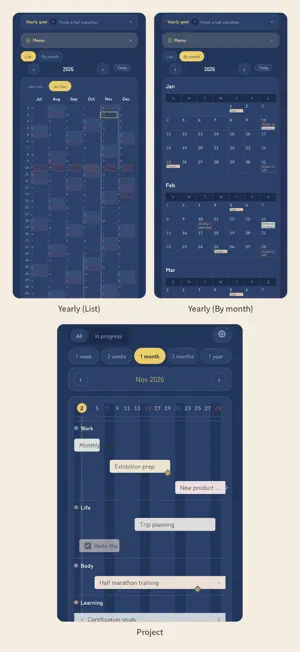

About Nagi Planner
Nagi is a digital planner for putting your days in order and moving forward in your own way. Set goals from 10 years ahead down to this week, guided by your values and rules, and let daily planning and reflection lead you toward the future you truly want. ■ Features [Free plan] ● Reflection and planning ・Journal time (morning, evening, weekend, month-end, every 3 months, year-end) and past entries ● Schedule ・Daily, Weekly, Monthly and Yearly, with device calendar sync and notifications ・Handwriting, like a paper planner ● TO-DOs and routines ・TO-DOs with dates, times, deadlines and repeats ・Routines with a timer ・Routine Time (a step-by-step timer for sequences like your morning routine) *One on the free plan. ・Plan time (place TO-DOs on your day's timeline) ● Memos and notes ・Memos and notebooks with handwriting, photos, audio, templates, checklists, tables and cards ・Reading notes (title, author and cover) ● Widgets and Apple Watch ・Today's events, TO-DOs, routines and records; weekly routines ・Apple Watch: check off TO-DOs and routines, timers, Routine Time ● Insights ・Records over 1 day, 3 days and 1 week [Premium] Everything in the free plan, plus: ● Values and goals ・Values and personal rules (with photos, shown in morning journal time) ・Goals from 10 years ahead to this week, printable on one sheet ● Projects ・Project bars on your schedule with milestones, repeats and categories ● Diary and memories ・Photo diary (handwriting supported) and "Today" over the past 10 years ・Memories slideshow and time-stamped short notes with tags ・TO-DO and routine logs added to your diary ● Daily records ・Meals, drinks, exercise, medication and meditation (meditation also on Apple Watch) ・Log sleep, weight, temperature and mood from home-screen icons ・Marks: tap an icon to log the time in your diary (eye drops, toilet, etc.) ・Plan vs. actual, also in the Weekly vertical view ・Completed TO-DOs by date ・Search journal time, TO-DOs and diary by text and date ● Insights ・2 weeks to 1 year, custom periods and balance ● Picture your future ・Wish list slideshow and a color-coded map of places, with check-ins ● More ・Unlimited Routine Times ・Write on PDFs (pen, highlighter, bookmarks, added pages, export); drag PDFs in from Finder on Mac ・Mind maps with images, memos and handwriting ・16 color themes and 20 app icons [for Business] Everything in Premium, plus targets and results for sales, store visits, customers and more. For sole proprietors, small businesses and exam study. ● Results calendar ・Select "Business" to switch to a calendar for results ・Daily, Weekly, Monthly and Yearly ・Choose any figures to track ● Groups ・Separate figures, clients and memos by business or project (e.g. Business A, exam study) ・Work time by category in every view and Analysis ● Targets and progress ・Automatic weekly, monthly and yearly totals, variance and projection ・Targets with deadlines (e.g. 5 passes through a textbook by exam day) ・Today's target ● Results analysis ・Stage conversion rates, totals by client and store, hourly revenue, year-over-year ● Jobs (project list) Tap "Jobs" when creating a TO-DO to track it as a project. ・Order date, sales, work hours and completion date per project; filter by client or status; A4 PDF export ● Clients ・Contact details, address, memo, custom fields and a timeline of TO-DOs, events, notes and sales ■ Privacy ・No account needed ・Records stay on your device and in your own iCloud ・No ads, analytics or tracking ■ Pricing Premium and for Business: monthly and yearly plans, each with a 3-day free trial. *Prices are shown in the app. Subscriptions auto-renew at the same price unless canceled at least 24 hours before the period ends. Cancel at least 24 hours before the trial ends to avoid charges. To cancel: Settings > [your name] > Subscriptions. Terms of Use (EULA): https://mikiko-app.github.io/nagi/terms.html Privacy Policy: https://mikiko-app.github.io/nagi/privacy.html
What’s new
Version 2.7 · Updated November 8, 2026
● Records ・Log sleep, weight, temperature and mood any time from home-screen icons (Premium). ・New: Marks. Icons such as eye drops or toilet that save the time you tap them to your diary (Premium). ・Record your temperature in morning journal time. ・Reorder the home-screen icons freely. ● Schedule ・Switch between "Plan" and "Actual" in the Weekly vertical view (Actual is Premium). ・Choose which calendars to show for each view: Weekly (vertical / left) and Yearly (list / calendar). ● Notes ・Archive finished notes. They are hidden from the list but still appear in search. ・On Mac, drag images into a note. ● Display ・New "Smaller" text size and a choice of fonts for handwritten-style text. ● for Business ・Groups: keep the figures, clients and memos you track separate for each business or project. ・See work time by category in Daily, Weekly, Monthly, Yearly and Analysis. Plus other improvements and bug fixes.
App privacy
The developer, MIKI SHOJI, reported these privacy practices to Apple.
Data Not Collected
The developer does not collect any data from this app.
Alternatives to Nagi Planner
Looking for apps like Nagi Planner? Here are 6 similar apps on the App Store.
-
 脳死ブロッカー
-
 CalNote: Paper Planner
-
 Dayzy: Photo to Calendar
-
 Second Brain - AI Note
-
 Timiew / 作業時間記録・調整・通知・時給計算
-
 SNS下書き帳
| App | Rating | Price | Last updated | Compare |
|---|---|---|---|---|
| Nagi Planner | – | Free | November 8, 2026 | |
| 脳死ブロッカー | – | Free | Aug 6, 2026 | Compare |
| CalNote: Paper Planner | – | Free | Nov 7, 2026 | Compare |
| Dayzy: Photo to Calendar | – | Free | Nov 6, 2026 | Compare |
| Second Brain - AI Note | – | Free | Oct 12, 2026 | Compare |
| Timiew / 作業時間記録・調整・通知・時給計算 | – | Free | Aug 28, 2026 | Compare |
| SNS下書き帳 | – | Free | Sep 29, 2026 | Compare |
Compare Nagi Planner with the top alternatives: ratings, updates, ASO score and keyword gaps →