

Text to Speech, Voice Reader
EclixTech UK LTD Productivity iPhoneiPadiPod touchMac
Text to Speech, Voice Reader is a free Productivity app for iPhone and iPad by EclixTech UK LTD. Requires iOS 15.5. Updated September 4, 2026.
- Price
- Free
- on the App Store
- Size
- 71 MB
- Age 4+
- Updated
- Sep 4
- 2026 · v1.0
Screenshots
About Text to Speech, Voice Reader
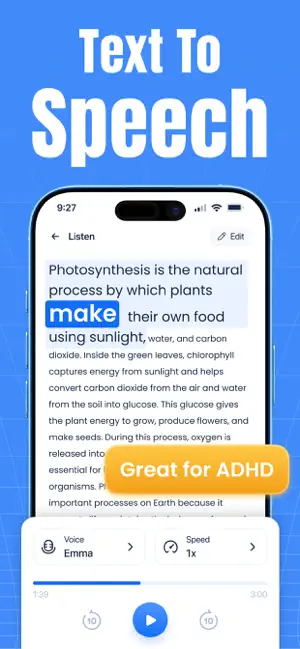
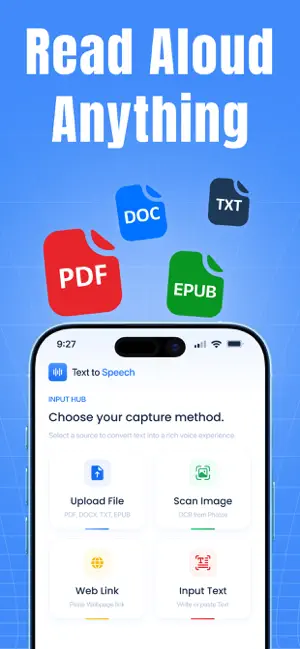
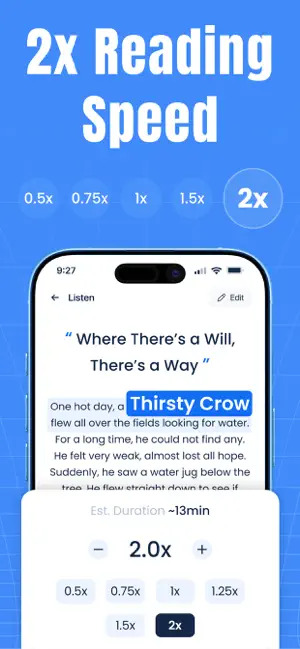
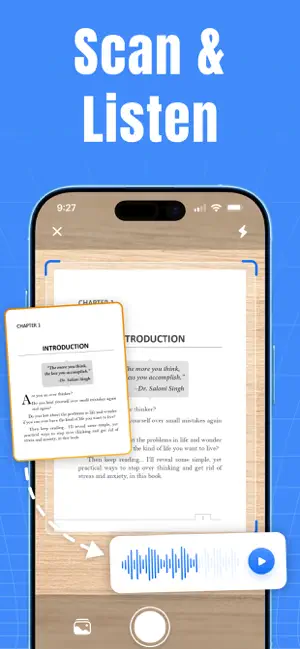
Text to Speech - Voice Reader helps you convert text into natural-sounding speech with AI voices. Listen to PDFs, TXT, DOCX, EPUB files, web articles, emails, books, and notes all in one app. From studying and productivity to language learning, content creation, and accessibility, this text to speech app makes it easy to listen to written content anytime. Choose from 100+ AI voices in 100+ languages and customize the voice with adjustable speed. Convert text into natural-sounding speech, listen AI voice with background playback, export audio, and enjoy a clean, easy-to-use interface. Use it as a speech assistant and aloud reader text to speech solution for books, documents, articles, and web pages. Key Features of text to speech reader app - Document & Web Reader: Convert PDF, TXT, DOCX, EPUB files, and any web link into speech. Paste a URL and listen to articles, reports, research papers, or emails using the built-in voice reader for all documents and text reader. - Scan Images: Scan multiple images at once and import photos, screenshots, or scanned pages so app can turn printed or captured text into audio. - Text Input: Type or paste text directly into the text reader & text to voice app to hear it read aloud instantly with natural AI voices. - AI Voices & Language Support: Realistic voices with natural pronunciation and expression across 100+ languages — ideal for reading books, documents, articles, and web content as a full AI aloud reader app. - Voice Customization Adjust speech speed, pitch, volume, and emphasis to create a listening experience that fits your preferences, whether you're studying, working, or relaxing. - Audio Export: Convert written content into audio and export recordings files. A built-in TTS converter & tts voice generator makes it easy to save books, notes, articles, and business documents as portable audio How to Use Text to speech - Voice reader app: -Import a PDF, TXT, DOCX, EPUB file, or open a web article. -Select your preferred language and AI voice. -Adjust the reading speed to match your listening preference. -Tap Play to read aloud your content. -Continue listening in the background or export the audio. Who Is It For? • Students & Learners Listen to textbooks, lecture notes, study guides, and revision material. • Professionals Review emails, reports, and contracts while multitasking or traveling using text to voice and a reliable voice reader text to speech . • Content Creators Generate AI voiceovers for videos, podcasts, and tutorials • Accessibility Users Access books, articles, web pages, and documents more comfortably using an aloud reader and speech assistant for everyday listening. Download Text to Speech - Voice Reader and turn written content into natural-sounding speech for reading, learning, productivity, and everyday listening Disclaimer: This app uses AI to convert text to voice. Accuracy may vary depending on the language and content. Your data and files are not shared with third parties. Support email: [email protected] Privacy Policy: https://eclixtech.com/privacy-policy Terms of Service: https://eclixtech.com/terms-service
App privacy
The developer, EclixTech UK LTD, reported these privacy practices to Apple.
Data Used to Track You
The following data may be used to track you across apps and websites owned by other companies:
- Location: Precise Location
Data Linked to You
The following data, which may be collected and linked to your identity, may be used for the following purposes:
- Location: Precise Location
Used for: Third-Party Advertising
Alternatives to Text to Speech, Voice Reader
Looking for apps like Text to Speech, Voice Reader? Here are 6 similar apps on the App Store. The highest rated is Text to Speech - XSpeech Read (5.0/5), and all 6 are free to download.
-
 Text to Speech - XSpeech Read
5.0
Text to Speech - XSpeech Read
5.0
-
 Narrate: Text to Speech Reader
-
 Text2Speech - Text to Speech
-
 俺のクリップボード〜コピペをさらにやりやすく!〜
-
 PaperHear - Text to Speech
-
 Offline Dictation: VoiceCrisp
| App | Rating | Price | Last updated | Compare |
|---|---|---|---|---|
| Text to Speech, Voice Reader | – | Free | September 4, 2026 | |
| Text to Speech - XSpeech Read | 5.0 / 5 (1) | Free | Aug 26, 2026 | Compare |
| Narrate: Text to Speech Reader | – | Free | Feb 17, 2026 | Compare |
| Text2Speech - Text to Speech | – | Free | Sep 2, 2026 | Compare |
| 俺のクリップボード〜コピペをさらにやりやすく!〜 | – | Free | Aug 26, 2026 | Compare |
| PaperHear - Text to Speech | – | Free | Oct 1, 2026 | Compare |
| Offline Dictation: VoiceCrisp | – | Free | Aug 19, 2026 | Compare |