

PaperHear - Text to Speech
HOANG LE Productivity iPhoneiPadiPod touch
PaperHear - Text to Speech is a free Productivity app for iPhone and iPad by HOANG LE. Requires iOS 18.0. Updated October 1, 2026.
- Price
- Free
- on the App Store
- Size
- 99 MB
- Age 17+
- Updated
- Oct 1
- 2026 · v1.1.0
Screenshots


About PaperHear - Text to Speech
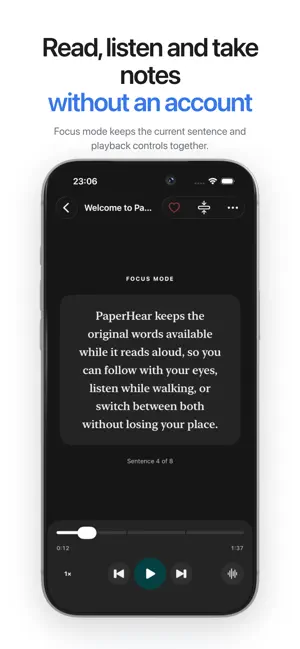
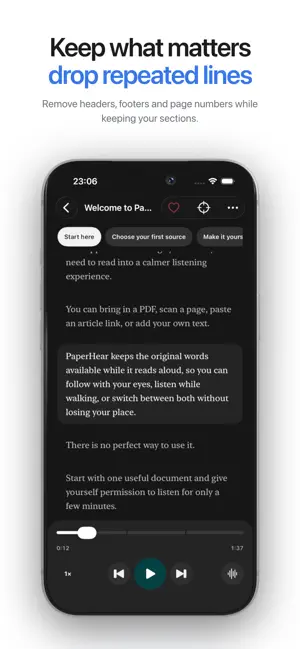
PaperHear reads your documents to you — PDFs, scans, web articles, pasted text and your own notes — in natural voices that run entirely on your iPhone. FREE TO TRY, NO LIMITS WITH PLUS Add 3 documents a month at no cost. PaperHear Plus is a one-time purchase that removes the limit: add as many documents as you like, hear every one of them and save each as an audio file (M4A). No subscription, ever. BUILT FOR LISTENING • Reads PDFs, scans, links and pasted text • Keeps the original words on screen so you can follow along • Resumes at the exact sentence you stopped on • Works offline once a voice is on your device • Sleep timer, playback speed, focus mode and notes • Save a whole document as an audio file (M4A) to Files or anywhere you choose VOICES • 13 neural voices: English, Vietnamese and Mandarin Chinese • Optional pinyin line under each Chinese sentence • Hear a short sample before downloading a voice • Delete voices you do not use and reclaim the space PRIVATE BY DESIGN • Speech is generated on your device — your documents are never sent to a speech server • No account, no ads, no tracking • Your library stays on your iPhone, with backup and restore when you want a copy Scan a page with the camera, paste an article, or open a PDF from Files. PaperHear cleans up headers, page numbers and clutter, then reads it to you while you walk, commute or rest your eyes.
What’s new
Version 1.1.0 · Updated October 1, 2026
New voices • Four new Vietnamese voices: Hải Đăng, Ngọc Huyền, Thái Sơn and Trúc Ly. • A Mandarin voice, Gù Niàn (顾念), with an optional pinyin line under each Chinese sentence. New • Save a document as an audio file (M4A) into any folder you choose: reader menu > Save audio file. • Restore your library from a backup: Settings > Data controls. • Rate PaperHear from Settings. • New libraries on a Vietnamese phone start with a Vietnamese welcome document. Fixes • After a document plays to the end, Play starts it again from the top. • The progress bar on the lock screen can be dragged. • A voice download interrupted by leaving the app continues where it stopped. • Scanning a page detects its language, so Vietnamese scans keep their accents. • Leaving the reader keeps your place, and finished documents stay marked as finished.
App privacy
The developer, HOANG LE, reported these privacy practices to Apple.
Data Not Collected
The developer does not collect any data from this app.
Alternatives to PaperHear - Text to Speech
Looking for apps like PaperHear - Text to Speech? Here are 6 similar apps on the App Store. The highest rated is Text to Speech + (5.0/5), and all 6 are free to download.
-
 AI Text to Speech: Audio Books
2.0
AI Text to Speech: Audio Books
2.0
-
 MISA Soundify - Text to Speech
1.0
MISA Soundify - Text to Speech
1.0
-
 Text to Speech - Reader
-
 SpeakCove - Text to Speech
3.6
SpeakCove - Text to Speech
3.6
-
 Text to Speech +
5.0
Text to Speech +
5.0
-
 Voiced - Text to Speech
4.9
Voiced - Text to Speech
4.9
| App | Rating | Price | Last updated | Compare |
|---|---|---|---|---|
| PaperHear - Text to Speech | – | Free | October 1, 2026 | |
| AI Text to Speech: Audio Books | 2.0 / 5 (1) | Free | Oct 3, 2026 | Compare |
| MISA Soundify - Text to Speech | 1.0 / 5 (1) | Free | Jun 19, 2025 | Compare |
| Text to Speech - Reader | – | Free | May 5, 2025 | Compare |
| SpeakCove - Text to Speech | 3.6 / 5 (9) | Free | Mar 23, 2026 | Compare |
| Text to Speech + | 5.0 / 5 (5) | Free | Oct 15, 2026 | Compare |
| Voiced - Text to Speech | 4.9 / 5 (8) | Free | Sep 29, 2026 | Compare |