

Offline Dictation: VoiceCrisp
MARCOS VINICIUS PLACONA Productivity iPhoneiPadiPod touch
Offline Dictation: VoiceCrisp is a free Productivity app for iPhone and iPad by MARCOS VINICIUS PLACONA. Requires iOS 17.0. Updated August 19, 2026.
- Price
- Free
- on the App Store
- Size
- 5 MB
- Age 4+
- Updated
- Aug 19
- 2026 · v1.0.1
Screenshots


About Offline Dictation: VoiceCrisp
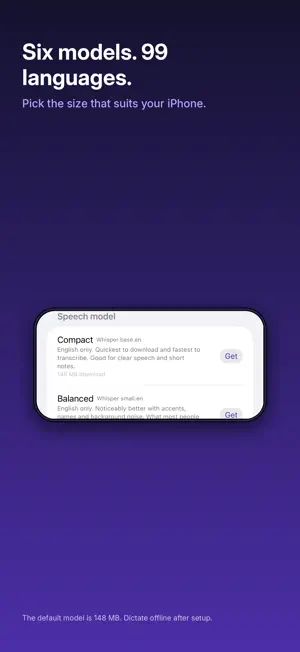
VoiceCrisp turns what you say into clean, finished text without sending a single word to the cloud. Hold the button. Speak. Get back tidy, corrected writing in about a second. Everything runs on your iPhone. No account, no sign-in, no tracking, no servers. WHY VOICECRISP IS DIFFERENT Most dictation apps stream your voice to someone else's computer. VoiceCrisp does not. Speech recognition runs locally using Whisper, and a second local pass rewrites the raw transcript into something you would be happy to send: grammar fixed, homophones sorted, dropped words put back, mis-hearings corrected. On an iPhone 17 Pro, 19 seconds of speech is transcribed in 0.46 seconds and fully cleaned up in 1.57 seconds. VoiceCrisp only uses its own network connection to download speech models. Once a model is installed, dictation works in airplane mode. BUILT FOR ACCENTED SPEECH If you speak English with an accent, you already know the problem. Ordinary dictation hears "Kubernetes" as "cooper netties" and quietly ruins the sentence. That is precisely why VoiceCrisp has a second pass. It reads the transcript in context and repairs the words speech recognition got wrong, so you spend your time thinking instead of correcting. You can also teach it. Add the names, brands and jargon you use to your custom vocabulary and VoiceCrisp biases the recognizer towards them before it starts listening. Add always-correct replacements for the words it stubbornly gets wrong, and it will fix them every time. YOUR WORDS STAY YOURS Audio is deleted the moment it has been transcribed. Nothing is uploaded, nothing is analyzed, nothing is kept that you did not ask for. Every transcript is appended to a plain markdown file, one per month, in the Files app under Dictation. Open them in Obsidian, iA Writer, Drafts, VS Code or Notes. Sync them with iCloud, or do not. They are ordinary text files on your phone, readable in twenty years whether or not this app still exists. THE KEYBOARD VoiceCrisp includes a keyboard you can switch to in any app. Tap a recent dictation and it is inserted straight into whatever you are writing: an email, a message, a document, a text field in someone else's app. To be completely straight with you about how this works: iOS does not allow any keyboard to use the microphone, so you cannot hold to talk from inside another app. You dictate in VoiceCrisp, then use the keyboard (or the clipboard) to place that text wherever you need it. It takes one tap. WHAT YOU GET - Hold-to-talk dictation with on-device Whisper speech recognition - A second local pass that repairs grammar, homophones and mis-transcriptions - Custom vocabulary for names, brands and jargon - Always-correct replacements for the words it keeps getting wrong - A list of your recent dictations, kept on device - Automatic markdown logs, one file per month, in the Files app - A keyboard extension for inserting recent dictations anywhere - Full offline operation after the initial model download - Your transcripts stay readable and exportable, always BEFORE YOU DOWNLOAD VoiceCrisp downloads a speech model the first time you open it, and you choose the size during setup. The default is 148 MB and suits most people; larger, more accurate models are there if you want them. It happens once. Use Wi-Fi and you are done. The advanced cleanup pass uses Apple's Foundation Models and needs an iPhone with Apple Intelligence on iOS 26. On older devices VoiceCrisp falls back to a fast rule-based cleanup engine, so dictation and correction still work. Terms of Use: https://www.apple.com/legal/internet-services/itunes/dev/stdeula/ Speak freely.
What’s new
Version 1.0.1 · Updated August 19, 2026
Small fixes and polish throughout. Dictation, the cleanup pass and your markdown logs all continue to run entirely on your iPhone.
App privacy
The developer, MARCOS VINICIUS PLACONA, reported these privacy practices to Apple.
Data Not Collected
The developer does not collect any data from this app.
Alternatives to Offline Dictation: VoiceCrisp
Looking for apps like Offline Dictation: VoiceCrisp? Here are 6 similar apps on the App Store.
-
 Diktator!
-
 Todofy AI Voice
-
 Refine - Offline AI Writer
-
 DualTextScanner
-
 Grammar Checker AI Assistant
-
 Voice Pad - Transcribe
| App | Rating | Price | Last updated | Compare |
|---|---|---|---|---|
| Offline Dictation: VoiceCrisp | – | Free | August 19, 2026 | |
| Diktator! | – | Free | Oct 6, 2026 | Compare |
| Todofy AI Voice | – | Free | Sep 22, 2026 | Compare |
| Refine - Offline AI Writer | – | Free | Jun 19, 2026 | Compare |
| DualTextScanner | – | Free | Sep 2, 2026 | Compare |
| Grammar Checker AI Assistant | – | Free | Feb 10, 2026 | Compare |
| Voice Pad - Transcribe | – | Free | Jul 14, 2026 | Compare |