
Text2Speech - Text to Speech
盛成 杨 Productivity iPhoneiPadiPod touch
Text2Speech - Text to Speech is a free Productivity app for iPhone and iPad by 盛成 杨. Requires iOS 17.6. Updated September 2, 2026.
- Price
- Free
- on the App Store
- Size
- 6 MB
- Age 12+
- Updated
- Sep 2
- 2026 · v1.0.0
Screenshots
About Text2Speech - Text to Speech
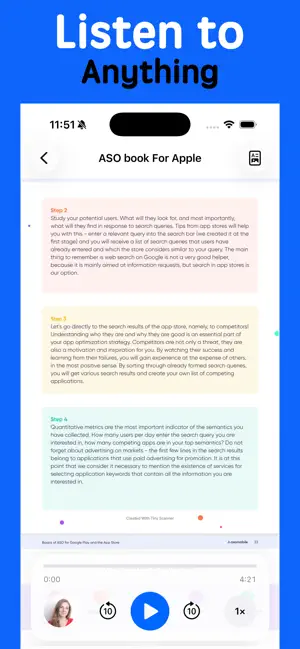
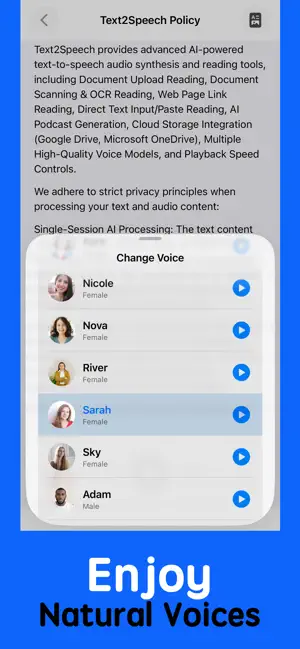
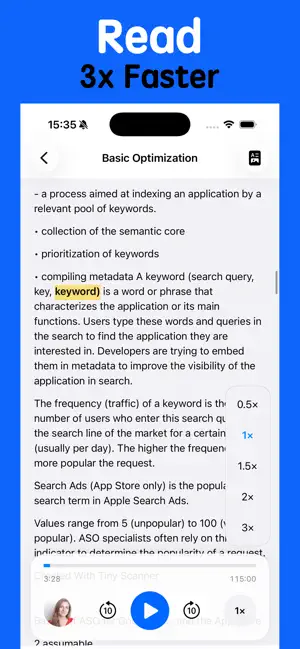
Text2Speech — Listen to Anything Turn anything you want to read into natural, comfortable speech. Text2Speech makes it easy to listen to novels, articles, study materials, work documents, and more. We designed the experience around one simple idea: less tapping, more listening. With just two steps, you can turn your content into speech and start listening right away. Bring Your Content There are many ways to add content to Text2Speech: - Import documents from your iPhone or iPad - Access files from Google Drive, Microsoft OneDrive, Dropbox, and other cloud storage through the Files app - Scan printed documents - Open content from a web link - Type or paste text directly Whether it's a book you want to listen to, study material you need to review, or a work document you want to hear on the go, Text2Speech makes it easy to turn it into something you can listen to. We use the system Files app to access cloud documents, helping keep your files and cloud storage under your control. Natural Voices Choose from more than 20 natural and friendly voices to find the one that feels right for you. Whether you prefer a calm voice for reading, a warm voice for listening at night, or something more energetic for studying, you can choose the voice that works best for you. Listen Your Way Everyone listens differently, so Text2Speech gives you control over your listening experience. - Adjust playback speed up to 3× - Tap anywhere in a document to start listening from that point - Easily skip forward or backward - Start listening from wherever you want You don't have to listen from the beginning or follow a fixed pace. Just choose where you want to start and listen at your own speed. Sleep Timer Enjoy listening before you fall asleep without worrying about leaving playback running all night. Set a sleep timer, get comfortable, and let Text2Speech automatically stop playback when the timer ends. Made for Simple, Everyday Listening Text2Speech is designed to stay out of your way. No complicated setup, no unnecessary steps — just bring your content, choose a voice, and start listening. We hope Text2Speech becomes a simple and enjoyable part of your everyday life, whether you're reading, studying, working, relaxing, or getting ready for sleep. Thank you for using Text2Speech. We hope you enjoy listening. FREE TRIAL FOR 3 DAYS - OFFERING UNLIMITED GALLERY CLEANING FOR A LIMITED TIME You may cancel your subscription at any time! Text2Speech’s free trial allows you unlimited access to all features for the duration of 3 days. Your account will be automatically charged for renewal, based on the annual subscription plan, within 24 hours before the end of the 3 days free trial period. You can cancel auto-renewal at any time, given that the cancellation is at least 24 hours before the end of the current period. Any unused portion of a free trial period will be forfeited when making a purchase of an auto-renewing subscription. Manage your subscription directly from your iPhone Subscriptions can be managed by the user and auto-renewal can be turned off by going to the Account Settings: Open the Settings app -> Tap your name -> Tap Subscriptions -> Tap the subscription that you want to manage. By using Text2Speech, you agree to our Privacy Policy and Terms of Use: Privacy policy: https://teufeltim.github.io/text2speech_policy/ Terms of use: https://teufeltim.github.io/text2speech_tou/
App privacy
The developer, 盛成 杨, reported these privacy practices to Apple.
Data Linked to You
The following data, which may be collected and linked to your identity, may be used for the following purposes:
- Purchases: Purchase History
- Contact Info: Email Address, Other User Contact Info
- User Content: Audio Data, Other User Content
- Identifiers: Device ID
Used for: Product Personalization, App Functionality, Other Purposes
Data Not Linked to You
The following data, which may be collected but is not linked to your identity, may be used for the following purposes:
- Other Data: Other Data Types
Used for: Other Purposes
Alternatives to Text2Speech - Text to Speech
Looking for apps like Text2Speech - Text to Speech? Here are 6 similar apps on the App Store. The highest rated is Fluso (5.0/5), and all 6 are free to download.
-
 Text to Speech: TTS Reader
-
 Basin: Voice Memos to Text
-
 Fluso
5.0
-
 Text to Speech: ListenAloud
-
 Text to Speech Reader ThinkSay
-
 OCR Scanner - Paper to Text
1.7
| App | Rating | Price | Last updated | Compare |
|---|---|---|---|---|
| Text2Speech - Text to Speech | – | Free | September 2, 2026 | |
| Text to Speech: TTS Reader | – | Free | Oct 5, 2026 | Compare |
| Basin: Voice Memos to Text | – | Free | Oct 19, 2026 | Compare |
| Fluso | 5.0 / 5 (2) | Free | Oct 21, 2026 | Compare |
| Text to Speech: ListenAloud | – | Free | Oct 22, 2026 | Compare |
| Text to Speech Reader ThinkSay | – | Free | Dec 24, 2025 | Compare |
| OCR Scanner - Paper to Text | 1.7 / 5 (3) | Free | Jun 5, 2026 | Compare |