

OCR Scanner - Paper to Text
Bahtiyar Polat Productivity iPhoneiPadiPod touch
OCR Scanner - Paper to Text is a free Productivity app for iPhone and iPad by Bahtiyar Polat. Rated 1.7/5 from 3 ratings. Requires iOS 15.6.
- Rating
- 1.7
- 3 ratings
- Price
- Free
- on the App Store
- Size
- 37 MB
- Age 4+
- Updated
- Jun 5
- 2026 · v1.3
Screenshots



About OCR Scanner - Paper to Text
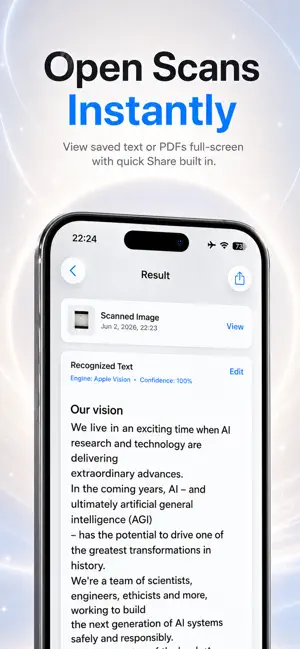
OCR Scanner — Turn Images into Text Instantly OCR Scanner is a simple, fast scanning app that turns text from any document, note, receipt, book page, or screenshot into editable text in seconds — using your camera or a photo from your gallery. No complicated settings, no sign-up. Scan, extract, share. What you can do • Scan or Import a Photo — Capture instantly with your camera or pick an image from your library. • Smart Text Recognition — Advanced dual-engine technology recognizes text with high accuracy. • Edit — Refine the recognized text in-app; change the font and size. • Save as Text or PDF — Keep your scans as plain text or as a PDF document. • Copy & Share — Copy the text with one tap or share it to other apps. • Organize with Folders — Keep your scans tidy in custom folders. • History — Access all your scans anytime; filter by All, Text, or PDF and search. • English & Turkish support, with light/dark theme. Your privacy is absolute OCR Scanner is built so that everything you scan stays on your device. • All scans, images, and recognized text are stored only on your device. • We never collect, transmit, sell, or share your data. • Text recognition runs fully on-device — your images never leave your iPhone. • No ads, no tracking, no analytics. • No account or sign-in required. • Delete any scan at any time, permanently. Carry your documents with you and turn paper into digital text in seconds.
What’s new
Version 1.3 · Updated June 5, 2026
This update makes saving and viewing your scans faster and clearer: • New full-screen viewers — open any saved text or PDF instantly, with quick Share built in. • Improved History filters — browse your scans by All, Text, or PDF. • Smoother saving — saving a scan now takes you right back to where you left off. • Cleaner Settings and various performance improvements and bug fixes. Thanks for using OCR Scanner!
App privacy
The developer, Bahtiyar Polat, reported these privacy practices to Apple.
Data Not Collected
The developer does not collect any data from this app.
Alternatives to OCR Scanner - Paper to Text
Looking for apps like OCR Scanner - Paper to Text? Here are 6 similar apps on the App Store. The highest rated is Do Scan: PDF Scanner & OCR (5.0/5), and 5 of the 6 are free to download.
-
 Text2Speech - Text to Speech
-
 LLM Player
-
 CranScan: Offline OCR Scanner
-
 Do Scan: PDF Scanner & OCR
5.0
Do Scan: PDF Scanner & OCR
5.0
-
 TQ Planner
-
 Bouncer: Study Blocker
| App | Rating | Price | Last updated | Compare |
|---|---|---|---|---|
| OCR Scanner - Paper to Text | 1.7 / 5 (3 ratings) | Free | June 5, 2026 | |
| Text2Speech - Text to Speech | – | Free | Sep 2, 2026 | Compare |
| LLM Player | – | Free | Apr 24, 2026 | Compare |
| CranScan: Offline OCR Scanner | – | Free | Oct 14, 2026 | Compare |
| Do Scan: PDF Scanner & OCR | 5.0 / 5 (1) | 14.99 USD | Oct 12, 2026 | Compare |
| TQ Planner | – | Free | Jul 15, 2025 | Compare |
| Bouncer: Study Blocker | – | Free | Jul 20, 2026 | Compare |