

Pikscan: Expense reports
EL AANOUNI Lahoussaine Finance iPhoneiPadiPod touch
Pikscan: Expense reports is a free Finance app for iPhone and iPad by EL AANOUNI Lahoussaine. Requires iOS 15.5. Updated August 15, 2026.
- Price
- Free
- on the App Store
- Size
- 38 MB
- Age 4+
- Updated
- Aug 15
- 2026 · v1.2
Screenshots

About Pikscan: Expense reports
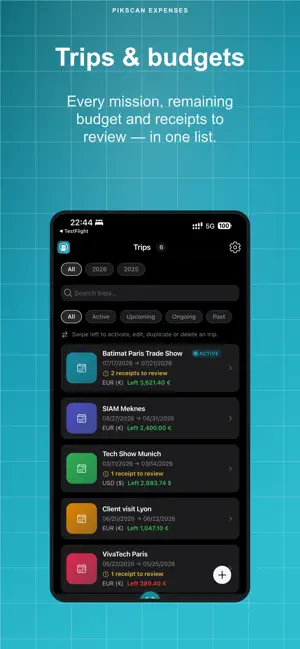
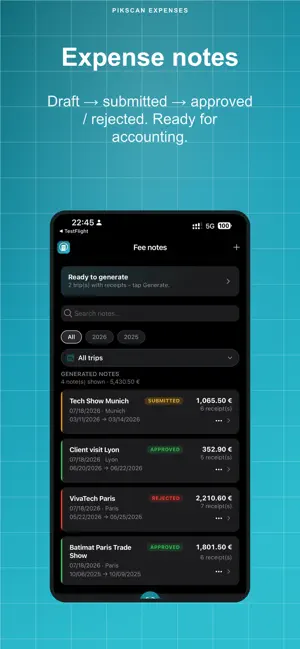
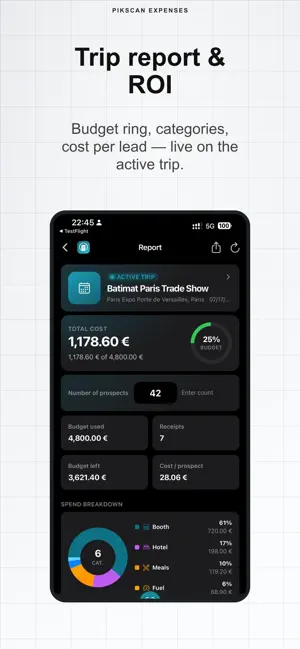
Pikscan: Expense reports - professional expense reports on iPhone. Scan one receipt (or up to 10 in a batch), organize by trip, track budgets, and export to accounting. Everything stays on your phone: on-device OCR, SQLite, zero cloud, no account required. WHO IT’S FOR Sales, consultants, freelancers, field teams - anyone who travels and needs clean expense reports. FEATURES • On-device OCR: amount, date, merchant, VAT, category • Trips with dates, location, currency and budget • Mileage trips with a configurable €/km rate • Expense notes: draft → submitted → approved / rejected • Report & ROI: budget ring, categories, cost per prospect • Compare trips year over year • Multi-currency, categories, receipt validation • JSON backup (free) or ZIP with images (Premium) • EN / FR / DE / ES EXPORTS Free: CSV, Excel Premium: PDF, FEC (France), Pennylane, QuickBooks, Xero, DATEV, Sage, Wave, FreshBooks + ZIP with receipts OFFER • Free: 30 receipt scans (deleting a receipt frees quota) • Premium: unlimited scans + advanced accounting exports • Free trial via the App Store • Cancel anytime in your Apple account PRIVACY No cloud upload of images. OCR and storage 100% on device. Built for GDPR. Support: [email protected] Terms of Use (EULA): https://expenses.pikscan.com/terms Privacy Policy: https://expenses.pikscan.com/privacy Website: https://expenses.pikscan.com
What’s new
Version 1.2 · Updated August 15, 2026
What’s new in this update • Choose your language right from onboarding • Set distances in km or miles in Settings • Try Premium free after your first scanned receipt • Clearer fee notes list and detail screens • More languages and interface polish
App privacy
The developer, EL AANOUNI Lahoussaine, reported these privacy practices to Apple.
Data Not Collected
The developer does not collect any data from this app.
Alternatives to Pikscan: Expense reports
Looking for apps like Pikscan: Expense reports? Here are 6 similar apps on the App Store.
-
 AI Receipt Scanner: Expenses
-
 Receipt Scanner: Expenses
-
 SheetFlow: Receipts to Sheets
-
 ReceiptFox: Expense Scanner
-
 Ticket Scanner
-
 Tally: Spending Control
| App | Rating | Price | Last updated | Compare |
|---|---|---|---|---|
| Pikscan: Expense reports | – | Free | August 15, 2026 | |
| AI Receipt Scanner: Expenses | – | Free | Aug 3, 2026 | Compare |
| Receipt Scanner: Expenses | – | Free | Sep 28, 2026 | Compare |
| SheetFlow: Receipts to Sheets | – | Free | Oct 9, 2026 | Compare |
| ReceiptFox: Expense Scanner | – | Free | Sep 15, 2026 | Compare |
| Ticket Scanner | – | Free | Jul 31, 2026 | Compare |
| Tally: Spending Control | – | Free | Oct 10, 2026 | Compare |