

SheetFlow: Receipts to Sheets
Sangho Kim Finance iPhoneiPadiPod touch
SheetFlow: Receipts to Sheets is a free Finance app for iPhone and iPad by Sangho Kim. Requires iOS 15.5. Updated October 9, 2026.
- Price
- Free
- on the App Store
- Size
- 101 MB
- Age 4+
- Updated
- Oct 9
- 2026 · v1.1.10
Screenshots


About SheetFlow: Receipts to Sheets
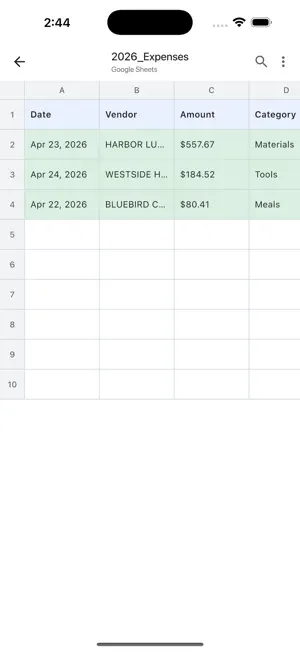
Snap the receipt. Toss the paper. SheetFlow reads a receipt the moment you take the photo and keeps the details for you. Connect your Google account and each receipt becomes a new row in a Google Sheet in your own Drive. No more receipts piling up in your pocket. HOW IT WORKS 1. Take a photo of a receipt, or pick several from your photo library at once. 2. AI reads the date, time, merchant, business or tax ID (when printed), total, currency and category, plus a short note of what you bought. 3. Each receipt is saved in the app. Once you connect Google, it is also written as one row in your sheet. Receipts you scanned before connecting can be sent over in one go. YOUR SHEET, IN YOUR DRIVE • SheetFlow sets up a new Google Sheet for you in your own Drive, with the columns already in place. • Already keep a spreadsheet? SheetFlow doesn't write into existing files, but you can pull its rows into yours with IMPORTRANGE. The how-to is on our website. • It asks for one Google permission: access to the files SheetFlow itself creates. It can't see anything else in your Drive. • Signing in is optional. Without it, receipts stay in the app on this device, and you can export them as CSV. STRAIGHT FROM THE LOCK SCREEN On iOS 18 or later, add the Scan Receipt control to your Lock Screen and start capturing without looking for the app. You can also start from the Action Button, Spotlight or Siri. THE BACKLOG, TOO • Pick a stack of receipt photos at once and they are processed one after another. • Receipts with the same date, merchant and amount are marked as possible duplicates. • The dashboard shows your spending for today, this week, this month and this year. • Optional reminders when you haven't logged a receipt for a while. YOUR PHOTOS, YOUR CHOICE Receipt photos are sent to an AI service so they can be read. After that, keep each photo only on this device, or don't keep it at all. Free. No ads. No subscription. SheetFlow is not affiliated with Google. Google Sheets is a trademark of Google LLC.
What’s new
Version 1.1.10 · Updated October 9, 2026
Small fixes that add up: • If Google Sheets can't take a receipt at that moment, SheetFlow tries again on its own. Anything still missing shows a one-tap "Try again". • Reminders now come only after you've gone a while without logging a receipt, not on days you've already used the app. • Start a scan from the Action Button or Spotlight, too: Settings → Scan from the Lock Screen. • The camera pauses while you connect Google, and the camera tip appears only once. • Want the rows in a spreadsheet you already use? The connection screen shows how. • A new launch screen to match the icon.
App privacy
The developer, Sangho Kim, reported these privacy practices to Apple.
Data Linked to You
The following data, which may be collected and linked to your identity, may be used for the following purposes:
- Usage Data: Product Interaction
- Financial Info: Other Financial Info
- Contact Info: Email Address, Name
- User Content: Photos or Videos, Other User Content
- Identifiers: User ID
Used for: Analytics, App Functionality
Data Not Linked to You
The following data, which may be collected but is not linked to your identity, may be used for the following purposes:
- Diagnostics: Crash Data, Performance Data
Used for: App Functionality
Alternatives to SheetFlow: Receipts to Sheets
Looking for apps like SheetFlow: Receipts to Sheets? Here are 6 similar apps on the App Store. The highest rated is Snapstub: Receipt Scanner (5.0/5), and all 6 are free to download.
-
 Pikscan: Expense reports
-
 Snapstub: Receipt Scanner
5.0
Snapstub: Receipt Scanner
5.0
-
 Scan2Sheets - Receipt Scanner
5.0
Scan2Sheets - Receipt Scanner
5.0
-
 Scan Receipts: Expense Tracker
5.0
Scan Receipts: Expense Tracker
5.0
-
 Mt.Olive Baptist Church FCU
5.0
Mt.Olive Baptist Church FCU
5.0
-
 Receipt Scanner & Keeper
| App | Rating | Price | Last updated | Compare |
|---|---|---|---|---|
| SheetFlow: Receipts to Sheets | – | Free | October 9, 2026 | |
| Pikscan: Expense reports | – | Free | Aug 15, 2026 | Compare |
| Snapstub: Receipt Scanner | 5.0 / 5 (3) | Free | Oct 14, 2026 | Compare |
| Scan2Sheets - Receipt Scanner | 5.0 / 5 (7) | Free | Sep 20, 2026 | Compare |
| Scan Receipts: Expense Tracker | 5.0 / 5 (1) | Free | Sep 28, 2026 | Compare |
| Mt.Olive Baptist Church FCU | 5.0 / 5 (1) | Free | Sep 25, 2026 | Compare |
| Receipt Scanner & Keeper | – | Free | Aug 20, 2026 | Compare |