

Receiptic: Receipt Scanner
yatagan oguz kagan Finance iPhoneiPadiPod touch
Receiptic: Receipt Scanner is a free Finance app for iPhone and iPad by yatagan oguz kagan. Requires iOS 17.0. Updated October 12, 2026.
- Price
- Free
- on the App Store
- Size
- 11 MB
- Age 4+
- Updated
- Oct 12
- 2026 · v1.2
Screenshots

About Receiptic: Receipt Scanner
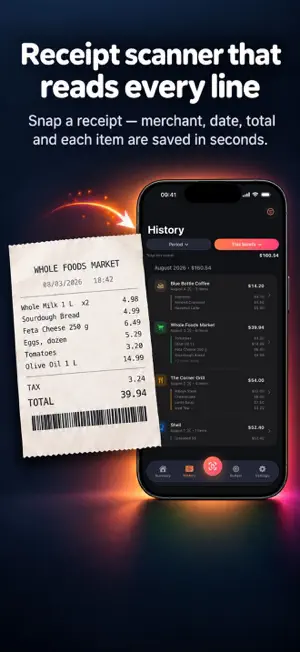
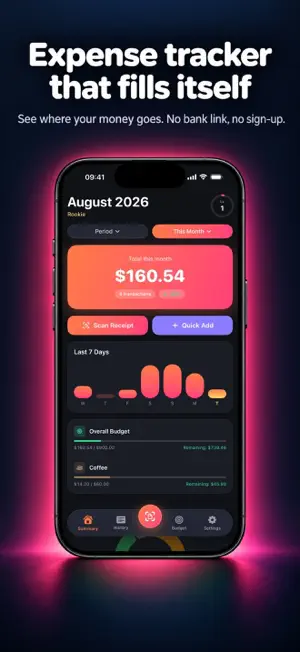
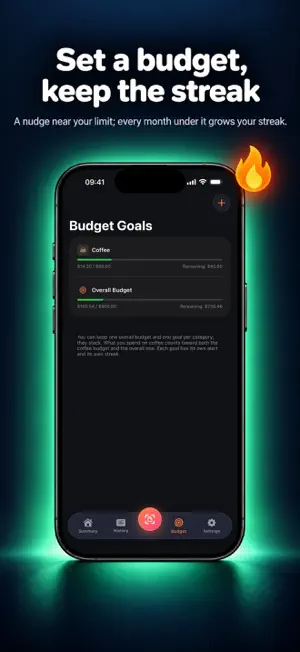
Snap it. Leave the rest. Receiptic reads a photo of your receipt with AI: merchant, date, time, receipt number, total, VAT and every item you bought, one by one. You never type a single figure. IT READS LINE BY LINE Most apps take only the total from a receipt. Receiptic saves ten items on one receipt as ten separate lines. You see exactly what you paid for what. ONE FILE FOR YOUR ACCOUNTANT At month's end, generate an .xlsx and share it. Category summary, line-by-line breakdown and the VAT collected from your receipts, all in one file. BUDGETS AND STREAKS Set a monthly limit. You get a nudge at 90% of it. Every month you close under the limit extends your streak. NO BANK ACCOUNT REQUIRED No membership, no sign-up, no bank connection. Download, snap, done. Your expenses and receipt images stay on your phone. The receipt photo is sent only to be read, and you can turn that off in Settings — with it off, reading happens entirely on your device. 12 LANGUAGES, EVERY COUNTRY English, Turkish, German, French, Spanish, Italian, Portuguese, Dutch, Polish, Russian, Japanese and Arabic. Currency follows your phone's region; a receipt you snap abroad keeps its own currency. ALSO • Home screen widget: this month's total, budget status, top category • Insights: "your coffee spending is up 40% from last month" • Month in review — a shareable card • Levels and XP: turns a boring chore into a game FREE AND PRO The free version scans 2 receipts a day, takes unlimited manual entries and exports the category summary to Excel. Budget goals, insights and the home screen widget also work in the free version. Pro: unlimited scanning, line-by-line Excel with VAT, and back-to-back scanning in one session. Terms of Use (EULA): https://www.apple.com/legal/internet-services/itunes/dev/stdeula/ Privacy Policy: https://receiptic.app/en/privacy/
What’s new
Version 1.2 · Updated October 12, 2026
• If you'd like, we can now let you know about new features and handy tips with a notification. It's completely optional — turn it on or off anytime in Settings → Notifications.
App privacy
The developer, yatagan oguz kagan, reported these privacy practices to Apple.
Data Not Linked to You
The following data, which may be collected but is not linked to your identity, may be used for the following purposes:
- Purchases: Purchase History
- Identifiers: Device ID
- User Content: Photos or Videos
Used for: Developer’s Advertising or Marketing, App Functionality
Alternatives to Receiptic: Receipt Scanner
Looking for apps like Receiptic: Receipt Scanner? Here are 6 similar apps on the App Store.
-
 Receipt Scanner: Expenses
-
 Varlio: Budget & Gold
-
 AI Receipt Scanner & Tracker
-
 Home Receipt: Expense Tracker
-
 Slip Vault: Receipt Keeper
-
 SnapCost: Receipt Scanner
| App | Rating | Price | Last updated | Compare |
|---|---|---|---|---|
| Receiptic: Receipt Scanner | – | Free | October 12, 2026 | |
| Receipt Scanner: Expenses | – | Free | Sep 28, 2026 | Compare |
| Varlio: Budget & Gold | – | Free | Sep 8, 2026 | Compare |
| AI Receipt Scanner & Tracker | – | Free | Sep 15, 2026 | Compare |
| Home Receipt: Expense Tracker | – | Free | Mar 31, 2026 | Compare |
| Slip Vault: Receipt Keeper | – | Free | Oct 7, 2026 | Compare |
| SnapCost: Receipt Scanner | – | Free | Jul 16, 2026 | Compare |