

Receipt Scanner: Expenses
Artiom Gaureac Finance iPhoneiPadiPod touch
Receipt Scanner: Expenses is a free Finance app for iPhone and iPad by Artiom Gaureac. Requires iOS 16.0. Updated November 14, 2026.
- Price
- Free
- on the App Store
- Size
- 18 MB
- Age 4+
- Updated
- Nov 14
- 2026 · v1.2.0
Screenshots
Save to Pinterest
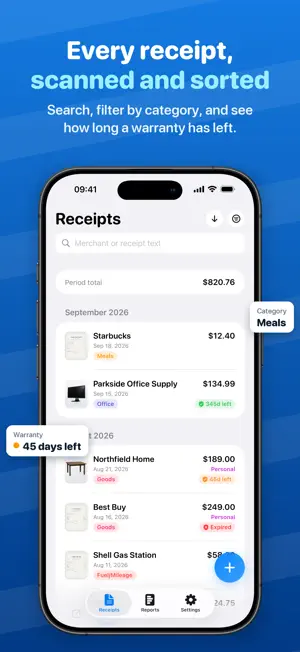


About Receipt Scanner: Expenses
Receipt Scanner turns a pile of paper receipts into tidy, tax-ready expense records — right on your iPhone, no account required. SCAN IN SECONDS Point your camera at a receipt and the edges are detected automatically. On-device OCR fills in merchant, date, total, tax and a suggested category. Import photos or PDFs too. Or share receipt photos straight from Photos or any app: tap Share, then Receipt Scanner. BUILT FOR TAX & REIMBURSEMENT Group expenses into categories and export clean reports as PDF, CSV or Excel for any period — ready for tax filing or expense claims. Attach the receipt images to the PDF. PRIVATE BY DESIGN Your receipts stay on your device. No account, no sign-up, no ads and no tracking. To improve recognition, the app tells the developer which fields you had to correct after a scan — never the photo, the text or the amounts. Turn it off under Settings → Recognition statistics. Optional iCloud backup uses your own private iCloud — only you can see it. FAIR PRICING Scan and store receipts, search, edit and build reports for free. Pro unlocks unlimited scanning, report export and iCloud backup. Pay weekly, monthly or yearly — the annual plan starts with a 7-day free trial. FREE • 10 receipt scans per month (manual entry unlimited) • Unlimited storage, search, editing and custom categories • Report builder with live preview • ZIP export & import PRO • Unlimited receipt scanning • Export reports as PDF, CSV & Excel (Share & Save) • iCloud backup & restore SUBSCRIPTION DETAILS Receipt Scanner Pro unlocks unlimited scanning, report export and iCloud backup & restore: • Weekly: $3.99 per week • Monthly: $5.99 per month • Yearly: $49.99 per year, including a 7-day free trial for new subscribers Prices are in USD and may vary by country. Payment is charged to your Apple ID at confirmation of purchase. A subscription renews automatically unless it is cancelled at least 24 hours before the end of the current period, and your account is charged for renewal within 24 hours before the period ends. Manage or cancel your subscription in your Apple ID settings. Any unused part of a free trial is forfeited when a subscription is purchased. Terms of Use (EULA): https://gaureac.github.io/receipt-scanner-expenses/terms.html Privacy Policy: https://gaureac.github.io/receipt-scanner-expenses/privacy.html
What’s new
Version 1.2.0 · Updated November 14, 2026
• Scan opens the camera straight away, with Photos and Files right inside it • Share receipt photos straight from Photos or any app: tap Share, then Receipt Scanner • E-invoices: open an XRechnung, ZUGFeRD or Factur-X invoice from Files or Mail and its data fills the form, with no scan used. The original stays attached to view, share and print, and reports list e-invoices in their own section • Possible duplicates: a warning before you save a receipt you already have, and Don't save gives the free scan back • Receipts taxed at several rates show each rate under Tax • Swipe between a receipt's photos and pages in full screen, just like in Photos • Photos imported from your library are cropped to the receipt like a scan, and a curled receipt's edge is no longer cut off • Restoring a backup brings back pages removed since it was made, and removing a page now asks first • Recognition statistics: after a scan, the developer learns which fields you had to correct — never the photo, the text or the amounts. Switch them off in Settings • Crash reports: if the app crashes, a report goes to the developer. It contains nothing from your receipts, and you can switch them off in Settings • Totals and currencies are read more reliably, plus many smaller fixes
App privacy
The developer, Artiom Gaureac, reported these privacy practices to Apple.
Data Not Linked to You
The following data, which may be collected but is not linked to your identity, may be used for the following purposes:
- Purchases: Purchase History
- Usage Data: Product Interaction
- Diagnostics: Other Diagnostic Data, Crash Data, Performance Data
- Identifiers: User ID
Used for: Analytics, App Functionality
Alternatives to Receipt Scanner: Expenses
Looking for apps like Receipt Scanner: Expenses? Here are 6 similar apps on the App Store. The highest rated is ReceiptZero: Receipt Scanner (1.0/5), and 5 of the 6 are free to download.
-
 Receiptic: Receipt Scanner
-
 Receipt Scanner: Tax Tracker
-
 SpendlyGo
-
 ReceiptZero: Receipt Scanner
1.0
-
 ScanLedger: Receipt Keeper
-
 OWL ERP: POS & Inventory
| App | Rating | Price | Last updated | Compare |
|---|---|---|---|---|
| Receipt Scanner: Expenses | – | Free | November 14, 2026 | |
| Receiptic: Receipt Scanner | – | Free | Oct 12, 2026 | Compare |
| Receipt Scanner: Tax Tracker | – | 0.99 USD | Aug 19, 2026 | Compare |
| SpendlyGo | – | Free | Nov 11, 2026 | Compare |
| ReceiptZero: Receipt Scanner | 1.0 / 5 (1) | Free | Sep 8, 2026 | Compare |
| ScanLedger: Receipt Keeper | – | Free | Nov 9, 2026 | Compare |
| OWL ERP: POS & Inventory | – | Free | Nov 9, 2026 | Compare |