

LowPoly 3D Modeling
Leonardo Amora Graphics & Design iPad
LowPoly 3D Modeling is a paid Graphics & Design app for iPad by Leonardo Amora. Rated 5.0/5 from 1 ratings. Requires iOS 17.0. Updated October 22, 2026.
- Rating
- 5.0
- 1 ratings
- Price
- 12.99 USD
- on the App Store
- Size
- 15 MB
- Age 4+
- Updated
- Oct 22
- 2026 · v1.9.1
Screenshots


About LowPoly 3D Modeling
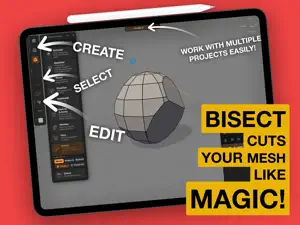
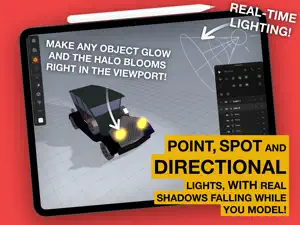
The 3D studio that fits in your bag. And works on a Mac too! :D :D LowPoly brings real 3D modeling to iPad and Mac, with the fluidity you already love from drawing. Your finger navigates, the Apple Pencil builds. It is the Procreate feel applied to lowpoly 3D: direct, tactile and fast. Draw it, build it Sketch a line and watch it become geometry. Spin a profile on the Lathe for vases, bottles, wheels and chess pieces, or add pitch and turns for springs and spiral staircases. Draw a closed outline and pull it into thickness for logos, signs and gears. Draw a floor plan and raise real walls, with thickness, mitered corners and magnetic nodes. Freehand with the Pencil, then drag the nodes until it is exactly right. Every shape stays editable, so you can reopen the drawing that made it. Already have the artwork? Import SVG, PDF, AI, EPS, DXF and PLT from Files or the clipboard, and it becomes a model. Sculpt it for real Start from a primitive and go: extrude, inset, bevel, subdivide, edge loop, slide, a knife that cuts as you draw, shell for thickness, boolean to merge and carve, bridge, live symmetry and smoothing groups. Bend, twist, taper and inflate the whole shape, or grab a lattice cage and push it around. A complete modeling kit with nothing buried in menus. Animate it A real keyframe timeline, right under the model. Animate position, rotation, scale, visibility and even the deformers, so a shape can bend, twist and inflate over time. Set easing per keyframe, choose your frame rate and duration, drag and snap keyframes to frames, and scrub with the model moving live. Play it back full speed on device, then export the animation to GLB or FBX for your engine, as a video, or as a PNG sequence with alpha to composite anywhere. Bring your model to life Paint per face or open the UV and take the texture to your favorite painting app. Flip on Cartoon mode for instant outlines, flat shading and a studio shadow, or bake ambient occlusion for depth. Print it Slice right here, send it over the network to Bambu Lab, OctoPrint, Klipper or PrusaLink, and watch the job from the app: progress, time left and temperatures, live. Export anywhere GLB with animation for engines and AR, OBJ, FBX and 3DS for other software, STL in millimeters for 3D printing, and a 9:16 video, turntable or your animation, ready to post. No forced cloud. No subscription. Your model, your control. Download it and turn your next idea into a model right now. Maximum effort!
What’s new
Version 1.9.1 · Updated October 22, 2026
NEW - Slide works on a vertex too: it rides the edge you aim at, without leaving the surface. - Subdivide a single edge into up to eight pieces, with dots showing where the new vertices land. - Show vertices, in the View panel: a dot on every vertex of every piece. CHANGES - One window, one project: the same project is never open twice. - Community: declining to share your age range now explains why and offers to ask again. FIXES - The app reopens in the project you were working on. - Symmetry mirrors every Edit Form tool: Loop, Slide, Arc, Subdivide edge, Knife, Bisect and Extrude with a locked axis. - Shapes created on a face inside a rotated layer come out straight. - Bisect with Cap on a tube closes only the wall and leaves the hole open. - OBJ, FBX and 3DS: the right size, pieces in place, UVs and textures kept. - Stickers keep their color and a clean edge while you drag them. - Imported vectors with crossing outlines or touching holes come out closed. - Bevel, Slide and Split are many times faster on heavy meshes, and playback with the timeline open is smoother. - Render shadow has the strength you set. - Stacks in the gallery drag like projects. - New projects start with the heavy render options off. Maximum effort!
App privacy
The developer, Leonardo Amora, reported these privacy practices to Apple.
Data Linked to You
The following data, which may be collected and linked to your identity, may be used for the following purposes:
- User Content: Other User Content
- Identifiers: User ID
- Other Data: Other Data Types
Used for: App Functionality
Alternatives to LowPoly 3D Modeling
Looking for apps like LowPoly 3D Modeling? Here are 6 similar apps on the App Store. The highest rated is FormWright 3D (5.0/5), and 3 of the 6 are free to download.
-
 FormWright 3D
5.0
-
 Poligon: Pixel Art & Low Poly
-
 Paper: 3D Drawing Studio
5.0
-
 Qwartz
-
 Wax
5.0
-
 LUNE 2D Animation
| App | Rating | Price | Last updated | Compare |
|---|---|---|---|---|
| LowPoly 3D Modeling | 5.0 / 5 (1 rating) | 12.99 USD | October 22, 2026 | |
| FormWright 3D | 5.0 / 5 (2) | 19.99 USD | Oct 10, 2026 | Compare |
| Poligon: Pixel Art & Low Poly | – | Free | Sep 7, 2026 | Compare |
| Paper: 3D Drawing Studio | 5.0 / 5 (2) | 6.99 USD | Oct 9, 2026 | Compare |
| Qwartz | – | Free | Oct 22, 2026 | Compare |
| Wax | 5.0 / 5 (1) | Free | Oct 21, 2026 | Compare |
| LUNE 2D Animation | – | 9.99 USD | Aug 13, 2026 | Compare |