
Paper: 3D Drawing Studio
Imran Gul Graphics & Design iPad
Paper: 3D Drawing Studio is a paid Graphics & Design app for iPad by Imran Gul. Rated 5.0/5 from 2 ratings. Requires iOS 26.4. Updated October 9, 2026.
- Rating
- 5.0
- 2 ratings
- Price
- 6.99 USD
- on the App Store
- Size
- 3 MB
- Age 4+
- Updated
- Oct 9
- 2026 · v1.0.6
Screenshots


About Paper: 3D Drawing Studio
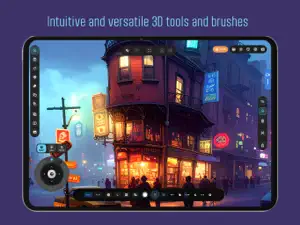
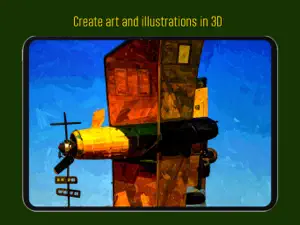
3D Paper Studio: The Most Tactile Modeling Experience on iPad. Step into a digital atelier where the precision of CAD meets the soul of hand-crafted paper art. 3D Paper Studio is a first-of-its-kind creative suite designed specifically for iPad and Apple Pencil, allowing you to build complex 3D structures as easily as drawing on paper. Draw freely in 3D space and use any 3D stroke as a canvas to draw over as well to enhance your ideas and creative expressions. INFINITE SPATIAL FREEDOM: NO CANVAS REQUIRED Forget everything you know about 3D drawing. Unlike other apps that force you to create a canvas surface or plane before you draw, 3D Paper Studio gives you total spatial freedom. Start your stroke anywhere in 3D space and let it flow. Our engine handles the complex coordinate math so you can focus on the form. Draw in thin air, bridge gaps, and weave intricate 3D webs without ever feeling "stuck" to a 2D surface. THE OMNI-JOYSTICK: CONTROL DEPTH WITH ONE THUMB Experience the revolutionary OmniJoystick—the heart of our interaction model. While your Apple Pencil handles the art, your other thumb controls the universe. The same joystick becomes an object controller when any object/s is selected. No need to draw complicated canvases; Simply long press on the ground or any other stroke to set the precise drawing position and start painting in 3D space. Real-time Depth Control: Glide through the Z-axis as you draw to create sweeping 3D curves. Precision Snapping: Use the joystick to "Lock" to specific axes or snap to existing 3D "Magnets" for perfect alignment. Tactile Feedback: Feel the "click" of the grid as you navigate through your 3D studio. BEYOND DRAWING: TRUE 3D GEOMETRY Don't just sketch—extrude, revolve, and sweep. Use our advanced geometry engine to create ribbons, tubes, and complex lathes with a single stroke. The Bridge Tool: Connect two existing points with a sinuous paper ribbon that respects the surface normals of both objects. The Revolve Tool: Turn a single profile into a 3D vessel, bowl, or column in seconds. Edge Perturbation: Choose between "Clean" or "Torn" edges to give your models a raw, hand-crafted aesthetic. PHYSICAL MATERIALS & CINEMATIC LIGHTING Watch your creations come to life with our high-end material library. Choose from Smooth Bristol, Cold-Press Watercolor, Crumpled Foil, Corrugated Cardboard, and more. Use Cinematic Looks to light your scene with professional studio presets like Golden Hour, Midnight, and Vaporwave. KEY FEATURES: Zero-Canvas Drawing: Draw directly into 3D space with no setup required. OmniJoystick Workflow: Master depth, rotation, and snapping with a single, intuitive control. Tactile Tools: Draw, Bridge, Arc, and Revolve to create complex 3D meshes. Advanced Deformers: Warp, Twist, and Liquify your 3D geometry in real-time. Symmetry Engine: Mirror and Radial symmetry for intricate architectural patterns. Professional Export: Save your work as USDZ for AR, or OBJ for professional 3D pipelines. Camera Tours: Create cinematic fly-throughs and export them as high-quality video. UNLEASH YOUR CREATIVITY IN 3D. Join a new generation of designers who are redefining what it means to create on iPad. 3D Paper Studio—where paper becomes infinite. The app supports finger touch drawing but we recommend using apple Pencil for the best drawing experience and to access pressure sensitivity features. No subscriptions - Ever! Once you purchase the app, thats it. No additional in-app purchases, no subscriptions ever again. Every future update will be free for the life of the app.
What’s new
Version 1.0.6 · Updated October 9, 2026
• Smart Auto-Shape Recognition: Draw any shape and hold! Auto-Shape now recognizes and mathematically perfects Squares, Rectangles, Triangles, Circles, Ellipses, Polygons, Arcs, and Straight Lines. Drag to scale and orient your perfected shape seamlessly. • Instant Drawing Flow & Zero Input Lag: Optimized the drawing pipeline with instant stroke-to-stroke responsiveness. Consecutive strokes now start with zero delay and fluid 120Hz/240Hz ProMotion responsiveness. • Precision Apple Pencil Input: Sub-frame coalesced touch sampling captures 240Hz Apple Pencil data for ultra-responsive line fidelity, natural pressure response, and tilt/roll handling. • Enhanced Bridge Connect Tool: Bridging strokes now naturally follow the 3D curvature, thickness, and plane orientation of the connected lines. • Smooth Segment Eraser: Overhauled segment erasing with real-time continuous cuts, clean cut caps, and seamless stroke splitting. • Reliable Undo & Performance Optimizations: 1-tap Undo now cleanly reverts actions without duplicate history states, accompanied by faster background mesh generation. More features and performance updates coming soon.
App privacy
The developer, Imran Gul, reported these privacy practices to Apple.
Data Not Collected
The developer does not collect any data from this app.
Alternatives to Paper: 3D Drawing Studio
Looking for apps like Paper: 3D Drawing Studio? Here are 6 similar apps on the App Store. The highest rated is LowPoly 3D Modeling (5.0/5), and 3 of the 6 are free to download.
-
 LowPoly 3D Modeling
5.0
LowPoly 3D Modeling
5.0
-
 Poligon: Pixel Art & Low Poly
-
 Pixelart Studio: Sprite Maker
-
 ZPixit
-
 FormWright 3D
5.0
FormWright 3D
5.0
-
 Wax
5.0
Wax
5.0
| App | Rating | Price | Last updated | Compare |
|---|---|---|---|---|
| Paper: 3D Drawing Studio | 5.0 / 5 (2 ratings) | 6.99 USD | October 9, 2026 | |
| LowPoly 3D Modeling | 5.0 / 5 (2) | 12.99 USD | Oct 22, 2026 | Compare |
| Poligon: Pixel Art & Low Poly | – | Free | Sep 7, 2026 | Compare |
| Pixelart Studio: Sprite Maker | – | 12.99 USD | Oct 15, 2026 | Compare |
| ZPixit | – | Free | Sep 15, 2026 | Compare |
| FormWright 3D | 5.0 / 5 (2) | 19.99 USD | Oct 10, 2026 | Compare |
| Wax | 5.0 / 5 (1) | Free | Oct 21, 2026 | Compare |