

Pixelart Studio: Sprite Maker
Leonardo Amora Graphics & Design iPad
Pixelart Studio: Sprite Maker is a paid Graphics & Design app for iPad by Leonardo Amora. Requires iOS 17.0. Updated October 15, 2026.
- Price
- 12.99 USD
- on the App Store
- Size
- 10 MB
- Age 4+
- Updated
- Oct 15
- 2026 · v1.9
Screenshots


About Pixelart Studio: Sprite Maker
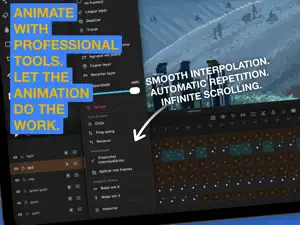
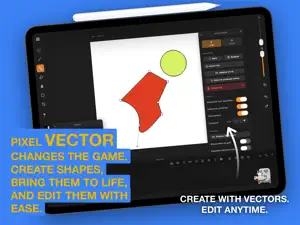
You are not going to believe what fits inside this app. Pixel Art Studio is a pixel art and animation studio built from scratch for iPad and Mac. The feel is inspired by Procreate, the output is pure pixels: no blur, no interpolation, every pixel exactly where you put it. And then it keeps going, way past what a pixel editor is supposed to do. ONE TAP AND THE SHAPE IS PERFECT Scribble a wobbly line, hold the pencil at the end of the stroke, and QuickShape turns it into a flawless line, rectangle, ellipse or polygon, snapped to the classic pixel art angles. Believe it: you can draw an isometric cube, a cylinder, a staircase or a rounded box in one gesture, extrude it to any height, and never nudge a single pixel by hand. Independent brush axes, spray, pressure shading, glow, blur and a silhouette brush that closes your outline and floods it the moment you lift the pencil. Four axis symmetry, Lock Alpha, one coat of paint per pixel, and Smart Nudge that snaps shapes to their neighbours. ANIMATION TOOLS FROM ANOTHER UNIVERSE This is where it stops behaving like a pixel editor. Leave frames empty between two drawings and Tweening fills them in, reading how your art moved, scaled and rotated, object by object. Two sketches become a full animation. Layer Loop is the loopOut of After Effects: two frames of a blinking eye on Cycle, Ping-pong or Reverse, and that layer animates the entire scene by itself, forever. Infinite Scroll slides a layer with wrap around, one full lap every N frames, on X or Y. Paint one strip of clouds, get an endless sky. Offset Assist is the Photoshop Offset filter, live under your pen, so seamless tiles are built, not guessed. Add per layer frames, onion skinning, animation tags, a scrub bar with playhead, folders, blend modes and Parallax Assist playing depth right inside the canvas. SELECT LIKE MAGIC Tap an object and the whole object is selected. Tap a color and it is selected across the layer, connected or not. Freehand and polygon lasso, exact color matching, additive wand, 9 slice scaling in the Unity Sliced style, rotation, mirroring, and a move handle with 1px arrows because pixel art is precision. Erase or transform the same selection across every frame at once. A TILESET STUDIO HIDING INSIDE Build a tileset, stamp a map with it, edit one tile and watch every copy in the map update. Then export PNG plus Tiled .tsj and .tmj, one tile layer per app layer, ready to drop into your engine. Ask around: almost nobody does this. EXPORT LIKE A PRO PNG, JPG, GIF, image sequence and sprite sheet with a configurable grid. MP4 in 4:5, 9:16, 1:1, 16:9 or the canvas ratio, with a safe area drawn over the canvas and loop repetition inside the file. Ship everything, the current frame or a single tag. Opens and saves .aseprite, so your work is never locked in. Record a time lapse of the session and publish your process. IPAD AND MAC Apple Pencil with pressure, two and three finger gestures, project tabs, automatic backup of your library and preview broadcast to another screen. On Mac, the same app with keyboard shortcuts, hover hints and wheel zoom. Your projects and your .aseprite files travel between both. One tap. Perfect pixels. Animation that thinks for you. Maximum effort!
What’s new
Version 1.9 · Updated October 15, 2026
Codename: Unstoppable. Six big reasons to update today. MIRROR TO THE CLOUD Start a sprite on your iPad, finish it on your Mac. Touch and hold any project, pick Mirror to the cloud, and the same project lives on both. A little cloud on the card tells you it is in sync, and if both devices save, nothing is lost. YOUR ANIMATIONS, LIVE IN THE COMMUNITY Post the whole animation, not just a frame. In Export, Post now offers This frame or Animation with a live preview, and the gallery plays every animated piece in crisp pixels. Give any piece 1 to 5 stars and see the average, the number of votes and the flag of the country it came from. VECTORS THAT MOVE Draw a pose on a vector layer, skip a few frames and draw the next one. Turn on Tween and every frame in between moves node by node, with arms swinging in real arcs instead of shrinking. Onion skin shows the poses around the one you edit. SKETCH IT FIRST Rough out the motion by hand before the first pixel. Every frame keeps its own sketch, drawn with real pencils from HB to charcoal, and onion skin shows the ones around it. Draw Assist now steadies your line while the tip stays right under your pen. PALETTE PRO Bring any palette from Lospec by its name or link, or from .gpl, .hex, .pal, .aseprite and image files. Sort by hue or by light, build ramps of up to 32 colors between two, and clean out the colors you never used. In Indexed mode your art never changes color while you do it. READY FOR YOUR GAME ENGINE The new Game Engine export gives you a PNG sheet plus a JSON in the Aseprite format: Phaser reads it as is, Unity and Godot slice it as a grid. Choose the columns, spacing, border, trimming and one sheet per layer. Every tag becomes an animation. ALSO Paste images and .aseprite files copied from other apps or from your Mac. Duplicate projects right from the gallery. Semi-transparent pixels now export exactly as you see them. Windows glide in smoothly, and the whole interface got cleaner corners, clearer icons and calmer layer rows. Maximum effort!
App privacy
The developer, Leonardo Amora, reported these privacy practices to Apple.
Data Linked to You
The following data, which may be collected and linked to your identity, may be used for the following purposes:
- User Content: Other User Content
- Identifiers: User ID
Used for: App Functionality
Alternatives to Pixelart Studio: Sprite Maker
Looking for apps like Pixelart Studio: Sprite Maker? Here are 6 similar apps on the App Store. The highest rated is Paper: 3D Drawing Studio (5.0/5), and 3 of the 6 are free to download.
-
 Light Animator
-
 Canvas Software - Animate
-
 Poligon: Pixel Art & Low Poly
-
 ZPixit
-
 Paper: 3D Drawing Studio
5.0
Paper: 3D Drawing Studio
5.0
-
 Wax
5.0
Wax
5.0
| App | Rating | Price | Last updated | Compare |
|---|---|---|---|---|
| Pixelart Studio: Sprite Maker | – | 12.99 USD | October 15, 2026 | |
| Light Animator | – | 7.99 USD | Jun 24, 2026 | Compare |
| Canvas Software - Animate | – | 4.99 USD | Jun 22, 2026 | Compare |
| Poligon: Pixel Art & Low Poly | – | Free | Sep 7, 2026 | Compare |
| ZPixit | – | Free | Sep 15, 2026 | Compare |
| Paper: 3D Drawing Studio | 5.0 / 5 (2) | 6.99 USD | Oct 9, 2026 | Compare |
| Wax | 5.0 / 5 (1) | Free | Oct 21, 2026 | Compare |