

Qwartz
Gargant Graphics & Design iPadMac
Qwartz is a free Graphics & Design app for iPad and Mac by Gargant. Requires iOS 17.6. Updated October 22, 2026.
- Price
- Free
- on the App Store
- Size
- 7 MB
- Age 4+
- Updated
- Oct 22
- 2026 · v26.4
Screenshots


About Qwartz
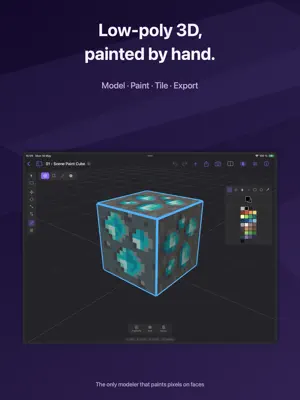
Qwartz is a low-poly 3D modeler with built-in pixel painting on faces. Model game-ready assets, paint pixel art directly onto mesh faces with no UV mapping required, stamp tile sheets to build levels, and export to glTF, OBJ, or STL. Designed for indie game developers, pixel artists exploring 3D, and anyone who wants a focused 3D tool that respects their time. START IN SECONDS • A home screen with your models as thumbnails • Starters: Cube, Grid, Blocky Character, a Tiled Room and a Terrain Block — the tiled ones come with their tile sheets, ready to stamp • Isolate one object to work on it alone • Tips on first launch, and Help from the app's menus AUTO PIXEL PAINT • Tap any face and start painting — pixels appear directly on the mesh • Per-face pixel grid sized automatically from the geometry • Built-in palettes: PICO-8, DB16, DB32, Endesga 32, or your own • Pencil, eraser, fill, line, rectangle, circle, eyedropper • Move vertices and the pixel grid resizes with nearest-neighbor resample • No UV mapping required. No external tools. LOW-POLY MODELING • Object, face, edge, and vertex selection modes • Extrude, inset, loop cut, subdivide, merge, slide, dissolve • Transform gizmo with axis constraints and snapping • Edge-loop and face-loop selection on double-click • Seven primitives: cube, plane, cylinder, sphere, cone, torus, quad grid • Full undo / redo for every operation TILE MODE • Import a tile sheet PNG and stamp tiles onto mesh faces • Up to four layers per face: a base tile plus decals like windows, doors and signs • Per-stamp rotation and flip, and Flip H / Flip V on any textured face • Extrude faces to make walls, extrude edges to grow the grid • The whole level stays one editable mesh MATERIALS & UV EDITOR • Color materials and PNG-textured materials • Built-in UV editor with planar and box auto-unwrap • Pixel-perfect paint tools directly on the UV texture • Live preview synced between 3D viewport and UV editor IMPORT & EXPORT • Export to glTF (.glb), OBJ + MTL + PNG, and STL — pixel paint and tile layers baked in • Render turntable GIFs and MP4 videos • Import FBX and OBJ files • Open your models in Blender, Unity, Unreal, Godot, or any 3D tool • Open glTF and OBJ exports in any voxel or game-asset pipeline NATIVE & UNIVERSAL • Universal app — one purchase covers tablet and desktop • Pencil drives tools, finger orbits the camera on touch devices • Full hardware keyboard support • Open and save models anywhere through the Files app • Metal renderer, no compromises PRIVACY FIRST • All files stored locally on your device • No account, no login, no tracking • Works fully offline ONE-TIME PURCHASE Qwartz is free to download and evaluate. Every modeling and painting tool works during evaluation, for up to five models; renders carry a watermark. A single one-time purchase unlocks exporting and unlimited models, and removes the watermark.
What’s new
Version 26.4 · Updated October 22, 2026
Combine arrives: cut a hole or merge shapes in one step. • Select one shape and tap Combine to cut it out of every shape it touches. Or select two or more and choose Union, Subtract or Intersect. You get clean low-poly faces, even around holes, and paint and UVs carry through. • Mirror keeps one side of an object and rebuilds the other. Plain faces cut in two join back, so a box mirrored down its middle stays a simple box. Edit your side, Mirror again, and the other side follows. • Set Origin moves an object’s origin to its Center of Geometry, Bottom Center or the World Origin without moving the shape; Set Origin to Selection puts it on what you’ve selected. Mirror reflects across it. • Separate turns the selected faces into their own object, and Join puts objects together into one. • glTF export keeps the object hierarchy, so Godot, Unity and Blender get the same tree you see in Qwartz. OBJ and STL follow the same rules: anything under a hidden object is left out, and Selected Objects export where they sit in the model. Export also says what each format gives you. • Import Palette… adds GIMP (.gpl), Lospec (.hex), JASC (.pal) and PNG swatch palettes to My Palettes. • Bevel remembers its segments and snaps in one-pixel steps. • Painted faces keep their pixels when you assign a material to the whole object, and new Texture materials start mapped, with a checker image. • The UV editor shows what you’re editing in every selection mode, and says why when it’s empty. Fill on a textured face stays on its UV island. • Large models update much faster, and very large ones display without crashing. • Fixes: Apply Transform with a negative scale no longer turns faces inside out, deleting an object keeps its children in place, and concave and many-sided faces draw, select and export correctly.
App privacy
The developer, Gargant, reported these privacy practices to Apple.
Data Not Collected
The developer does not collect any data from this app.
Alternatives to Qwartz
Looking for apps like Qwartz? Here are 6 similar apps on the App Store. The highest rated is FormWright 3D (5.0/5), and 3 of the 6 are free to download.
-
 ZPixit
-
 FormWright 3D
5.0
FormWright 3D
5.0
-
 Poligon: Pixel Art & Low Poly
-
 LowPoly 3D Modeling
5.0
LowPoly 3D Modeling
5.0
-
 LUNE 2D Animation
3.0
LUNE 2D Animation
3.0
-
 Wax
5.0
Wax
5.0
| App | Rating | Price | Last updated | Compare |
|---|---|---|---|---|
| Qwartz | – | Free | October 22, 2026 | |
| ZPixit | – | Free | Sep 15, 2026 | Compare |
| FormWright 3D | 5.0 / 5 (2) | 19.99 USD | Oct 10, 2026 | Compare |
| Poligon: Pixel Art & Low Poly | – | Free | Sep 7, 2026 | Compare |
| LowPoly 3D Modeling | 5.0 / 5 (2) | 12.99 USD | Oct 22, 2026 | Compare |
| LUNE 2D Animation | 3.0 / 5 (1) | 9.99 USD | Aug 13, 2026 | Compare |
| Wax | 5.0 / 5 (1) | Free | Oct 21, 2026 | Compare |
Compare Qwartz with the top alternatives: ratings, updates, ASO score and keyword gaps →