

Exscroll: Exercise App Blocker
Tonet I Juhasz Health & Fitness iPhoneiPadiPod touch
Exscroll: Exercise App Blocker is a free Health & Fitness app for iPhone and iPad by Tonet I Juhasz. Requires iOS 16.4. Updated July 29, 2026.
- Price
- Free
- on the App Store
- Size
- 145 MB
- Age 4+
- Updated
- Jul 29
- 2026 · v1.0
Screenshots
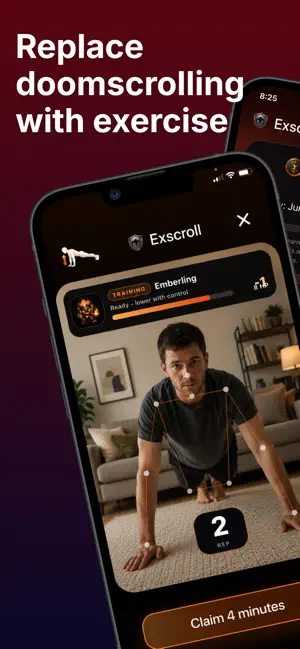
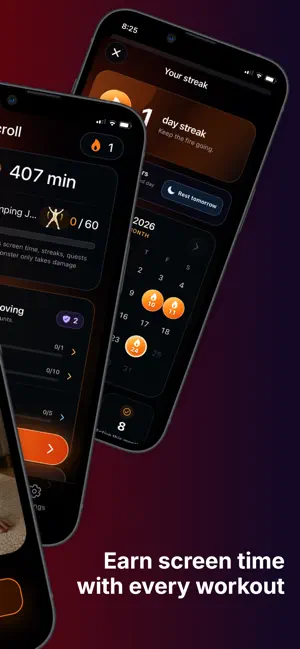


About Exscroll: Exercise App Blocker
Turn workouts into screen time and make scrolling something you earn. Exscroll is an exercise-powered app blocker for iPhone. Choose distracting apps, complete a workout, bank earned minutes, then spend those minutes on timed access. It replaces automatic scrolling with a simple loop: move first, scroll later. WORK OUT. EARN MINUTES. UNLOCK APPS. • Choose apps and categories to limit using Apple Screen Time • Complete camera-counted exercises and earn screen time • Bank your minutes and spend them on timed unlocks • Set reward rates to fit your goals and routine • Track reps, workouts, steps, earned minutes, streaks, and progress MOVE YOUR WAY Earn time with push-ups, squats, sit-ups, jumping jacks, lunges, squat holds, diamond push-ups, or eligible steps from Apple Health. Camera-based exercise sessions count completed movements, while Health steps let everyday activity contribute too. TURN FITNESS INTO A JOURNEY Stay motivated through a journey of monster battles. Complete the exercise linked to each encounter, defeat monsters, climb the ranks, finish daily and weekly quests, collect trophies, and keep your streak alive. Save progress during longer battles and continue later. BUILT FOR FOCUS AND BETTER HABITS Use Exscroll when you want to: • Reduce doomscrolling and social media distraction • Add friction before opening distracting apps • Build a more consistent workout habit • Turn screen time limits into a motivating fitness challenge • See the connection between movement and app time EXSCROLL PRO App selection, app blocking, timed unlocks, and Hard Mode require an Exscroll Pro auto-renewing subscription. Monthly and annual options may be available. Current pricing and billing periods are shown before purchase. Payment is charged to your Apple Account when purchase is confirmed. Your subscription renews automatically unless canceled at least 24 hours before the end of the current billing period. Your Apple Account is charged for renewal within 24 hours before the current period ends. Manage or cancel your subscription in your App Store account settings. Terms of Use: https://exscroll.app/terms/ Privacy Policy: https://exscroll.app/privacy/ Support: https://exscroll.app/#contact Download Exscroll and turn the urge to scroll into a reason to move.
App privacy
The developer, Tonet I Juhasz, reported these privacy practices to Apple.
Data Linked to You
The following data, which may be collected and linked to your identity, may be used for the following purposes:
- Purchases: Purchase History
- Health & Fitness: Health, Fitness
- Contact Info: Email Address
- User Content: Gameplay Content
- Identifiers: User ID
- Usage Data: Product Interaction
Used for: Analytics, App Functionality
Data Not Linked to You
The following data, which may be collected but is not linked to your identity, may be used for the following purposes:
- Diagnostics: Other Diagnostic Data
Used for: Analytics
Alternatives to Exscroll: Exercise App Blocker
Looking for apps like Exscroll: Exercise App Blocker? Here are 6 similar apps on the App Store. The highest rated is RepScreen: Screen Time Control (5.0/5), and all 6 are free to download.
-
 Lock100: Exercise App Blocker
-
 BlockUp: Earn Screen Time
-
 Abs On Lock: App Blocker
-
 Step1st: Walk to Unlock Apps
-
 AquaPulsector
-
 RepScreen: Screen Time Control
5.0
RepScreen: Screen Time Control
5.0
| App | Rating | Price | Last updated | Compare |
|---|---|---|---|---|
| Exscroll: Exercise App Blocker | – | Free | July 29, 2026 | |
| Lock100: Exercise App Blocker | – | Free | Sep 14, 2026 | Compare |
| BlockUp: Earn Screen Time | – | Free | Sep 10, 2026 | Compare |
| Abs On Lock: App Blocker | – | Free | Jul 7, 2026 | Compare |
| Step1st: Walk to Unlock Apps | – | Free | Oct 20, 2026 | Compare |
| AquaPulsector | – | Free | Nov 29, 2025 | Compare |
| RepScreen: Screen Time Control | 5.0 / 5 (1) | Free | May 12, 2026 | Compare |