

LensLink: Phone Webcam for OBS
OMER FARUK COKUN Photo & Video iPhoneiPadiPod touch
LensLink: Phone Webcam for OBS is a free Photo & Video app for iPhone and iPad by OMER FARUK COKUN. Requires iOS 15.1. Updated October 27, 2026.
- Price
- Free
- on the App Store
- Size
- 68 MB
- Age 4+
- Updated
- Oct 27
- 2026 · v1.0.5
Screenshots

About LensLink: Phone Webcam for OBS
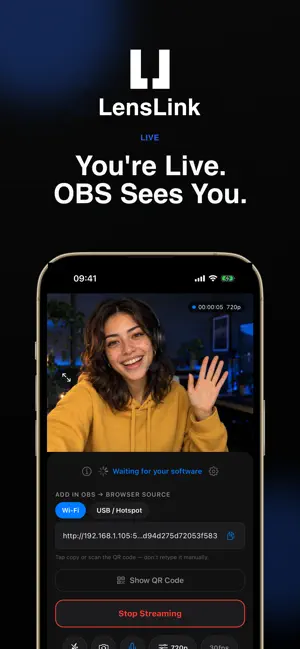
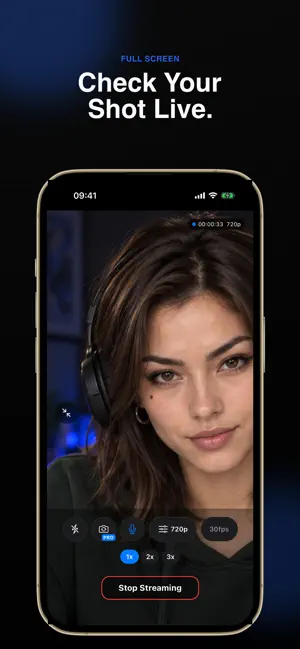
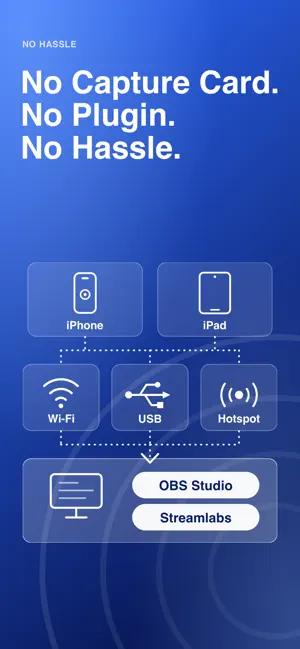
Use your iPhone as a wireless webcam and live stream camera for OBS Studio and Streamlabs. Connect over Wi-Fi or a USB cable, add one Browser Source, and go live in about 2 minutes — no plugin, no desktop app, no IP addresses. LensLink streams high-quality H.264 video from your iPhone or iPad straight to OBS Studio or Streamlabs using WebRTC. Add it as an OBS Browser Source and your phone becomes a dedicated camera angle — instantly. WHY STREAMERS CHOOSE LENSLINK No plugin needed. LensLink works through a standard OBS Browser Source, so over Wi-Fi there is nothing to install on your Mac or PC besides the OBS Studio or Streamlabs you already use. For USB on Windows, iTunes or Apple Devices must be installed. Wi-Fi or USB. Stream over your local Wi-Fi, or connect with a USB cable or hotspot when there is no shared network. No capture card needed. Zero-config setup. Open the app, tap Start Streaming, then copy the link (or scan the QR code) into an OBS Browser Source. No IP addresses to type, no router settings to touch. Low-latency streaming. By default, video travels over your local network — not the internet — so you get the responsiveness you need for live production without cloud upload delays. Clean, streamer-first interface. Every control is where you expect it. Flashlight, zoom, microphone mute, resolution and audio quality are all one tap away, without leaving your stream. A short guided tour shows you around, and the layout works in portrait and landscape. Private by design. No account needed and no cloud upload: by default your video stays on your local network. PERFECT FOR - Streamers who want a dedicated face-cam, over-the-shoulder, second-camera or B-roll angle - YouTubers shooting solo setups without a dedicated camera or capture card - Podcasters adding a professional video source to their OBS scene - Content creators who already own a phone and want to unlock it as a camera HOW IT WORKS 1. Open LensLink on your iPhone and tap Start Streaming 2. Open OBS Studio or Streamlabs on your Mac or PC 3. Add a Browser Source and paste the link shown in LensLink (or scan the QR code) 4. You're live No account needed. No cloud. By default, your video stays on your local network. GOOD TO KNOW LensLink is a camera source for OBS Studio and Streamlabs. It does not install a system-wide virtual webcam, so it is not meant for video-call apps. LENSLINK PRO (OPTIONAL) LensLink is free to start: stream at 720p and 30 fps with no watermark. Pro removes the watermark from 1080p streams and unlocks camera switching while you stream and a custom streaming port. It also adds 60 fps and 4K video on phones that support them. Pro is available as an auto-renewing subscription or a one-time lifetime purchase. Subscriptions renew automatically until cancelled; manage or cancel anytime in your App Store account settings. TECHNICAL DETAILS - Protocol: WebRTC / WHIP - Encoding: H.264 hardware-accelerated via VideoToolbox - Connection: local network (Wi-Fi) or USB cable / hotspot, no internet required - OBS integration: Browser Source (no plugin required) - Discovery: Automatic via Bonjour / mDNS LensLink is built for streamers who want professional results without professional complexity. Your phone. Pro camera. For OBS. Terms of Use (EULA): https://www.apple.com/legal/internet-services/itunes/dev/stdeula/ Privacy Policy: https://apps.conectlens.com/lenslink/policy/privacy OBS, OBS Studio, Streamlabs, Wi-Fi and iPhone are trademarks of their respective owners. LensLink is not affiliated with or endorsed by them. Screenshots use illustrative imagery.
What’s new
Version 1.0.5 · Updated October 27, 2026
• Refreshed design across the app: clearer Settings, consistent sheets and buttons, and light mode that follows your phone's appearance • Connect to Bridge now links to the LensLink Bridge download for your computer • Creator profile: choose your audience's language from a short list • Many fixes and improvements
App privacy
The developer, OMER FARUK COKUN, reported these privacy practices to Apple.
Data Linked to You
The following data, which may be collected and linked to your identity, may be used for the following purposes:
- Purchases: Purchase History
- Location: Coarse Location
- Identifiers: User ID, Device ID
- Usage Data: Product Interaction, Other Usage Data
- Diagnostics: Other Diagnostic Data
- Contact Info: Email Address, Name
- User Content: Other User Content
Used for: Analytics, App Functionality
Data Not Linked to You
The following data, which may be collected but is not linked to your identity, may be used for the following purposes:
- Usage Data: Product Interaction
Used for: App Functionality
Alternatives to LensLink: Phone Webcam for OBS
Looking for apps like LensLink: Phone Webcam for OBS? Here are 6 similar apps on the App Store. The highest rated is LensLink Camera (5.0/5), and 5 of the 6 are free to download.
-
 LensLink Camera
5.0
LensLink Camera
5.0
-
 Wireless Webcam - SplonkCam
-
 TetherCam
-
 Orbit: AI Viral Video Analyzer
5.0
Orbit: AI Viral Video Analyzer
5.0
-
 BEAM: Live Streaming
5.0
BEAM: Live Streaming
5.0
-
 Wallpaper Expert Pro
| App | Rating | Price | Last updated | Compare |
|---|---|---|---|---|
| LensLink: Phone Webcam for OBS | – | Free | October 27, 2026 | |
| LensLink Camera | 5.0 / 5 (2) | Free | Oct 4, 2026 | Compare |
| Wireless Webcam - SplonkCam | – | Free | Jun 18, 2026 | Compare |
| TetherCam | – | Free | Sep 11, 2026 | Compare |
| Orbit: AI Viral Video Analyzer | 5.0 / 5 (1) | Free | Oct 24, 2026 | Compare |
| BEAM: Live Streaming | 5.0 / 5 (5) | Free | Aug 19, 2026 | Compare |
| Wallpaper Expert Pro | – | 1.99 USD | Oct 18, 2026 | Compare |