

LensLink Camera
Eric Murray Photo & Video iPhoneiPadiPod touch
LensLink Camera is a free Photo & Video app for iPhone and iPad by Eric Murray. Rated 5.0/5 from 2 ratings. Requires iOS 15.0. Updated October 4, 2026.
- Rating
- 5.0
- 2 ratings
- Price
- Free
- on the App Store
- Size
- 8 MB
- Age 4+
- Updated
- Oct 4
- 2026 · v1.17.1
Screenshots



About LensLink Camera
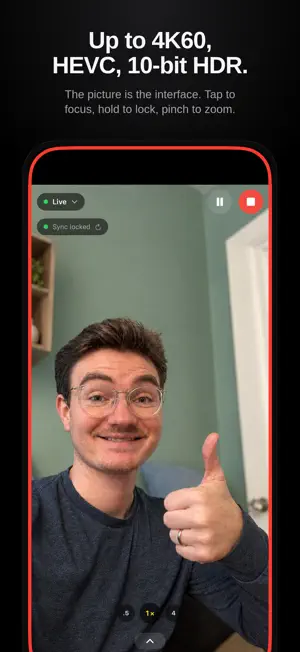
LensLink Camera turns your iPhone or iPad into a camera for OBS Studio. Mount the phone, open the app, and it appears in OBS as a video source over Wi-Fi or a USB cable — with the picture quality the phone's camera is actually capable of. Picture first Up to 4K at 60 fps, HEVC or H.264, with 120 and 240 fps available where the camera has them 10-bit HDR (HLG) and Apple Log on supported devices Balanced or Maximum quality: Maximum finds the most your connection can carry Every lens, with the Camera app's lens buttons Controls that stay out of the way Tap to focus, hold to lock focus and exposure, drag for brightness, pinch to zoom One tray for exposure, shutter, white balance and focus, with faces-first autofocus The same controls in a browser panel on your computer, and in OBS itself Remember camera settings: a shot dialed in once stays dialed-in Built for production Remote start: OBS starts the camera while the app sits idle Tally light: a colored border says when you're on air Pause with a held picture instead of a frozen frame Keeps streaming beside other apps on iPads that support it Automatic lip-sync: the plugin measures latency and aligns your real microphone Virtual green screen, right on the phone Mirror your whole screen with app audio Siri and Shortcuts Private by design Nothing is recorded on the phone, and nothing leaves your local network. No account, no sign-in, no analytics. Requires OBS Studio and the free, open-source LensLink plugin for Mac, Windows or Linux: https://lenslink.cam
What’s new
Version 1.17.1 · Updated October 4, 2026
More control over focus, exposure and white balance, and tidier controls on the Live screen. • Calibrate white balance on white paper: tap the eyedropper on the WB chip, then tap the paper in the picture. It also corrects the green or magenta cast of LED and fluorescent lights. • On iPhones with a 48 MP Main camera, a 2× lens button uses the sensor's full detail. • Hold the picture to pin focus and exposure to that spot of the frame: wherever you point the phone, they keep adjusting for what is there, until a tap on the picture releases them. • A Lock button in the tray locks the selected setting at what auto is doing right now. Hold it to lock or unlock everything. • Natural motion blur, on by default: auto exposure keeps the shutter at half the frame time or faster (1/60 at 30 fps), raising ISO in dim light instead of smearing motion. Turn it off in Options or with the Shutter chip's button. • The tray's chips are Focus, WB, EV, ISO and Shutter, and the EV, ISO and Shutter dials click between stops. • Zoom moves to the lens row: tap the yellow lens button for a zoom dial, and tap it again to reset the zoom. • Green screen has its own button next to the lens buttons. Hold it to turn green screen on or off; where depth assist runs, a tap opens the Subject dial. • The Subject distance now starts on Auto, which keeps the cutoff just behind you. • Green screen shows where depth assist works: the Green screen row and the Format menus mark it with Depth, and the Subject button turns to dots while it runs. Zoom steps aside then, since the camera can't zoom with depth. • Options are grouped under Camera, Live screen, Remote start and Advanced, and the computer card now reads simply OBS connected, Ready or Armed. • Update the OBS plugin to 1.17.1 too: its browser control panel gains white balance calibration, Natural motion blur and the Auto subject distance.
App privacy
The developer, Eric Murray, reported these privacy practices to Apple.
Data Not Collected
The developer does not collect any data from this app.
Alternatives to LensLink Camera
Looking for apps like LensLink Camera? Here are 6 similar apps on the App Store. The highest rated is PocketTok - Save Videos (4.9/5), and all 6 are free to download.
-
 LensLink: Phone Webcam for OBS
-
 Camly — Phone Webcam
-
 OBS 4K
4.7
OBS 4K
4.7
-
 RTMP Broadcaster: Live Stream
4.7
RTMP Broadcaster: Live Stream
4.7
-
 SplitCam Live Streaming App
3.2
SplitCam Live Streaming App
3.2
-
 PocketTok - Save Videos
4.9
PocketTok - Save Videos
4.9
| App | Rating | Price | Last updated | Compare |
|---|---|---|---|---|
| LensLink Camera | 5.0 / 5 (2 ratings) | Free | October 4, 2026 | |
| LensLink: Phone Webcam for OBS | – | Free | Oct 27, 2026 | Compare |
| Camly — Phone Webcam | – | Free | Jul 10, 2026 | Compare |
| OBS 4K | 4.7 / 5 (24) | Free | Oct 18, 2026 | Compare |
| RTMP Broadcaster: Live Stream | 4.7 / 5 (30) | Free | Oct 28, 2026 | Compare |
| SplitCam Live Streaming App | 3.2 / 5 (6) | Free | Oct 29, 2026 | Compare |
| PocketTok - Save Videos | 4.9 / 5 (15) | Free | Oct 27, 2026 | Compare |
Compare LensLink Camera with the top alternatives: ratings, updates, ASO score and keyword gaps →