

TetherCam
Bernhard Goetzendorfer Photo & Video iPhoneiPadiPod touch
TetherCam is a free Photo & Video app for iPhone and iPad by Bernhard Goetzendorfer. Requires iOS 17.0. Updated September 11, 2026.
- Price
- Free
- on the App Store
- Size
- 2 MB
- Age 4+
- Updated
- Sep 11
- 2026 · v0.4.0
Screenshots


About TetherCam
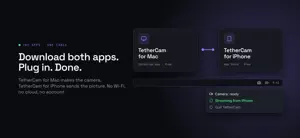
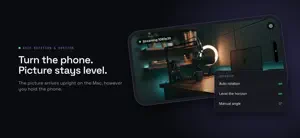
Your iPhone, instead of a webcam. TWO APPS, ONE CABLE TetherCam is two free apps. TetherCam for Mac is downloaded from tethercam.app; TetherCam for iPhone is this one. Install both, connect the phone to the Mac with the USB cable you already own, and the iPhone shows up as the camera "TetherCam" on the Mac, in the same camera picker as the built-in one. It works in every Mac app that lists system cameras: Zoom, Microsoft Teams, Google Meet, FaceTime, QuickTime Player, Safari, Chrome and the rest. Zoom and Microsoft Teams were verified on 10 September 2026. Nothing travels over Wi-Fi, nothing passes through a server, nothing is uploaded anywhere. There is no account, no pairing code and no discovery step. The cable is the whole path, which is why the picture stays stable in a crowded room where wireless cameras start to stutter. WHAT YOU NEED An iPhone with iOS 17 or newer, a Mac with macOS 14 or newer, and the USB cable that came with the phone. The free TetherCam Mac app asks once for approval of its camera extension in System Settings; after that the camera is simply there. THE HONEST LIMITS The Mac app carries the picture only. A Mac camera extension has no audio stream, so the sound stays with the Mac's own microphone. Audio over the cable exists, but only on the OBS path below. This iPhone app stays open in the foreground while it sends. The phone serves one receiver at a time. The Mac app and the OBS plugin are not used together; whichever connects second is told that the line is busy. ON THE PHONE Live preview from the moment you open the app, before anything is connected. A camera and lens picker for the wide, ultra wide and telephoto lenses or the front camera, switching the stream immediately. Automatic rotation that follows the horizon rather than the interface. Turn the phone and the picture stays level, because the orientation is resolved on the capture side. There is a manual angle override when you want to decide yourself. Hardware HEVC encoding, which keeps the phone cool and the latency low. A diagnostics panel that shows what is actually happening: listener state, connection, frames per second, bitrate and the measured levelling residual. FOR STREAMING AND RECORDING: OBS STUDIO The TetherCam plugin for OBS Studio is the pro path, also free and also at tethercam.app. It adds a source called TetherCam directly in OBS, finds the phone through the same cable, and it is the only path that brings the microphone of the phone across as well. PRIVACY No account, no analytics, no advertising, no purchases. The camera picture goes to your own Mac and nowhere else. Nothing is collected. TetherCam for iPhone is free and open source under the MIT licence at github.com/Kanevry/tethercam.
What’s new
Version 0.4.0 · Updated September 11, 2026
Your iPhone, instead of a webcam: install the free TetherCam Mac app from tethercam.app, plug in the cable, and the phone is a camera in Zoom, Teams, Meet, FaceTime and every other Mac app that lists system cameras. No changes to the iPhone app in this version. The work of this release is on the Mac side: TetherCam for Mac now checks for updates once a day and can restart its camera extension when macOS fails to start the camera after an update. Details: tethercam.app/changelog
App privacy
The developer, Bernhard Goetzendorfer, reported these privacy practices to Apple.
Data Not Collected
The developer does not collect any data from this app.
Alternatives to TetherCam
Looking for apps like TetherCam? Here are 6 similar apps on the App Store.
-
 Wireless Webcam - SplonkCam
-
 Starlight: AI Photo Video
-
 PhoneCam Pro: Webcam for PC
-
 OBS Phone Cam
-
 LensLink: Phone Webcam for OBS
-
 iCameraPlus
| App | Rating | Price | Last updated | Compare |
|---|---|---|---|---|
| TetherCam | – | Free | September 11, 2026 | |
| Wireless Webcam - SplonkCam | – | Free | Jun 18, 2026 | Compare |
| Starlight: AI Photo Video | – | Free | Sep 3, 2026 | Compare |
| PhoneCam Pro: Webcam for PC | – | Free | Oct 10, 2026 | Compare |
| OBS Phone Cam | – | Free | Sep 15, 2026 | Compare |
| LensLink: Phone Webcam for OBS | – | Free | Oct 27, 2026 | Compare |
| iCameraPlus | – | Free | Aug 25, 2026 | Compare |
Compare TetherCam with the top alternatives: ratings, updates, ASO score and keyword gaps →