

Wireless Webcam - SplonkCam
Pawel Karniej Photo & Video iPhoneiPadiPod touch
Wireless Webcam - SplonkCam is a free Photo & Video app for iPhone and iPad by Pawel Karniej. Requires iOS 17.0. Updated June 18, 2026.
- Price
- Free
- on the App Store
- Size
- 6 MB
- Age 4+
- Updated
- Jun 18
- 2026 · v1.0.3
Screenshots


About Wireless Webcam - SplonkCam
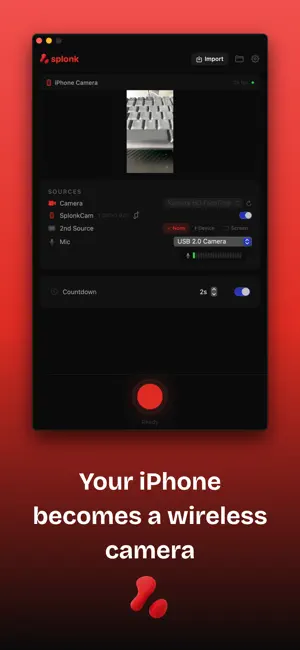
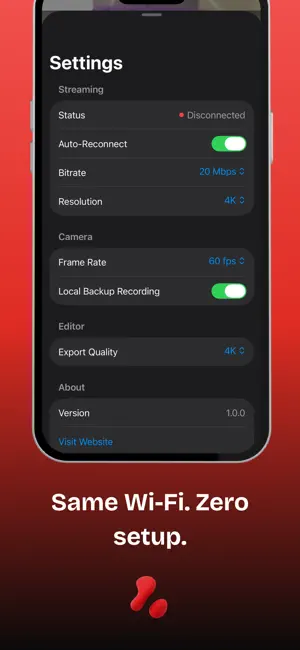
SplonkCam is the iOS camera companion for Splonk — the professional screen recorder and video editor for macOS. Stream your iPhone camera wirelessly, then edit everything right on your phone. STREAM TO YOUR MAC • Live Camera Streaming — Stream your iPhone camera in real-time to Splonk on Mac via local Wi-Fi • Automatic Connection — Discovers Splonk on your Mac instantly via Bonjour. Same Wi-Fi, zero setup. • High Quality — Up to 1080p at 60fps with optimized low-latency streaming • Portrait & Landscape — All orientations with automatic rotation handling • Local Backup — Optionally save a backup recording on your iPhone • Privacy First — Everything stays on your local network. Nothing goes to the cloud. FULL VIDEO EDITOR • Timeline Editing — Multi-track timeline with trim, reposition, and snap-to editing • Layouts — Fullscreen, stacked, side-by-side, and picture-in-picture with adjustable ratios • Custom Backgrounds — Gradients, solid colors, animated gradients, frosted glass, mesh gradients, and particle overlays • Cinematic Filters — 14 filters including Cinematic, Vintage, B&W, Noir, Chrome, and more • Motion Effects — Shake, glitch, speed ramp, zoom/pan with keyframes • Visual Effects — Blur, vignette, grain, chromatic aberration, light leaks, lens flare • Layout Transitions — Morph, card flip, cube rotation, slide, squeeze, circle reveal • Color Correction — Exposure, contrast, saturation, temperature, highlights, shadows • Audio Mixing — Per-track volume control and muting EXPORT EVERYWHERE • TikTok / Reels (9:16) • YouTube (16:9) • YouTube Shorts (9:16) • Instagram Post (1:1) • Twitter/X • Custom quality: 720p, 1080p, or 4K PERFECT FOR • Screen recording tutorials with facecam • Software demos and walkthroughs • Online course creation • TikTok and Instagram content • Product reviews and unboxing videos • Video podcasts and vlogs Camera streaming requires Splonk for macOS. The video editor works completely standalone — edit any video on your iPhone, no Mac needed. Download Splonk for Mac at https://splonk.app
What’s new
Version 1.0.3 · Updated June 18, 2026
New in SplonkCam: - Optional cable mode for a direct USB-backed connection to Splonk and the Mac virtual camera. - Backup transfer setting for controlling whether iPhone backup recordings are sent to the Mac. - Better reconnect behavior after recording, app switching, or temporary connection loss. - Camera-style zoom presets, including exact 1x.
App privacy
The developer, Pawel Karniej, reported these privacy practices to Apple.
Data Not Collected
The developer does not collect any data from this app.
Alternatives to Wireless Webcam - SplonkCam
Looking for apps like Wireless Webcam - SplonkCam? Here are 6 similar apps on the App Store.


| App | Rating | Price | Last updated | Compare |
|---|---|---|---|---|
| Wireless Webcam - SplonkCam | – | Free | June 18, 2026 | |
| TetherCam | – | Free | Sep 11, 2026 | Compare |
| Panovo Virtual Tour Maker | – | 3.99 USD | Aug 17, 2026 | Compare |
| PhoneCam Pro: Webcam for PC | – | Free | Oct 10, 2026 | Compare |
| FixMySync | – | Free | Apr 23, 2026 | Compare |
| OBS Phone Cam | – | Free | Sep 15, 2026 | Compare |
| XstereO | – | Free | Sep 25, 2026 | Compare |