

ShotSilo: Screenshot Manager
ismail kirenli Productivity iPhoneiPadiPod touch
ShotSilo: Screenshot Manager is a free Productivity app for iPhone and iPad by ismail kirenli. Requires iOS 17.6. Updated September 17, 2026.
- Price
- Free
- on the App Store
- Size
- 10 MB
- Age 4+
- Updated
- Sep 17
- 2026 · v1.2.0
Screenshots


About ShotSilo: Screenshot Manager
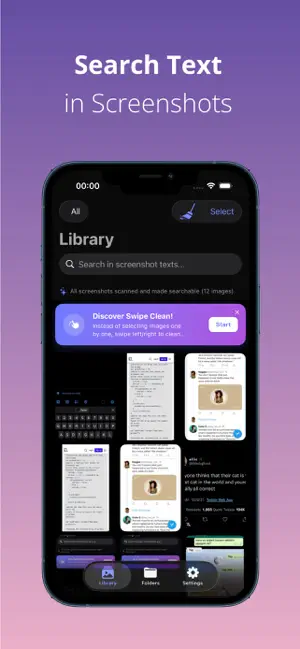
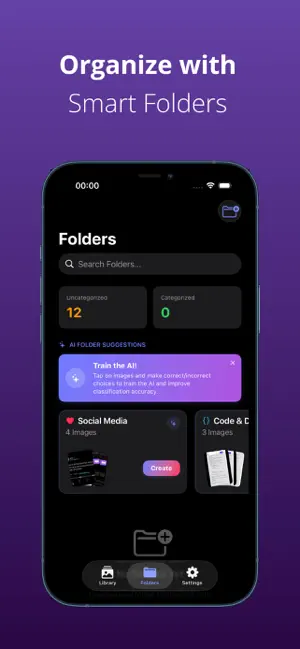
Is your gallery cluttered with hundreds of screenshots? Recipes, chat history, purchase receipts, and QR codes piling up? Meet ShotSilo – the ultimate screenshot manager and gallery cleaner. ShotSilo uses advanced on-device AI and OCR (Optical Character Recognition) to automatically scan, index, and organize your screenshots so you can find what you need in seconds and delete what you don't. KEY FEATURES: SEARCH TEXT INSIDE IMAGES No more scrolling endlessly to find that one screenshot. ShotSilo indexes all text in your images. Simply type a word, name, or URL to find the exact screenshot instantly. SWIPE CLEAN (GAMIFIED CLEANING) Clean up your gallery in a fun and fast way. Swipe right to KEEP, swipe left to DELETE. Reclaim gigabytes of storage space in minutes! AI-POWERED SMART FOLDERS Let AI do the organization for you. ShotSilo automatically groups screenshots into smart categories: - Chat History - Invoices & Receipts - Shopping & Products - Tickets & Passes - Documents & Notes - QR Codes & Links - Code & Development - Finance & Banking - Recipes AUTO-DELETE RULES Save space by setting temporary rules. Put receipts or temporary tickets in folders that automatically delete from your gallery after 1 day, 7 days, 30 days, or a year. CLEAN SIMILAR & DUPLICATE IMAGES Automatically identify near-identical screenshots and remove duplicates with one tap to free up precious storage. SECURITY & LOCK (FACE ID) Keep sensitive screenshots private. Lock individual folders or the entire application using Face ID or your device passcode. PDF REPORT GENERATION Need to share invoices or project screenshots? Generate professional, watermark-free PDF reports directly from your folders. iCLOUD CLOUD SYNC Keep your screenshot categories, OCR data, and folder structure synced seamlessly across all your Apple devices. --- ShotSilo Pro Subscription: Enjoy an ad-free experience, unlimited folder creation, unlimited OCR text scanning, iCloud synchronization, and Face ID security. Privacy-First: All OCR scanning and AI categorization happen locally on your device. Your data never leaves your phone. Download ShotSilo today and reclaim control of your photo gallery! https://www.apple.com/legal/internet-services/itunes/dev/stdeula/
What’s new
Version 1.2.0 · Updated September 17, 2026
Performance improvements: fixed slowdowns and freezing in the Folders tab when scanning large screenshot libraries. Scanning is now noticeably smoother.
App privacy
The developer, ismail kirenli, reported these privacy practices to Apple.
Data Used to Track You
The following data may be used to track you across apps and websites owned by other companies:
- Identifiers: Device ID
- Usage Data: Product Interaction, Advertising Data
Data Linked to You
The following data, which may be collected and linked to your identity, may be used for the following purposes:
- Identifiers: Device ID
- Usage Data: Product Interaction, Advertising Data
Used for: Third-Party Advertising, Analytics, App Functionality
Data Not Linked to You
The following data, which may be collected but is not linked to your identity, may be used for the following purposes:
- Diagnostics: Crash Data, Performance Data
Used for: Analytics, App Functionality
Alternatives to ShotSilo: Screenshot Manager
Looking for apps like ShotSilo: Screenshot Manager? Here are 6 similar apps on the App Store.
-
 パッと図解 - 文章・議事録をAI図解
-
 Kipp AI: Screenshot Organizer
-
 Zimby AI Screenshots Organizer
-
 ScreenSort: Screenshot Manager
-
 Vibe Note - Photo Notes
-
 Bookmark Manager: Nemor
| App | Rating | Price | Last updated | Compare |
|---|---|---|---|---|
| ShotSilo: Screenshot Manager | – | Free | September 17, 2026 | |
| パッと図解 - 文章・議事録をAI図解 | – | Free | Aug 16, 2026 | Compare |
| Kipp AI: Screenshot Organizer | – | Free | Sep 27, 2026 | Compare |
| Zimby AI Screenshots Organizer | – | Free | Jul 22, 2026 | Compare |
| ScreenSort: Screenshot Manager | – | Free | Mar 21, 2026 | Compare |
| Vibe Note - Photo Notes | – | Free | Sep 14, 2026 | Compare |
| Bookmark Manager: Nemor | – | Free | Oct 1, 2026 | Compare |