

Zimby AI Screenshots Organizer
Appyhigh Technology LLP Productivity iPhoneiPadiPod touch
Zimby AI Screenshots Organizer is a free Productivity app for iPhone and iPad by Appyhigh Technology LLP. Requires iOS 16.0. Updated July 22, 2026.
- Price
- Free
- on the App Store
- Size
- 46 MB
- Age 4+
- Updated
- Jul 22
- 2026 · v1.0.1
Screenshots

About Zimby AI Screenshots Organizer
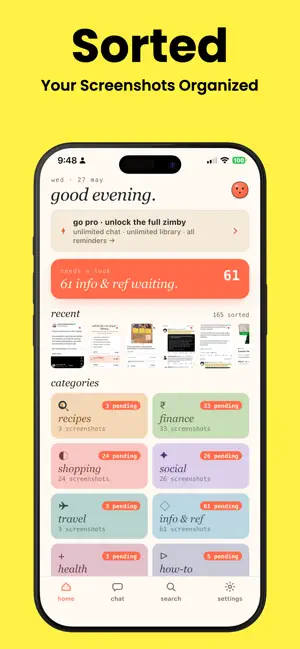
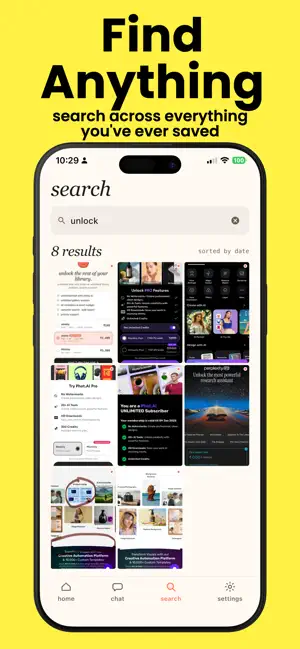
Your iPhone has 1,400 screenshots and you can't find anything. Zimby fixes that. Open the app, tap once, and your Screenshots album sorts itself into 10 clean buckets — recipes, receipts, links, addresses, IDs, social posts, anything else worth keeping. Then it gets better. You can just ask. "the wifi password from the airbnb" "my november electricity bill" "that recipe with the brown butter" "the gate number from the boarding pass last month" Zimby reads your screenshots locally and answers in plain English. No more pinch-zooming through Camera Roll at 11pm. WHY IT'S DIFFERENT • 100% on-device. Pixels, OCR text, embeddings — nothing leaves your phone. No cloud upload, no account, no login. • Built on Apple Vision (the same OCR the Photos app uses) and a compact language model running locally via MediaPipe. • Works offline. The whole pipeline — sorting, searching, chatting — runs without a network connection. WHAT YOU GET • Automatic categorization into 10 buckets the moment you open the app • Real-time progress as new screenshots come in • Full-text search across every screenshot you've ever taken • Natural-language chat with your library • Re-categorize anything Zimby got wrong — it learns from you • Reminders for recipes, bills, and to-dos pulled straight from screenshots • Dark mode, system fonts, no ads, no trackers in the UI ZIMBY PRO The first 200 screenshots and 3 chat queries per week are free, so you can decide if Zimby is for you. Pro unlocks: • Unlimited screenshots • Unlimited chat • Priority support Three plans: • Weekly — for trying it out • Yearly — with a 7-day free trial • Lifetime — one payment, forever PRIVACY, IN PLAIN ENGLISH Your screenshots never leave the device. Zimby has no servers that store your content. The only network traffic is anonymized usage analytics (taps, screen views — no content, no OCR, no images) and a one-time download of the on-device AI model. We can't see your screenshots. Even if we wanted to. QUESTIONS [email protected] Privacy policy: https://appyhigh.com/privacy Terms of use: https://appyhigh.com/terms Subscriptions auto-renew unless cancelled at least 24 hours before the end of the current period. Payment is charged to your Apple ID. Manage or cancel anytime in Settings → your name → Subscriptions.
What’s new
Version 1.0.1 · Updated July 22, 2026
- Minor bug fix. - Performance Optimization.
App privacy
The developer, Appyhigh Technology LLP, reported these privacy practices to Apple.
Data Not Linked to You
The following data, which may be collected but is not linked to your identity, may be used for the following purposes:
- Identifiers: User ID, Device ID
- Usage Data: Product Interaction, Advertising Data
- Diagnostics: Crash Data, Performance Data
Used for: Analytics
Alternatives to Zimby AI Screenshots Organizer
Looking for apps like Zimby AI Screenshots Organizer? Here are 6 similar apps on the App Store. The highest rated is Stoobs: Random Reminders (5.0/5), and all 6 are free to download.
-
 SnapAction AI
-
 Kipp AI: Screenshot Organizer
-
 ShotSilo: Screenshot Manager
-
 ScreenSort: Screenshot Manager
-
 Stoobs: Random Reminders
5.0
Stoobs: Random Reminders
5.0
-
 Vibe Note - Photo Notes
| App | Rating | Price | Last updated | Compare |
|---|---|---|---|---|
| Zimby AI Screenshots Organizer | – | Free | July 22, 2026 | |
| SnapAction AI | – | Free | Mar 24, 2026 | Compare |
| Kipp AI: Screenshot Organizer | – | Free | Sep 27, 2026 | Compare |
| ShotSilo: Screenshot Manager | – | Free | Sep 17, 2026 | Compare |
| ScreenSort: Screenshot Manager | – | Free | Mar 21, 2026 | Compare |
| Stoobs: Random Reminders | 5.0 / 5 (1) | Free | Sep 16, 2026 | Compare |
| Vibe Note - Photo Notes | – | Free | Sep 14, 2026 | Compare |