

Scanmint: PDF Document Scanner
Golinski Ventures Sp. z o.o. Productivity iPhoneiPadiPod touch
Scanmint: PDF Document Scanner is a free Productivity app for iPhone and iPad by Golinski Ventures Sp. z o.o. Rated 5.0/5 from 1 ratings. Requires iOS 17.0.
- Rating
- 5.0
- 1 ratings
- Price
- Free
- on the App Store
- Size
- 16 MB
- Age 4+
- Updated
- Jun 23
- 2026 · v1.0
Screenshots


About Scanmint: PDF Document Scanner
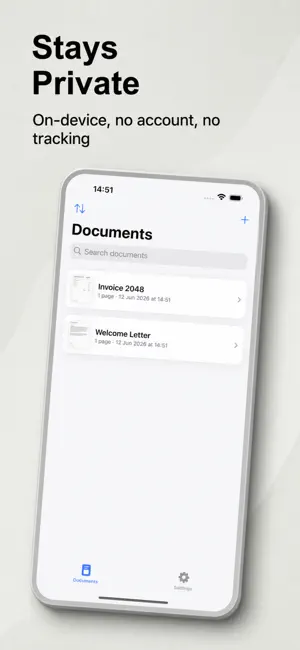
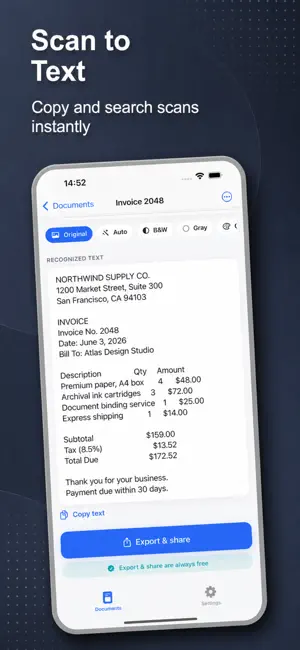
Scanmint turns your phone into a fast, private document scanner. Scan documents, receipts, ID cards, books, and notes, then save a clean, high-quality PDF in seconds. No account, no ads, and your scans never leave your device. FREE PDF EXPORT - NO PAYWALL Most scanner apps make you pay just to export your own scan. Scanmint does not. Saving and sharing PDFs is always free. No export paywall, no surprise wall after you have done the work. PRIVATE AND ON-DEVICE Your documents stay on your phone. OCR and scanning run on-device, so sensitive paperwork, contracts, and IDs never get uploaded to a server. NO ADS, HONEST PRICING A clean, ad-free scanner with transparent pricing, a clear trial, and easy cancel. No banners covering your scans. POWERFUL SCANNING, BUILT IN - Auto edge detection and multi-page capture - Manual crop and perspective correction - Scan modes: document, whiteboard, business card, QR code - Per-page filters: auto, black and white, grayscale, color - Page management: reorder, rotate, delete, add pages - OCR with searchable PDF, copy text, and TXT export - Export to PDF or JPG and share to Files or any app - App lock with Face ID or fingerprint GREAT FOR EVERYDAY DOCUMENTS Scan to PDF for tax receipts, contracts, homework, handwritten notes, whiteboards, business cards, and books. Use OCR to turn any scan into searchable, copyable text. A simple camera scanner and pdf maker for home, school, and work. PRO FEATURES - ID card scan (front and back on one page) - Signature: draw and place your signature on a page - Batch export multiple documents into one PDF - Advanced OCR with multi-language support (English, German, French, Spanish, Italian, Portuguese) - Password-protect and encrypt your exported PDF Scanmint is the document scanner that respects your documents and your wallet: free PDF export, no ads, and on-device privacy. Download Scanmint and scan your first document to PDF today. ---------------------- SCANMINT PRO SUBSCRIPTION Scanmint Pro is available as an auto-renewing subscription (monthly or yearly; the monthly plan includes a 3-day free trial) or as a one-time Lifetime Unlock. For subscriptions, payment is charged to your Apple ID and auto-renews unless cancelled at least 24 hours before the current period ends. Manage or cancel anytime in Settings. Terms of Use (EULA): https://golinski-ventures.pl/scanmint/terms Privacy Policy: https://golinski-ventures.pl/scanmint/privacy
App privacy
The developer, Golinski Ventures Sp. z o.o., reported these privacy practices to Apple.
Data Not Linked to You
The following data, which may be collected but is not linked to your identity, may be used for the following purposes:
- Usage Data: Product Interaction
- Diagnostics: Crash Data
Used for: App Functionality
Alternatives to Scanmint: PDF Document Scanner
Looking for apps like Scanmint: PDF Document Scanner? Here are 6 similar apps on the App Store.
-
 SnapDoc: PDF Scanner & Editor
-
 Scanner: Scan Documents to PDF
-
 Pageva: Convert PDF to Word
-
 LensFlow Scanner
-
 ScannerBest - PDF Scanner App
-
 AllDocs - Document Viewer
| App | Rating | Price | Last updated | Compare |
|---|---|---|---|---|
| Scanmint: PDF Document Scanner | 5.0 / 5 (1 rating) | Free | June 23, 2026 | |
| SnapDoc: PDF Scanner & Editor | – | Free | Aug 26, 2026 | Compare |
| Scanner: Scan Documents to PDF | – | Free | Oct 3, 2026 | Compare |
| Pageva: Convert PDF to Word | – | Free | Oct 10, 2026 | Compare |
| LensFlow Scanner | – | Free | Sep 15, 2026 | Compare |
| ScannerBest - PDF Scanner App | – | Free | Jun 29, 2026 | Compare |
| AllDocs - Document Viewer | – | Free | Jun 25, 2026 | Compare |