

Pageva: Convert PDF to Word
Numan Haktan Kartal Productivity iPhoneiPadiPod touch
Pageva: Convert PDF to Word is a free Productivity app for iPhone and iPad by Numan Haktan Kartal. Requires iOS 17.0. Updated October 10, 2026.
- Price
- Free
- on the App Store
- Size
- 14 MB
- Age 4+
- Updated
- Oct 10
- 2026 · v1.1
Screenshots

About Pageva: Convert PDF to Word
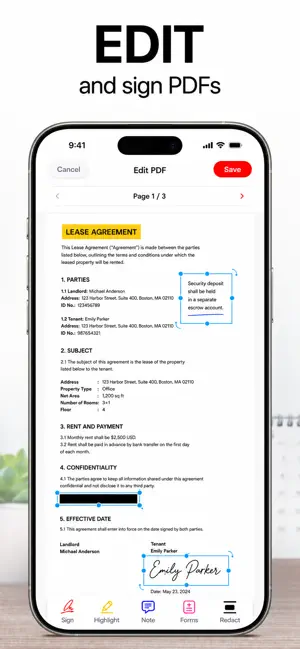
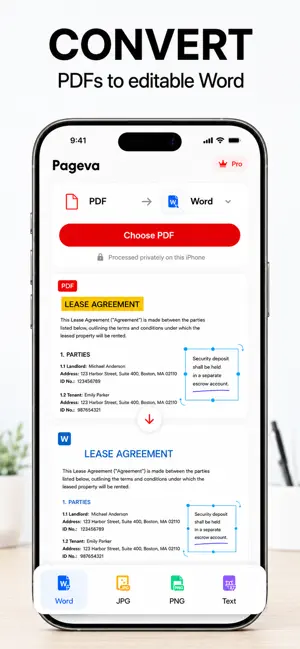
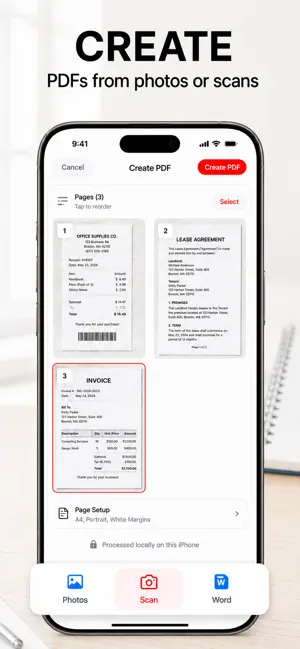
Convert a PDF to Word on your iPhone without sending it anywhere. Pageva rebuilds the document on your device — paragraphs in reading order, tables intact, headings still headings — and your file never touches a server, because Pageva does not have one. PDF TO WORD, TWO WAYS • Editable Word — flowing paragraphs, real Word tables, headings you can restyle. Rewrite a report, reuse a contract clause, turn a handout into notes. • Exact Layout — every block placed where it sat on the page, so the DOCX looks like the PDF. The right choice for forms, brochures and multi-column pages. • OCR turns scanned and photographed pages into real, selectable text • Export a PDF as JPG, PNG or plain text instead TEN PDF TOOLS, ALL FREE • Create a PDF from photos or the built-in document scanner • Word to PDF, so a DOCX opens the same everywhere • Organize — merge, reorder, rotate and split pages • Compress a big file down to a size you can actually send • Page numbers and watermarks, on their own or together • Protect a copy with a password of your choosing • Mark up — highlight, draw and add notes • Fill in a PDF's own form fields • Sign by drawing your name straight onto the page • Redact — the content is removed from the file, not covered with a black box No page limits on any of them, and every tool writes a new file beside the original. PRIVATE BY DESIGN • Nothing is uploaded. There is no conversion server to upload it to. • No account, no sign-in, no ads, no tracking, no analytics SDK • Works in airplane mode — conversion and OCR need no connection at all • A locked PDF's password opens it for that one run and is never written down BUILT FOR REAL DOCUMENTS • Batch: pick up to 50 files and convert them in one run • A Files library with folders and favorites keeps every result • Import from URL, then share the result to Mail, Drive or anywhere else • Fifteen languages FREE AND PRO Your first document converts in full — any length, free. Pageva Free converts as many documents as you like at full quality and writes the first 3 pages of each export. All ten PDF tools are free with no page limit. Pageva Pro exports whole documents of any length, runs OCR across every page of a scan, and converts full files in batch. Same engine, same quality — Pro only removes the length limit. Convert your next PDF on your phone, not on someone's server. *Whole documents, OCR on every page of a scan and full batch conversion may require a subscription. Terms of Use (EULA): https://pageva.vercel.app/terms/ Privacy Policy: https://pageva.vercel.app/privacy/
What’s new
Version 1.1 · Updated October 10, 2026
• Your first document now converts in full, free — any length. • Better conversion quality and reliability. • A clearer Pro screen.
App privacy
The developer, Numan Haktan Kartal, reported these privacy practices to Apple.
Data Not Linked to You
The following data, which may be collected but is not linked to your identity, may be used for the following purposes:
- Purchases: Purchase History
- Identifiers: User ID
- Usage Data: Product Interaction
Used for: Analytics, App Functionality
Alternatives to Pageva: Convert PDF to Word
Looking for apps like Pageva: Convert PDF to Word? Here are 6 similar apps on the App Store.
-
 Altrava
-
 PageVo — Document Scanner
-
 Tiho Docs
-
 MeasureSend: Site Dimensions
-
 Docunivo - Document Editor
-
 Doc Scanner&Converter PDFChamp
| App | Rating | Price | Last updated | Compare |
|---|---|---|---|---|
| Pageva: Convert PDF to Word | – | Free | October 10, 2026 | |
| Altrava | – | Free | Oct 3, 2026 | Compare |
| PageVo — Document Scanner | – | Free | Sep 28, 2026 | Compare |
| Tiho Docs | – | Free | Oct 5, 2026 | Compare |
| MeasureSend: Site Dimensions | – | Free | Aug 24, 2026 | Compare |
| Docunivo - Document Editor | – | Free | Sep 21, 2026 | Compare |
| Doc Scanner&Converter PDFChamp | – | Free | Mar 27, 2026 | Compare |