

Tiho Docs
Alan Matviienko Productivity iPhoneiPadiPod touchMac
Tiho Docs is a free Productivity app for iPhone and iPad by Alan Matviienko. Requires iOS 17.0. Updated October 5, 2026.
- Price
- Free
- on the App Store
- Size
- 11 MB
- Age 4+
- Updated
- Oct 5
- 2026 · v1.3
Screenshots


About Tiho Docs
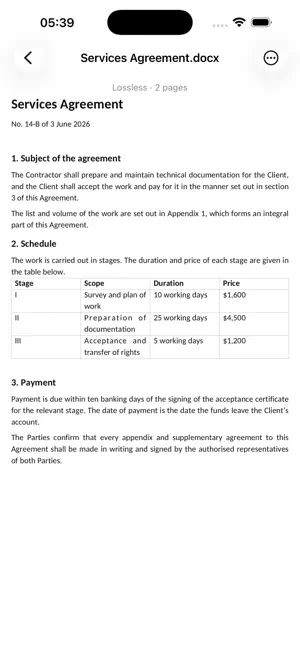
Tiho Docs is a document editor for Word .docx files. It opens a file from your disk, lets you work on it, and writes it back. Editing needs no account and no network. When you want the same documents on your other devices, or want to share them, there is the Tiho cloud — optional, by subscription. THE FILE ON YOUR DISK IS THE DOCUMENT Open a document, save it without touching anything, and you get back the same bytes you started with. That is not a figure of speech: it is checked against a corpus of more than sixteen hundred real documents on every change to the program. IT SAYS WHAT IT DOES NOT UNDERSTAND A .docx file can hold more than any editor implements — an unusual field, a chart from another program, a form control. Tiho Docs keeps all of it untouched and writes it back exactly as it was, and it tells you on screen which parts those are. Nothing disappears quietly, and nothing is described as supported when it is not. LINES BREAK WHERE WORD BREAKS THEM A document written on Windows asks for fonts your Mac or iPhone does not have. Most editors substitute something close-looking, and the text quietly moves: lines wrap elsewhere, pages end elsewhere, and a contract that was three pages becomes four. Tiho Docs ships metric-compatible faces — different drawings, identical widths — so the page count holds. WHAT IS IN IT • Text, paragraph and character formatting, styles, lists • Tables, images, footnotes, headers and footers, page numbers • Tracked changes and comments: accept, reject, filter by author • Compare with an earlier version of the same file • Find and replace, document outline, word and character counts • Printing and PDF export that agree with what is on screen • Twelve interface languages THE TIHO CLOUD, IF YOU WANT IT Sign in with your email address, and your documents are with you on your Mac, on your iPhone and in any browser at tiho.one. Keep them in folders, star the ones you need often, restore what you deleted from the trash within 30 days, and bring back an earlier version of a document within 30 days. Share a document with a person by email — to view or to edit — or hand out a link that works for up to 30 days. The cloud comes with the Tiho Plus subscription: 50 GB, monthly or yearly, and 200 GB more if you need it. The subscription belongs to your Tiho account, so it works wherever you sign in. If it ends, everything you stored stays yours to open and download. WHAT LEAVES YOUR DEVICE Documents you keep on your disk do not. What you put in the Tiho cloud — the documents and your email address — is kept on Tiho servers so that you can open it elsewhere and share it; nobody else sees it unless you share it. Deleting your account in the app erases all of it within minutes. The app also uses Firebase Analytics, which counts launches and sessions so we know the app is being used. It never sees a document, a file name, or a path. Time seal: put one on a document to show it existed in exactly this form at that moment. Only its SHA-256 fingerprint is sent — never the document — straight from your device to Sectigo, or to DigiCert if Sectigo does not answer. No account needed. Tiho Docs is part of Tiho Office, alongside Tiho Mail. Microsoft and Word are trademarks of Microsoft Corporation. Tiho Docs is not affiliated with Microsoft. Terms of Use (EULA): https://www.apple.com/legal/internet-services/itunes/dev/stdeula/ Privacy Policy: https://tiho.one/docs-privacy
What’s new
Version 1.3 · Updated October 5, 2026
• Suggest changes: edit in suggestion mode, and others accept or reject your edits one by one or all at once. • Comment threads: reply to a comment and mention people with @. • Format painter, bookmarks, a table of contents, page setup (size, orientation, margins, columns), the date and special characters. • Pictures: change their size right at the cursor, and text wraps around them. • Spreadsheets: new workbooks and sheets, frozen rows and columns, fill down and right, the fill handle, drop-down lists, conditional formatting, charts, find and replace, and CSV in and out. • Cloud: earlier versions, and signing in through your browser. • Working together on a document in the Tiho cloud: see where the others are typing; edits reach everyone through the cloud. • Font, size and colour of text; Tab and Shift-Tab change a list item’s level.
App privacy
The developer, Alan Matviienko, reported these privacy practices to Apple.
Data Linked to You
The following data, which may be collected and linked to your identity, may be used for the following purposes:
- Purchases: Purchase History
- Contact Info: Email Address
- User Content: Other User Content
- Identifiers: User ID
- Other Data: Other Data Types
Used for: App Functionality
Data Not Linked to You
The following data, which may be collected but is not linked to your identity, may be used for the following purposes:
- Identifiers: Device ID
- Usage Data: Product Interaction
Used for: Analytics
Alternatives to Tiho Docs
Looking for apps like Tiho Docs? Here are 6 similar apps on the App Store.
-
 Standstill: Focus & Block
-
 Altrava
-
 Docunivo - Document Editor
-
 Pageva: Convert PDF to Word
-
 PDF Translator: MultiDocX
-
 Remapp App
| App | Rating | Price | Last updated | Compare |
|---|---|---|---|---|
| Tiho Docs | – | Free | October 5, 2026 | |
| Standstill: Focus & Block | – | Free | Jul 28, 2026 | Compare |
| Altrava | – | Free | Oct 3, 2026 | Compare |
| Docunivo - Document Editor | – | Free | Sep 21, 2026 | Compare |
| Pageva: Convert PDF to Word | – | Free | Oct 10, 2026 | Compare |
| PDF Translator: MultiDocX | – | Free | Aug 8, 2026 | Compare |
| Remapp App | – | Free | Dec 3, 2024 | Compare |
Compare Tiho Docs with the top alternatives: ratings, updates, ASO score and keyword gaps →