

SnapDoc: PDF Scanner & Editor
Soe Htut Productivity iPhoneiPadiPod touch
SnapDoc: PDF Scanner & Editor is a free Productivity app for iPhone and iPad by Soe Htut. Requires iOS 16.6. Updated August 26, 2026.
- Price
- Free
- on the App Store
- Size
- 8 MB
- Age 4+
- Updated
- Aug 26
- 2026 · v1.6
Screenshots

About SnapDoc: PDF Scanner & Editor
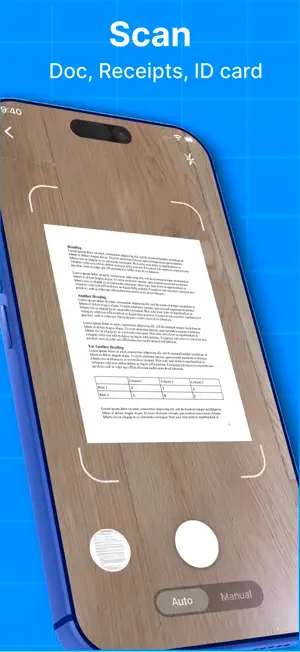
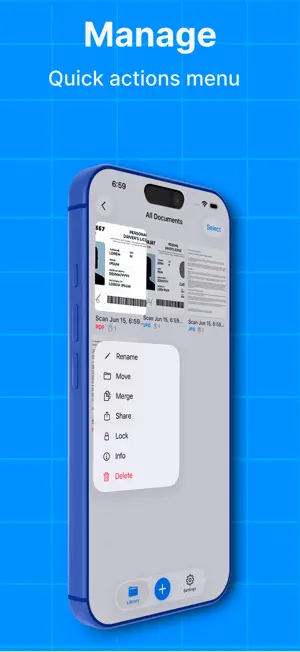
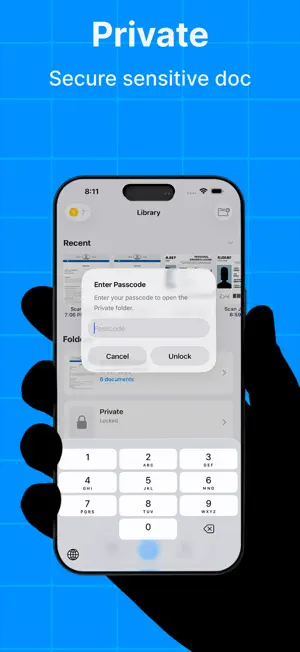
SnapDoc is your all-in-one document scanner and PDF editor for iPhone and iPad. Scan documents, receipts, IDs, notes, and whiteboards in seconds. Automatically detect edges, correct perspective, enhance image quality, then edit, annotate, sign, organize, and share your PDFs — all with a fast, private, on-device experience. SCAN WITH EASE • Automatic edge detection with a live scanning overlay • Auto-capture when your document is steady, or capture manually • Perspective correction for clean, straightened pages • Scan documents, receipts, IDs, notes, and whiteboards ENHANCE YOUR SCANS • Boost text for sharper, more readable documents • Remove shadows and uneven lighting • Sharpen, Grayscale, and Black & White filters • Turn photos and scans into clean PDFs EDIT & ANNOTATE PDFs • Add text and images to your PDFs • Draw naturally with Pen • Add stamps for quick annotations • Sign documents with your signature • Reorder, rotate, and delete pages • Merge multiple PDFs into one PROTECT YOUR DOCUMENTS • Password-protect PDF documents • Keep sensitive files in a Private Folder • Protect your Private Folder with a passcode and Face ID READ PDFs YOUR WAY • Full-screen reading mode for a distraction-free experience • Adjust your reading view for a comfortable experience • Easily navigate through multi-page documents STAY ORGANIZED • Organize documents into folders • Keep important files in one place • Protect sensitive documents with a private folder, passcode, and Face ID SHARE & EXPORT • Export high-quality, selectable PDFs • Save documents to Files • Share via Mail, Messages, AirDrop, and other apps PRIVATE BY DESIGN Your scans and documents are processed on your device and are never uploaded to our servers. Scan. Edit. Annotate. Sign. Read. SnapDoc gives you everything you need to work with documents on iPhone and iPad.
What’s new
Version 1.6 · Updated August 26, 2026
• Added iPad support • Optimized the PDF editing experience for iPad • Improved document reading and annotation • Password-protected PDFs and share • Performance and stability improvements
App privacy
The developer, Soe Htut, reported these privacy practices to Apple.
Data Used to Track You
The following data may be used to track you across apps and websites owned by other companies:
- Identifiers: Device ID
- Usage Data: Product Interaction, Advertising Data
Data Linked to You
The following data, which may be collected and linked to your identity, may be used for the following purposes:
- Identifiers: Device ID
- Usage Data: Product Interaction, Advertising Data
Used for: Third-Party Advertising
Data Not Linked to You
The following data, which may be collected but is not linked to your identity, may be used for the following purposes:
- Diagnostics: Crash Data, Performance Data
Used for: App Functionality
Alternatives to SnapDoc: PDF Scanner & Editor
Looking for apps like SnapDoc: PDF Scanner & Editor? Here are 6 similar apps on the App Store. The highest rated is Scanmint: PDF Document Scanner (5.0/5), and all 6 are free to download.
-
 Scanmint: PDF Document Scanner
5.0
-
 Morning Dew Creator
-
 PDF Scanner - Scan & OCR
-
 ScanNest: PDF Scanner & OCR
-
 Scan King: Scanner PDF
-
 ScannerBest - PDF Scanner App
| App | Rating | Price | Last updated | Compare |
|---|---|---|---|---|
| SnapDoc: PDF Scanner & Editor | – | Free | August 26, 2026 | |
| Scanmint: PDF Document Scanner | 5.0 / 5 (1) | Free | Jun 23, 2026 | Compare |
| Morning Dew Creator | – | Free | Feb 22, 2026 | Compare |
| PDF Scanner - Scan & OCR | – | Free | Jun 26, 2026 | Compare |
| ScanNest: PDF Scanner & OCR | – | Free | Jun 18, 2026 | Compare |
| Scan King: Scanner PDF | – | Free | Jun 19, 2026 | Compare |
| ScannerBest - PDF Scanner App | – | Free | Jun 29, 2026 | Compare |