

Luxa: Budget & Expense Tracker
Minhaj Zubair Finance iPhoneiPadiPod touch
Luxa: Budget & Expense Tracker is a free Finance app for iPhone and iPad by Minhaj Zubair. Requires iOS 15.1. Updated September 7, 2026.
- Price
- Free
- on the App Store
- Size
- 59 MB
- Age 4+
- Updated
- Sep 7
- 2026 · v1.4.2
Screenshots



About Luxa: Budget & Expense Tracker
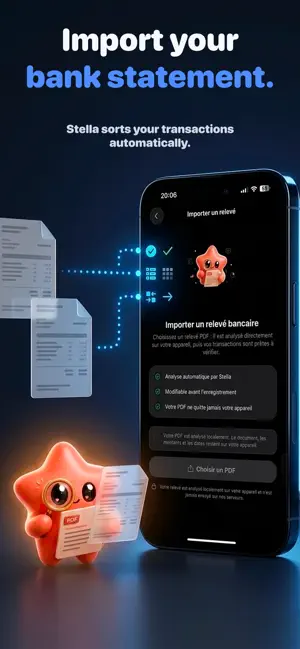
Money disappears fast. Rent, subscriptions, groceries, bills, impulse buys… by the end of the month, it is hard to know where it all went. Luxa helps you take back control with a clear, visual and private way to manage your money. Built for everyday budgeting, Luxa lets you track expenses, organize your budget with smart pockets, spot recurring payments and import PDF bank statements without connecting directly to your bank. Key features: Smart Budget Pockets: Start with the 50/30/20 method — needs, wants and savings — then adjust the split whenever your life changes. See what is left in each pocket in real time. Expense & Income Tracking: Add transactions manually in seconds with amount, category, date, notes, recurrence and optional visual logos. Subscription Tracking: Keep an eye on recurring expenses like Netflix, Disney+, Spotify, rent, insurance, mobile plans and gym memberships. Visual Spending Calendar: See your financial history by day, week, month or year with a clean calendar and transaction timeline. Financial Stats: Understand your spending by period, category and recurring charges so you can make better money decisions. PDF Statement Import: Import a PDF bank statement, review extracted transactions, edit them if needed and save only what you approve. Privacy first: Luxa never asks for your bank login or credentials. Your bank statement PDF stays on your device. Only cleaned-up transaction labels may be used to help categorize your spending, and you review every extracted transaction before saving. Take control of your budget. See where your money goes. Keep more of it. Terms of Use (EULA): https://www.apple.com/legal/internet-services/itunes/dev/stdeula/
What’s new
Version 1.4.2 · Updated September 7, 2026
New in 1.4.2 A new Luxa paywall shows trial eligibility and a clear Free vs Plus comparison. Quick Add is now the default from the + button. We also fixed purchase cancellation and restore feedback, expense/income arrows, the “-0 €” dashboard state, tab-bar spacing, long onboarding copy, Arabic alignment, and missing accessibility labels.
App privacy
The developer, Minhaj Zubair, reported these privacy practices to Apple.
Data Linked to You
The following data, which may be collected and linked to your identity, may be used for the following purposes:
- Usage Data: Product Interaction
- Diagnostics: Crash Data, Performance Data, Other Diagnostic Data
- User Content: Photos or Videos, Other User Content
- Financial Info: Other Financial Info
- Contact Info: Email Address, Name
- Identifiers: User ID
Used for: Analytics, Product Personalization, App Functionality
Alternatives to Luxa: Budget & Expense Tracker
Looking for apps like Luxa: Budget & Expense Tracker? Here are 6 similar apps on the App Store. The highest rated is BalanceCast, Budget & Forecast (5.0/5), and all 6 are free to download.
-
 Money Ledger: Finance Tracker
-
 SpendSmartAI - Expense Tracker
-
 Rilio - Smart Expense Tracker
-
 BalanceCast, Budget & Forecast
5.0
-
 DueMind: Bill Tracker
-
 AI Spend Tracker: RetroBudget
3.0
| App | Rating | Price | Last updated | Compare |
|---|---|---|---|---|
| Luxa: Budget & Expense Tracker | – | Free | September 7, 2026 | |
| Money Ledger: Finance Tracker | – | Free | Sep 16, 2026 | Compare |
| SpendSmartAI - Expense Tracker | – | Free | Sep 25, 2026 | Compare |
| Rilio - Smart Expense Tracker | – | Free | Jul 13, 2026 | Compare |
| BalanceCast, Budget & Forecast | 5.0 / 5 (1) | Free | Oct 5, 2026 | Compare |
| DueMind: Bill Tracker | – | Free | Jul 29, 2026 | Compare |
| AI Spend Tracker: RetroBudget | 3.0 / 5 (2) | Free | Aug 18, 2026 | Compare |