

SpendSmartAI - Expense Tracker
Heston Dsouza Finance iPhoneiPadiPod touch
SpendSmartAI - Expense Tracker is a free Finance app for iPhone and iPad by Heston Dsouza. Requires iOS 16.4. Updated September 25, 2026.
- Price
- Free
- on the App Store
- Size
- 45 MB
- Age 17+
- Updated
- Sep 25
- 2026 · v2.4.3
Screenshots

About SpendSmartAI - Expense Tracker
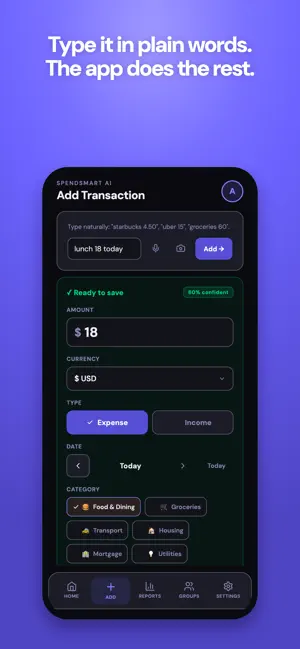
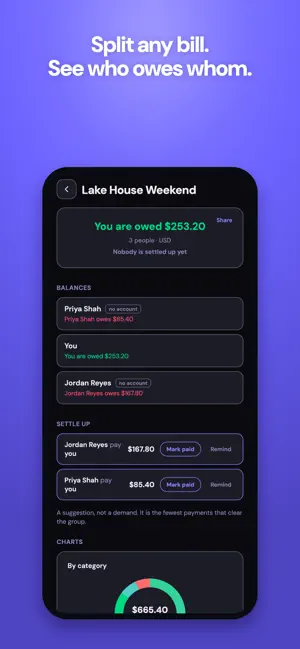
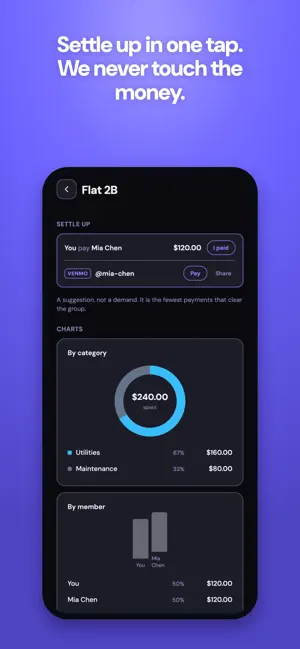
SpendSmart AI is a private, local-first expense tracker that turns everyday spending into something you can actually read. Just type "coffee 220" or say it out loud. Smart entry fills in the amount, category, and date for you. Snap a receipt and let OCR do the typing instead. Or hand it a bank statement and let it read the whole month at once, without ever asking for a bank login. WHY SPENDSMART AI- • Smart entry: add an expense by text or voice in one line. • Statement import with no bank login: OFX, QFX and CSV files are read entirely on your device, free and unlimited. PDFs and unusual formats use AI instead. • Shared groups: split a flat, a trip or a dinner, see who owes whom, and settle up in the fewest transfers. • Split a scanned receipt line by line, not just evenly (Pro, because the lines come from the receipt scan). Each line carries its quantity, so two coffees on one row can go to two different people. • The people you split with do not need an account: send a link and they tick their own items from a web page, with nothing to install. • Settle up by opening the other person's Venmo, Cash App or PayPal from the settle-up row, so nobody copies a handle by hand. Dollar amounts are filled in for you, and Venmo carries a note as well. We never process the payment and never learn whether money moved. • Split a single bill: record what you actually owed on a shared payment, and keep the rest out of your totals. • Works worldwide: 50+ currencies, UPI, Pix, PayPay, Venmo, and popular local merchants in 8+ countries. • Receipt scanning (Pro): photograph a receipt, get a ready-to-save expense. • Beautiful reports: donut breakdowns and trends at a glance. • Budgets, savings goals, recurring bills and reminders. • Quick ways in: Siri, the share sheet, a home screen shortcut, or open a statement file straight into the app. • Templates for the things you buy every week, and a streak that rewards showing up. • Powerful search: find any transaction instantly. • Light and dark themes, and a real desktop layout in the browser. • No ads, ever, on Free or Pro, and your data is never sold. • Change your home currency later if you move: every entry keeps the amount and currency you paid in, and your totals switch to the new currency at the rate you set • Local-first and private: works offline, and you own your data. Shared groups are the one exception: you can read them offline, but adding or settling needs a connection. • FREE includes unlimited transactions, 12 months of history, reports, budgets, search, unlimited on-device statement import, and up to 3 shared groups, plus 10 AI smart entries and 5 voice inputs each month. • PRO unlocks receipt OCR, unlimited smart and voice entry, unlimited groups, full history, and PDF export. • Prices vary by region; see current rates in the app. Your privacy isn't an afterthought. SpendSmart AI is built local-first, and you can delete all your data whenever you want. Terms of Use: https://spendsmartai.online/terms Privacy Policy: https://spendsmartai.online/privacy
What’s new
Version 2.4.3 · Updated September 25, 2026
Fixes between App Store releases now reach every install, not just some. Nothing to do on your side: open the app as usual and improvements arrive. Also brings the speech library up to date
App privacy
The developer, Heston Dsouza, reported these privacy practices to Apple.
Data Linked to You
The following data, which may be collected and linked to your identity, may be used for the following purposes:
- Usage Data: Product Interaction
- Purchases: Purchase History
- Financial Info: Other Financial Info
- Contact Info: Email Address, Name, Other User Contact Info
- User Content: Photos or Videos, Customer Support, Other User Content
- Identifiers: User ID
Used for: Analytics, App Functionality
Data Not Linked to You
The following data, which may be collected but is not linked to your identity, may be used for the following purposes:
- Diagnostics: Crash Data
Used for: App Functionality
Alternatives to SpendSmartAI - Expense Tracker
Looking for apps like SpendSmartAI - Expense Tracker? Here are 6 similar apps on the App Store.
-
 Luxa: Budget & Expense Tracker
-
 ToSpend: Expense Tracker
-
 Tallyra: Expense Tracker
-
 Rilio - Smart Expense Tracker
-
 DueMind: Bill Tracker
-
 PayPay : Bill Reminder
| App | Rating | Price | Last updated | Compare |
|---|---|---|---|---|
| SpendSmartAI - Expense Tracker | – | Free | September 25, 2026 | |
| Luxa: Budget & Expense Tracker | – | Free | Sep 7, 2026 | Compare |
| ToSpend: Expense Tracker | – | Free | Aug 8, 2026 | Compare |
| Tallyra: Expense Tracker | – | Free | Aug 19, 2026 | Compare |
| Rilio - Smart Expense Tracker | – | Free | Jul 13, 2026 | Compare |
| DueMind: Bill Tracker | – | Free | Jul 29, 2026 | Compare |
| PayPay : Bill Reminder | – | Free | Jul 15, 2026 | Compare |