

Jobmarq
JOHN WILLIAM CARR Business iPhoneiPadiPod touch
Jobmarq is a free Business app for iPhone and iPad by JOHN WILLIAM CARR. Rated 5.0/5 from 1 ratings. Requires iOS 26.4. Updated August 7, 2026.
- Rating
- 5.0
- 1 ratings
- Price
- Free
- on the App Store
- Size
- 5 MB
- Age 4+
- Updated
- Aug 7
- 2026 · v3.0
Screenshots


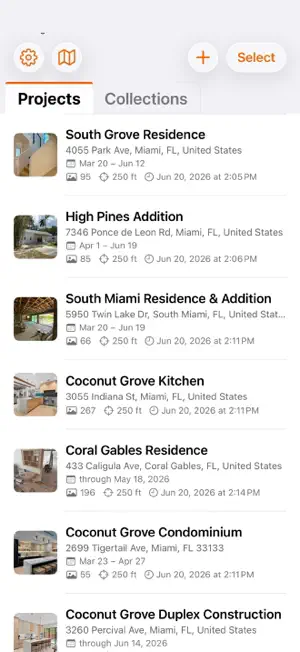

About Jobmarq
The job site photos app for contractors, architects, designers and the trades. Jobmarq files every photo you take on a job site into the right project automatically — no folders, no manual sorting, no "wait, where did I take that kitchen shot?" Walk on site and your phone knows where you are. The photos you snap go straight to the right project, ready to find by tag, role, or visit. ORGANIZE BY LOCATION • Drop a pin on a project address → photos taken nearby auto-attach • Geofence reminders surface the right project the moment you arrive • See every project at once on a single map view CAPTURE EVERYTHING IN CONTEXT • Built-in camera with ultra-wide (0.5×), wide, and telephoto presets • Document scanner for plans, permits, invoices — VisionKit OCR built in • Voice notes with on-device transcripts — record while you walk the site • Typed notes and voice memos are attached to projects as well as individual photos for sharing and documentation. FIND ANYTHING IN SECONDS • Tag photos as you shoot to categorize, or in bulk via Select mode • Smart Collections auto-group by tag, role, or favorites across every project • Manual Collections let you hand-pick a portfolio for a client meeting • Filter any project by date, role, photo type, week, favorites or any tag WORK AS A TEAM • Invite collaborators directly via iCloud — no link, no separate account • Architects, project managers, electricians, owners — everyone sees the same photos • Per-photo attribution shows who added it and when • Profile branding syncs to collaborators so "From Acme Construction" reads on every shared project • Take and send photos with notes and tags in the app –– photos don't fall back into the abyss to be searched for later. SCHEDULE TASKS REALTIME • See an issue? Remember a detail? Snap photos, add notes and schedule work realtime before you forget. • Leverage iOS Calendar to create work schedules by sending invites with photos and notes context • Schedule tab lives on main page alongside Projects and Collections YOUR DATA, YOUR DEVICE • Photos stay in your Photos library — Postmarq never re-uploads or hides them • iCloud Sharing uses Apple's end-to-end encryption • No external server, no subscription, no analytics tracking • Your roles, tags, and projects are yours to keep Built with feedback from contractors, architects, designers, and remodelers — people whose hands are usually full of drywall dust. PRIVACY Project metadata stays on-device. Photos remain in your Photos library. Geofencing uses Apple's Core Location and never leaves the phone. iCloud sharing is opt-in per project. Requires iOS 26 or later. iPhone only.
What’s new
Version 3.0 · Updated August 7, 2026
Spaces — measure rooms as you walk the site Add a Space to any project: name, description, and dimensions in feet and inches. Fractions work — enter 3 1/2 or 3.5. Floor, wall, and perimeter quantities calculate as you type. Ceiling height defaults to 8 ft. Take photos from inside a Space and they stay filed with that room. Export every Space to CSV from the share sheet — dimensions, areas, and photo counts, ready for takeoffs and estimating. Length is always north-south, width east-west. Notes and collaboration Notes are private by default — touch and hold a note to share it with the project. The lock means only you see it; the people icon means the project does. Notes now show who wrote them, with their role. Team invites are faster — one email carries the link for everyone, and photos upload in the background instead of holding up the send. A collaborator only shows "Invited" after the invite email actually goes out. Settings → Collaborators now lists previous collaborators — add them to your defaults or remove them from every project. Sharing Shared photos and notes carry the project address in the title, so recipients know where the job is. Camera Video records in 16:9 1080p with stronger stabilization and a steady 30 fps. Recording audio uses the system's video mode — less wind and background noise. The viewfinder now shows the true photo frame (4:3) and video frame (16:9), matching the built-in Camera. Markup — pinch to zoom while you draw. Adding photos Photos, scans, and files you add to a project now open the tag and notes sheet, same as camera captures. Projects with a date range show how many photos fall outside it — tap to widen the range. Reliability Fixed several ways photos or Space dimensions could disappear from a project. Anything you placed by hand stays put unless you delete it.
App privacy
The developer, JOHN WILLIAM CARR, reported these privacy practices to Apple.
Data Not Collected
The developer does not collect any data from this app.
Alternatives to Jobmarq
Looking for apps like Jobmarq? Here are 6 similar apps on the App Store. The highest rated is JobMarkup: Photo Markup (5.0/5), and all 6 are free to download.
-
 Joblens: Project Photos
-
 JobMarkup: Photo Markup
5.0
-
 DustiCam
-
 JobPhotoLog: Work Reports
5.0
-
 JobLens Contractor Photo App
-
 WorksiteCam
| App | Rating | Price | Last updated | Compare |
|---|---|---|---|---|
| Jobmarq | 5.0 / 5 (1 rating) | Free | August 7, 2026 | |
| Joblens: Project Photos | – | Free | Oct 10, 2026 | Compare |
| JobMarkup: Photo Markup | 5.0 / 5 (3) | Free | Sep 14, 2026 | Compare |
| DustiCam | – | Free | Sep 29, 2026 | Compare |
| JobPhotoLog: Work Reports | 5.0 / 5 (3) | Free | Aug 5, 2026 | Compare |
| JobLens Contractor Photo App | – | Free | Feb 9, 2026 | Compare |
| WorksiteCam | – | Free | Oct 2, 2026 | Compare |
Compare Jobmarq with the top alternatives: ratings, updates, ASO score and keyword gaps →