

WorksiteCam
Investoy Software Inc. Productivity iPhoneiPadiPod touch
WorksiteCam is a free Productivity app for iPhone and iPad by Investoy Software Inc. Requires iOS 15.0. Updated October 2, 2026.
- Price
- Free
- on the App Store
- Size
- 41 MB
- Age 4+
- Updated
- Oct 2
- 2026 · v1.6.23
Screenshots

About WorksiteCam
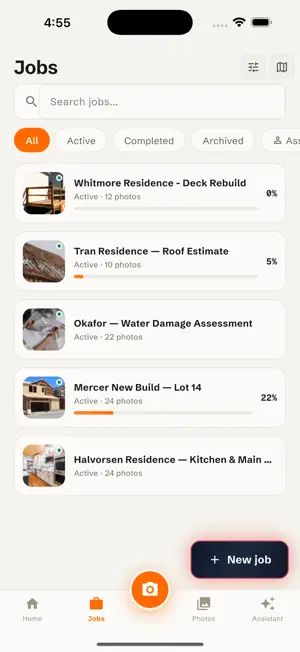
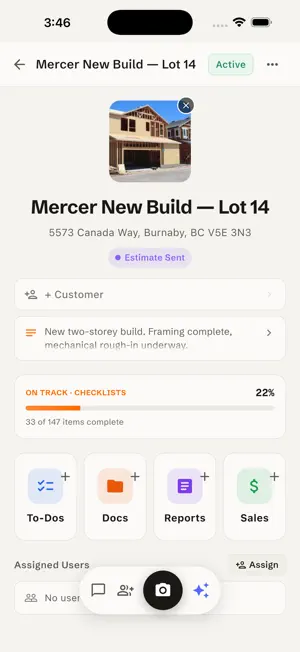
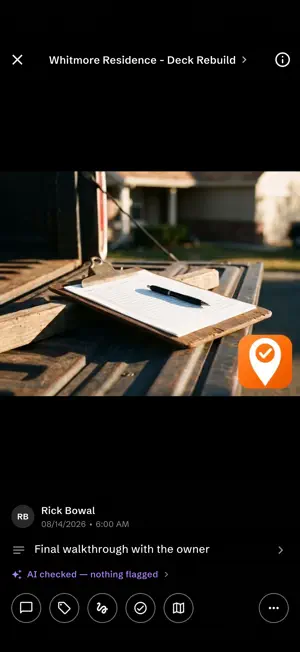
WorksiteCam turns the photos your crew already takes into proof you can hand a client. Every shot is stamped with the job, the location and the time it was taken. So when a client says the damage was already there, or asks what happened on Tuesday, the answer is one tap away instead of an argument. STOP CHASING THE CREW FOR UPDATES See what your crew shot the moment they shoot it. No phone calls, no end-of-day text threads, no photos stranded on somebody's camera roll. SHOOT NOW, SYNC LATER Job sites lose signal. The camera still opens, photos still get taken, and everything uploads itself the moment service comes back. PROVE IT WASN'T ALREADY LIKE THAT Every photo carries the time and place it was actually taken. Mark up a shot to circle a defect and the original is kept, so you always still have the clean frame. ONE JOB, ONE PLACE Jobs carry addresses, clients, statuses and crew. Find any job on the map by where it is, not by what someone called it. Filter and search across all of them. CHECKLISTS AND TO-DOS Build checklists with sections, custom fields, ratings and required proof photos. Assign them to your crew and watch completion in real time. Templates keep every job consistent. QUOTE IT RIGHT THE FIRST TIME Estimates, reports and proof of work, filed against the job itself. Generate a branded report from a walkthrough in a couple of taps. WORK WITH YOUR CREW Assign crew to jobs, comment on photos, mention a colleague, and get notified when something changes. Everyone sees the same thing wherever they are. AI THAT DOES THE PAPERWORK Walkthrough summaries write themselves. Photos are checked for defects, missing components and safety concerns as they come in, so problems surface while the crew is still on site. SHOW CLIENTS THE WORK Build a portfolio of finished jobs. Share galleries with clients. Request and manage reviews from inside the app. DOCUMENTS AND PAGES Upload job files, scan paper documents straight into the job, and write rich-text pages with a built-in editor. Built for crews who work in the field and need their documentation to be fast, reliable and reachable from anywhere.
What’s new
Version 1.6.23 · Updated October 2, 2026
Walkthroughs now record in one continuous take and put each photo under the work it shows. Turn a walkthrough into a draft estimate from the prices you say on site, then send it by email, text or link. Owners get a text when a client signs. Estimates now show up on each job, reports keep your words accurate, and street addresses appear on every photo. Plus reliability fixes.
App privacy
The developer, Investoy Software Inc., reported these privacy practices to Apple.
Data Linked to You
The following data, which may be collected and linked to your identity, may be used for the following purposes:
- Location: Precise Location, Coarse Location
- Contact Info: Physical Address, Email Address, Name, Phone Number
- User Content: Photos or Videos, Audio Data
Used for: App Functionality
Alternatives to WorksiteCam
Looking for apps like WorksiteCam? Here are 6 similar apps on the App Store. The highest rated is SiteCams SiteWatch (5.0/5), and all 6 are free to download.
-
 DustiCam
-
 Subtrade
-
 BuildReport Pro: Punch List
-
 Snapline by Voice2Jobs
-
 SiteCams SiteWatch
5.0
SiteCams SiteWatch
5.0
-
 Tally: Offline Checklist Maker
| App | Rating | Price | Last updated | Compare |
|---|---|---|---|---|
| WorksiteCam | – | Free | October 2, 2026 | |
| DustiCam | – | Free | Sep 29, 2026 | Compare |
| Subtrade | – | Free | Oct 10, 2026 | Compare |
| BuildReport Pro: Punch List | – | Free | Feb 17, 2026 | Compare |
| Snapline by Voice2Jobs | – | Free | Oct 12, 2026 | Compare |
| SiteCams SiteWatch | 5.0 / 5 (2) | Free | Apr 11, 2025 | Compare |
| Tally: Offline Checklist Maker | – | Free | Sep 11, 2026 | Compare |
Compare WorksiteCam with the top alternatives: ratings, updates, ASO score and keyword gaps →