

Joblens: Project Photos
INTAGRI TECHNOLOGIES LLC Productivity iPhoneiPadiPod touch
Joblens: Project Photos is a free Productivity app for iPhone and iPad by INTAGRI TECHNOLOGIES LLC. Requires iOS 17.0. Updated October 10, 2026.
- Price
- Free
- on the App Store
- Size
- 43 MB
- Age 4+
- Updated
- Oct 10
- 2026 · vv0.8.0
Screenshots
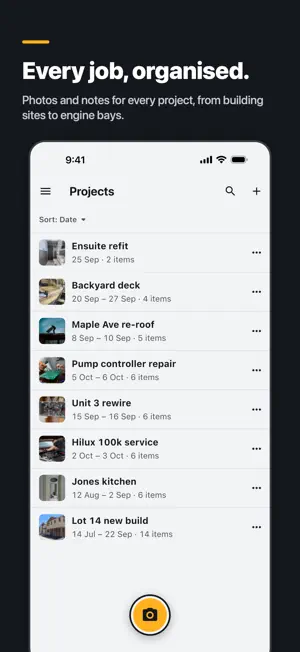


About Joblens: Project Photos
Joblens keeps your work photos out of your personal camera roll and organised by job. Take photos and videos straight into a project, add notes and checklists, and back everything up to your own cloud drive. No Joblens account, no sign-up. BUILT FOR ANY JOB Builders, electricians, mechanics, makers, renovators and anyone who needs to show what was done, where and when. WHAT YOU CAN DO • Capture photos and videos straight into a project, or into the Inbox to sort later • See every job's photos grouped by the day they were taken • Stamp the date, time and job name onto new photos • Add notes and checklists to any photo or project, by typing or by voice • Draw on photos to point out a fault or a measurement, then share them • Tag photos Before, During or After • Add photos you already have on your phone • Give projects start and end dates • Search notes across all your projects • Archive finished projects to your cloud drive to free up space, and restore them any time YOUR PHOTOS, YOUR CLOUD Joblens backs up straight from your phone to Google Drive, OneDrive, Dropbox or Nextcloud. There is no Joblens account and no Joblens server in between. WORKS OFFLINE Everything works without signal. Changes are saved on your phone and back up when you're connected again.
What’s new
Version v0.8.0 · Updated October 10, 2026
Joblens 0.8.0 • Draw on photos: mark up a photo and share it with the drawing included. • Before, During and After: tag photos by stage and filter a project to show just one stage. • Notes: dictate notes by voice and keep the recording, add checklists, and undo or redo edits. • Projects now have optional start and end dates. • Archive a project to your cloud drive to free up space on your phone, then restore it any time. • Restore your library from an export in Settings. • Share photos and videos straight from the viewer or a selection. • Camera: the volume buttons take a photo, and a thumbnail of your last shot opens it in its project. • Undo after moving, deleting or archiving instead of confirmation pop-ups. • Fixes for photos and videos taken on iPhone that failed to save, plus many sync and stability fixes.
App privacy
The developer, INTAGRI TECHNOLOGIES LLC, reported these privacy practices to Apple.
Data Not Linked to You
The following data, which may be collected but is not linked to your identity, may be used for the following purposes:
- Diagnostics: Performance Data, Crash Data, Other Diagnostic Data
- Contact Info: Email Address
- Other Data: Other Data Types
Used for: Analytics, App Functionality, Other Purposes
Alternatives to Joblens: Project Photos
Looking for apps like Joblens: Project Photos? Here are 6 similar apps on the App Store. The highest rated is JobMarkup: Photo Markup (5.0/5), and 5 of the 6 are free to download.
-
 JobMarkup: Photo Markup
5.0
JobMarkup: Photo Markup
5.0
-
 Symple Superapp
-
 PDF Export Pro - PDF Editor
4.6
PDF Export Pro - PDF Editor
4.6
-
 AI Room Design - Re:Build
-
 Glit - Web Novel Writing
-
 Wildnote
3.7
Wildnote
3.7
| App | Rating | Price | Last updated | Compare |
|---|---|---|---|---|
| Joblens: Project Photos | – | Free | October 10, 2026 | |
| JobMarkup: Photo Markup | 5.0 / 5 (2) | Free | Sep 14, 2026 | Compare |
| Symple Superapp | – | Free | Sep 23, 2026 | Compare |
| PDF Export Pro - PDF Editor | 4.6 / 5 (219) | 12.99 USD | Sep 15, 2026 | Compare |
| AI Room Design - Re:Build | – | Free | Oct 27, 2026 | Compare |
| Glit - Web Novel Writing | – | Free | Sep 9, 2026 | Compare |
| Wildnote | 3.7 / 5 (3) | Free | Jun 8, 2026 | Compare |