

Yap!!
Robert Corbin Productivity iPhoneiPadiPod touch
Yap!! is a paid Productivity app for iPhone and iPad by Robert Corbin. Requires iOS 17.0. Updated September 13, 2026.
- Price
- 3.99 USD
- on the App Store
- Size
- 5 MB
- Age 4+
- Updated
- Sep 13
- 2026 · v3.0
Screenshots

About Yap!!
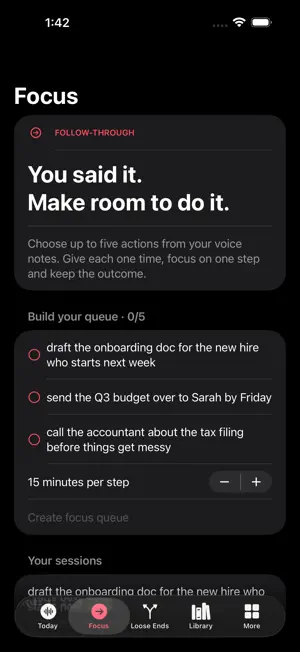
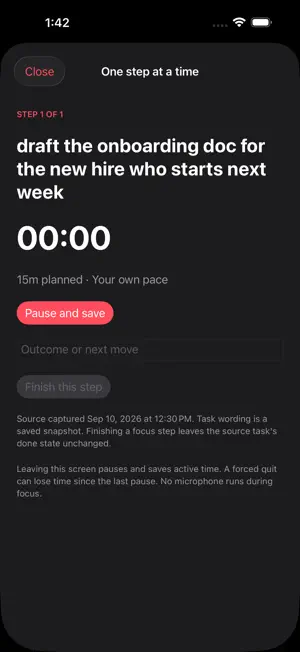
Build a focus queue from actions extracted from your voice notes. Work on one step at a time, track active time and keep an outcome for every step. HOW IT WORKS 1. Open Focus and select up to five open actions. Choose the planned minutes per step and create the queue. 2. Start the timer, work on the current step, and pause when needed. Write an outcome or next move before finishing each step. 3. Review the completed session and share its report. Reopen sessions later; source memos and task completion states stay separate. Voice recording, transcription, daily wraps, action inbox, Loose Ends, searchable library and insights remain available in a five-tab layout. Finish a recording before opening Focus. Transcription now requires on-device recognition and safely handles duplicate completion callbacks. WHAT TO KNOW Extracted tasks need your review. Queues preserve a snapshot of the selected wording and source memo identifier. Finishing a focus step does not mark its source commitment done. Leaving the screen pauses and saves; a forced quit can lose time since the last pause. Up to five steps per session, 1–120 planned minutes per step and 100 saved sessions. iPhone and iPad.
What’s new
Version 3.0 · Updated September 13, 2026
Follow-through Focus Build a focus queue from actions extracted from your voice notes. Work on one step at a time, track active time and keep an outcome for every step. 1. Open Focus and select up to five open actions. Choose the planned minutes per step and create the queue. 2. Start the timer, work on the current step, and pause when needed. Write an outcome or next move before finishing each step. 3. Review the completed session and share its report. Reopen sessions later; source memos and task completion states stay separate. Extracted tasks need your review. Queues preserve a snapshot of the selected wording and source memo identifier. Finishing a focus step does not mark its source commitment done. Leaving the screen pauses and saves; a forced quit can lose time since the last pause. Up to five steps per session, 1–120 planned minutes per step and 100 saved sessions.
App privacy
The developer, Robert Corbin, reported these privacy practices to Apple.
Data Not Collected
The developer does not collect any data from this app.
Alternatives to Yap!!
Looking for apps like Yap!!? Here are 6 similar apps on the App Store. The highest rated is ScanTo Pro: Offline PDF & OCR (3.0/5), and all 6 are free to download.
-
 FastScan2PDF
-
 ScanTo Pro: Offline PDF & OCR
3.0
ScanTo Pro: Offline PDF & OCR
3.0
-
 Ear Recorder
-
 Speech to text - Transcription
1.0
Speech to text - Transcription
1.0
-
 Scan Sheets: QR & Barcode
-
 Yoyu: Departure Timer
| App | Rating | Price | Last updated | Compare |
|---|---|---|---|---|
| Yap!! | – | 3.99 USD | September 13, 2026 | |
| FastScan2PDF | – | Free | May 26, 2026 | Compare |
| ScanTo Pro: Offline PDF & OCR | 3.0 / 5 (2) | Free | Oct 26, 2026 | Compare |
| Ear Recorder | – | Free | Oct 27, 2026 | Compare |
| Speech to text - Transcription | 1.0 / 5 (1) | Free | Oct 17, 2026 | Compare |
| Scan Sheets: QR & Barcode | – | Free | Sep 1, 2026 | Compare |
| Yoyu: Departure Timer | – | Free | Jun 22, 2026 | Compare |
Compare Yap!! with the top alternatives: ratings, updates, ASO score and keyword gaps →