

ScanTo Pro: Offline PDF & OCR
Guan Feng Lai Productivity iPhoneiPadiPod touch
ScanTo Pro: Offline PDF & OCR is a free Productivity app for iPhone and iPad by Guan Feng Lai. Rated 3.0/5 from 2 ratings. Requires iOS 17.0.
- Rating
- 3.0
- 2 ratings
- Price
- Free
- on the App Store
- Size
- 9 MB
- Age 4+
- Updated
- Oct 26
- 2026 · v1.2.9
Screenshots



About ScanTo Pro: Offline PDF & OCR
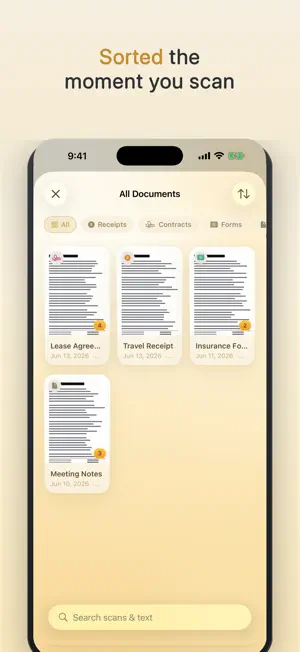
Optimized for iPhone Duo. Built with the latest SDK, the app fills the entire inner display and automatically adjusts its layout whether the device is folded or open. Scan contracts, receipts and IDs into crisp PDFs — then find any of them later by typing one word from inside the document. On-device text recognition (OCR) reads every scan and auto-sorts it into Receipts, IDs, Cards and Contracts, so you never hunt by file name again. It all works offline: nothing is uploaded, no account, same in airplane mode. Lock the app with Face ID and export password-protected PDFs. SEARCH INSIDE YOUR DOCUMENTS — OFFLINE • On-device text recognition (OCR) reads every scan automatically. • Search for a word and find the document that contains it — not just by its name. • Scans are auto-sorted into Receipts, IDs, Cards, Contracts and more — all offline. • View and copy the recognized text, or export it as a .txt file. It never leaves your device. LOCKED & ENCRYPTED • Lock the app with Face ID or your passcode. • Export password-protected, encrypted PDFs to share sensitive documents safely. PRIVATE BY DESIGN • No cloud. Your scans never touch a server. • No account. No sign-up, no login, no profile. • No tracking. Zero analytics, zero ads, zero third-party SDKs. • No network. It works exactly the same in airplane mode. FREE TO START — UNLOCK ONCE Download free and try 3 scans on us (free exports carry a watermark). A single one-time purchase unlocks unlimited scanning, removes the watermark for good and opens every advanced export — OCR text export, password-encrypted PDFs and the ID-card layout. No subscription, no ads, no trial that quietly starts charging. EVERYTHING YOU NEED • Fast multi-page scanning with automatic edge detection and perspective correction. • Five looks: Original, Color, Grayscale, B&W, and Document enhance. • Reorder, rotate, delete, and add pages anytime. • Smart auto-naming from the document's contents. • ID Card mode: front and back on a single page. • Export PDFs sized to the image, A4, or US Letter — ready to print. • Save to Files, or share to Mail, AirDrop, or Messages. • Scan hands-free with Siri, Spotlight, Shortcuts, or the Action Button. • A calm, premium interface, designed down to the last detail. • Now available in 44 languages — auto-detected, or switch any time. Built for lawyers, accountants, freelancers, founders, students — anyone who scans something they'd rather not hand to someone else's server. Your documents stay on this device. That's the whole idea. Optimized for iPhone Duo.
What’s new
Version 1.2.9 · Updated October 26, 2026
Optimized for iPhone Duo: truly full screen. Improved how text is displayed across all languages, along with stability and performance improvements.
App privacy
The developer, Guan Feng Lai, reported these privacy practices to Apple.
Data Not Collected
The developer does not collect any data from this app.
Alternatives to ScanTo Pro: Offline PDF & OCR
Looking for apps like ScanTo Pro: Offline PDF & OCR? Here are 6 similar apps on the App Store. The highest rated is Walkaway: Screen Time Blocker (5.0/5), and 5 of the 6 are free to download.
-
 Ear Recorder
-
 Save My Receipt
-
 Meemo Assistant
-
 Yoyu: Departure Timer
-
 Walkaway: Screen Time Blocker
5.0
Walkaway: Screen Time Blocker
5.0
-
 Yap!!
Yap!!
| App | Rating | Price | Last updated | Compare |
|---|---|---|---|---|
| ScanTo Pro: Offline PDF & OCR | 3.0 / 5 (2 ratings) | Free | October 26, 2026 | |
| Ear Recorder | – | Free | Oct 27, 2026 | Compare |
| Save My Receipt | – | Free | Jul 1, 2026 | Compare |
| Meemo Assistant | – | Free | Jun 24, 2026 | Compare |
| Yoyu: Departure Timer | – | Free | Jun 22, 2026 | Compare |
| Walkaway: Screen Time Blocker | 5.0 / 5 (1) | Free | Jun 20, 2026 | Compare |
| Yap!! | – | 3.99 USD | Sep 13, 2026 | Compare |