
Speech to text - Transcription
Motion Apps AB Productivity iPhoneiPadiPod touch
Speech to text - Transcription is a free Productivity app for iPhone and iPad by Motion Apps AB. Rated 1.0/5 from 1 ratings. Requires iOS 16.4.
- Rating
- 1.0
- 1 ratings
- Price
- Free
- on the App Store
- Size
- 42 MB
- Age 4+
- Updated
- Oct 17
- 2026 · v1.3.4
Screenshots
About Speech to text - Transcription
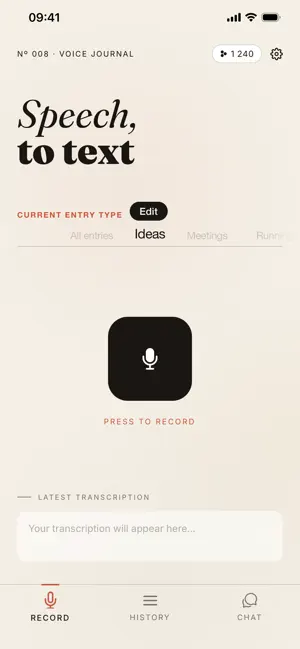
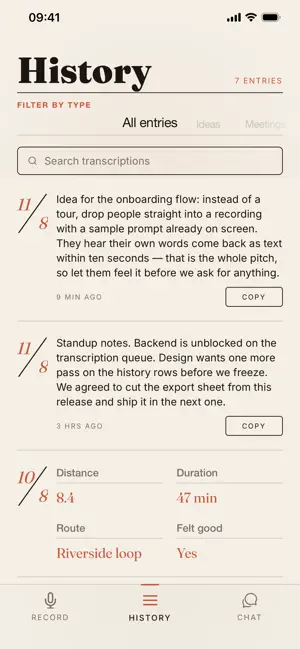
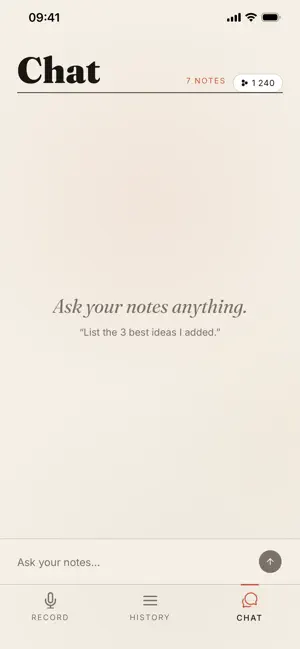
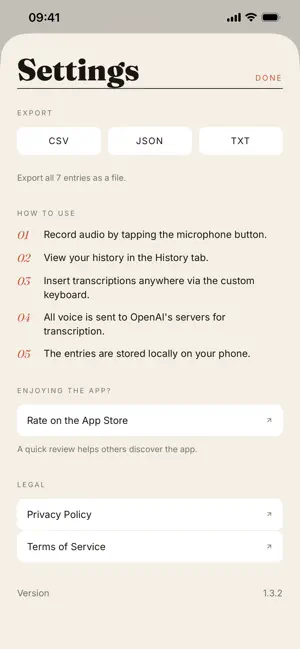
Speak, and watch your words appear on screen instantly. Speech to Text uses the latest AI transcription frameworks to turn your voice into clean, readable text in seconds. No typing, no fiddling with settings — just tap once, talk, and your transcript is ready to copy anywhere: notes, email, Slack, docs, wherever you need it. What's new Build custom modules for the things you do again and again — training sets, meeting formats, journal prompts, or any recurring workflow. Once a module is set up, just speak directly into it and skip the repetitive setup every time. What makes it different No subscription, no trial that quietly turns into a bill - pay for what you use. No analytics, no ads, no tracking. Your transcripts are stored on your device, not on our servers — recordings go to our AI provider only to be turned into text, and are deleted from your device once transcribed. You're asked before anything is sent, and you can turn it off at any time. Built for speed, not bloat — no unnecessary accounts, logins, or setup screens standing between you and your first transcription. Features Instant transcription powered by the latest AI transcription frameworks, tuned for accuracy across accents and speaking speeds Chat with your transcriptions — ask follow-up questions, request summaries, or dig deeper into your notes using AI Full history view that works as a running voice diary, so you can revisit any past session whenever you want One-tap copy to clipboard for fast pasting into any app Universal Clipboard support — copy on your iPhone or iPad and paste straight onto your Mac Custom modules for recurring use cases like training dictation, standing meeting notes, or journaling templates Clean, distraction-free interface that gets out of your way Perfect for Meeting notes you don't want to type by hand, voice journaling at the end of a long day, training dictation for repeatable workflows, and capturing quick ideas the moment they hit you — before you forget them.
What’s new
Version 1.3.4 · Updated October 17, 2026
- Transcription and chat now run on newer OpenAI models. - Your token balance now lives on our server, and every purchase is verified with the App Store before the tokens are added.
App privacy
The developer, Motion Apps AB, reported these privacy practices to Apple.
Data Linked to You
The following data, which may be collected and linked to your identity, may be used for the following purposes:
- Purchases: Purchase History
- Identifiers: Device ID
Used for: App Functionality
Data Not Linked to You
The following data, which may be collected but is not linked to your identity, may be used for the following purposes:
- User Content: Audio Data, Other User Content
Used for: App Functionality
Alternatives to Speech to text - Transcription
Looking for apps like Speech to text - Transcription? Here are 6 similar apps on the App Store. The highest rated is Spokn: Expenses & Reminders (4.7/5), and 4 of the 6 are free to download.
-
 Yap!!
Yap!!
-
 Spokn: Expenses & Reminders
4.7
Spokn: Expenses & Reminders
4.7
-
 Meemo Assistant
-
 ScanTo Pro: Offline PDF & OCR
3.0
ScanTo Pro: Offline PDF & OCR
3.0
-
 Ear Recorder
-
 Receipt to PDF: Expense Report
| App | Rating | Price | Last updated | Compare |
|---|---|---|---|---|
| Speech to text - Transcription | 1.0 / 5 (1 rating) | Free | October 17, 2026 | |
| Yap!! | – | 3.99 USD | Sep 13, 2026 | Compare |
| Spokn: Expenses & Reminders | 4.7 / 5 (6) | Free | Aug 11, 2026 | Compare |
| Meemo Assistant | – | Free | Jun 24, 2026 | Compare |
| ScanTo Pro: Offline PDF & OCR | 3.0 / 5 (2) | Free | Oct 26, 2026 | Compare |
| Ear Recorder | – | Free | Oct 27, 2026 | Compare |
| Receipt to PDF: Expense Report | – | 3.99 USD | Oct 2, 2026 | Compare |