

Lutter: Video Color Grading
CHIH YU LIN Photo & Video iPhoneiPadiPod touch
Lutter: Video Color Grading is a free Photo & Video app for iPhone and iPad by CHIH YU LIN. Rated 5.0/5 from 4 ratings. Requires iOS 17.2.
- Rating
- 5.0
- 4 ratings
- Price
- Free
- on the App Store
- Size
- 66 MB
- Age 4+
- Updated
- Oct 12
- 2026 · v2.2.3
Screenshots



About Lutter: Video Color Grading
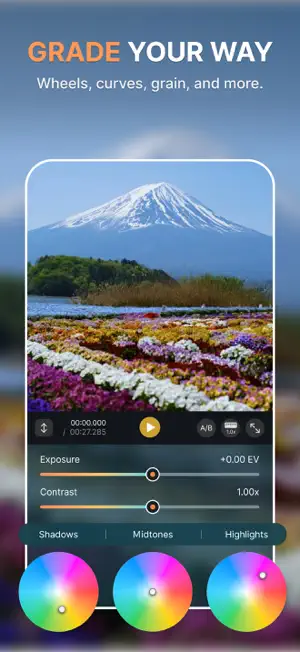
Give your videos a cinematic look. Lutter brings creative filters, LUTs, and precise color controls together in one video color grading workspace. Grade video on iPhone and iPad. Start with an everyday clip, a travel video, or your next short film. Shape the mood, compare your edits, and carry a consistent look across your videos. Import, grade, and export without a watermark. MORE ROOM TO CREATE On iPad, a larger preview and dedicated landscape controls give color wheels, curves and LUT browsing room to breathe. Add warm halation and soft bloom to highlights. Temporal noise reduction is available on supported devices with iOS/iPadOS 26 or later and compatible footage. BUILD YOUR LOOK • Apply built-in looks or import your own .cube LUTs. • Stack LUTs and independent color adjustments in the order you want. Adjust color before or after a look, change its strength, or bypass a stage to compare. • Refine exposure, contrast, saturation, vibrance, white balance, and tint. Use color wheels and tone curves for finer control, then add film grain. • Get a starting point with Auto Exposure, Auto White Balance, and a white-balance picker. COMPARE AND REUSE COLOR • Save a video frame as a reference, or import a reference photo from Photos or Files. Compare while you grade, including HDR references. • Reapply color settings from saved video references to other clips. Imported photos provide a visual reference for your own adjustments. • Copy and paste color settings between projects, or apply a look to multiple clips for a consistent shoot. SEE WHAT YOU ARE CHANGING • Compare the original and graded image with a split preview, or work in full screen. • Check exposure and color with a live histogram, floating waveform, vectorscope, and false color. • View HDR previews using the extra brightness of supported displays. FINISH YOUR VIDEO • Trim the start and end, crop, rotate, flip, straighten, and choose an aspect ratio. • Reduce handheld shake with stabilization. Use Skin Tone Fix to reduce unwanted magenta in skin. • Export up to 4K with H.264, HEVC, or ProRes 422 options. Control resolution, frame rate, and bitrate. • Export Rec.2020 HLG or PQ HDR with compatible 10-bit HEVC or ProRes settings. • Export supported color adjustments as a .cube LUT to reuse in other grading tools. MADE FOR YOUR WORKFLOW Projects save automatically, so you can organize multiple videos and return to your edits. Preview Pro editing tools before purchasing. Pro unlocks advanced color tools, film effects, stabilization and advanced export with one purchase, no subscription. Scopes, curves and color wheels remain free. WORK WITH YOUR FOOTAGE Grade standard SDR and HDR video, with support for Apple Log and Apple Log 2 when you need it. Choose Sony S-Log3 or supported DJI D-Log/D-Log M source profiles. On compatible devices, trim ProRes RAW/RAW HQ clips and export RAW to Files; RAW color grading is not supported. YOUR FOOTAGE STAYS WITH YOU No account required. Video processing happens on your device. No ads or cross-app tracking. Usage analytics and crash diagnostics can be disabled in Settings. Start with a clip. Make the color yours. Privacy: https://lutter.app/privacy Terms of Use: https://www.apple.com/legal/internet-services/itunes/dev/stdeula/
What’s new
Version 2.2.3 · Updated October 12, 2026
• Clearer Log, SDR and HDR color settings and source format identification. • Simpler LUT import and format setup. • A new advanced features guide helps explain the available settings. • Improved export reliability and overall usability.
App privacy
The developer, CHIH YU LIN, reported these privacy practices to Apple.
Data Not Collected
The developer does not collect any data from this app.
Alternatives to Lutter: Video Color Grading
Looking for apps like Lutter: Video Color Grading? Here are 6 similar apps on the App Store. The highest rated is Loot: Video Color Grading (5.0/5), and all 6 are free to download.
-
 LUT Designer: Color Grading
4.8
LUT Designer: Color Grading
4.8
-
 LogBloom: LUT Video Grading
-
 LogGrade
-
 Loot: Video Color Grading
5.0
Loot: Video Color Grading
5.0
-
 Filmtone: Film LUT Editor
-
 LUT Lab
5.0
LUT Lab
5.0
| App | Rating | Price | Last updated | Compare |
|---|---|---|---|---|
| Lutter: Video Color Grading | 5.0 / 5 (4 ratings) | Free | October 12, 2026 | |
| LUT Designer: Color Grading | 4.8 / 5 (5) | Free | Oct 12, 2026 | Compare |
| LogBloom: LUT Video Grading | – | Free | Aug 20, 2026 | Compare |
| LogGrade | – | Free | Sep 14, 2026 | Compare |
| Loot: Video Color Grading | 5.0 / 5 (2) | Free | Aug 26, 2026 | Compare |
| Filmtone: Film LUT Editor | – | Free | Jul 13, 2026 | Compare |
| LUT Lab | 5.0 / 5 (2) | Free | Feb 18, 2026 | Compare |