

Loot: Video Color Grading
Loot Video Photo & Video iPhoneiPadiPod touch
Loot: Video Color Grading is a free Photo & Video app for iPhone and iPad by Loot Video. Rated 5.0/5 from 2 ratings. Requires iOS 17.0.
- Rating
- 5.0
- 2 ratings
- Price
- Free
- on the App Store
- Size
- 226 MB
- Age 4+
- Updated
- Aug 26
- 2026 · v1.122
Screenshots


About Loot: Video Color Grading
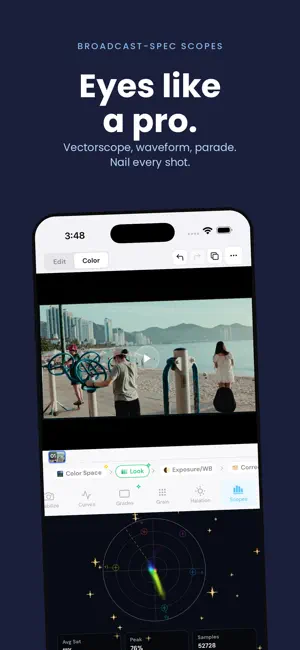
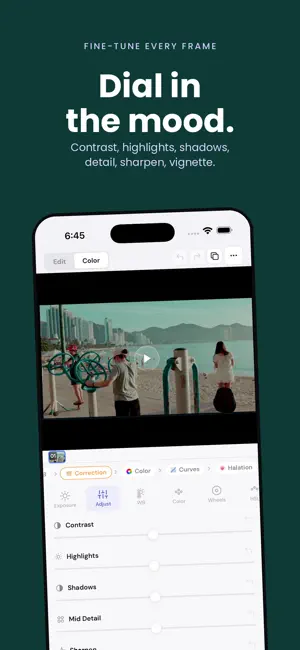
Turn everyday footage into cinematic video without leaving your iPhone. Import a clip, choose a look, fine-tune the grade, and export. CINEMA IN THREE TAPS - Import a video or photo - Choose from 60+ cinematic looks - Export the finished result to Photos PRO COLOR TOOLS Go beyond one-tap filters with lift, gamma, and gain wheels, HSL controls, per-channel curves, exposure, contrast, white balance, saturation, and vibrance. FILM EMULATION Build an organic finish with professional LUTs, film-stock emulations, adjustable grain, and highlight halation. Import your own .cube LUT files when you want to bring an existing look with you. TRUE LOG WORKFLOWS Transform Apple Log, Sony S-Log3, and ARRI LogC footage with proper color space transforms designed to preserve the range in your source. NODE-BASED GRADING Stack correction, color, curves, LUT, grain, and halation nodes in a flexible, non-destructive pipeline. Reorder or revisit any part of the grade without starting over. CAPTURE IN LOOT Shoot inside Loot with your chosen look previewing live, then grade and export on the same device. Stabilization helps smooth handheld footage before delivery. LOOT PRO Unlock premium looks, save custom presets, and export your own presets with a monthly subscription. Cancel anytime. Questions or feature requests? Email [email protected]. Terms: https://loot.video/terms Privacy: https://loot.video/privacy
What’s new
Version 1.122 · Updated August 26, 2026
Improves export reliability, keeps film grain luminance-neutral, and adds faster crash diagnostics so issues can be found and fixed sooner.