

LogGrade
Jack Richmond Photo & Video iPhoneiPadiPod touch
LogGrade is a free Photo & Video app for iPhone and iPad by Jack Richmond. Requires iOS 17.0. Updated September 14, 2026.
- Price
- Free
- on the App Store
- Size
- 6 MB
- Age 4+
- Updated
- Sep 14
- 2026 · v1.6
Screenshots
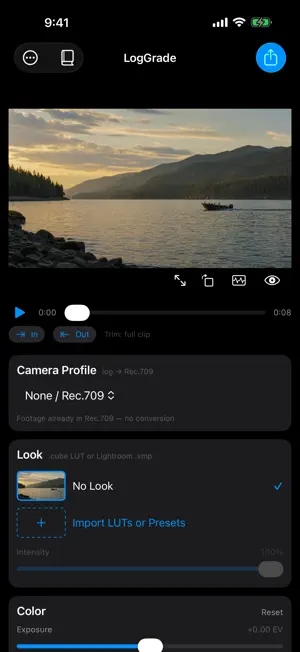
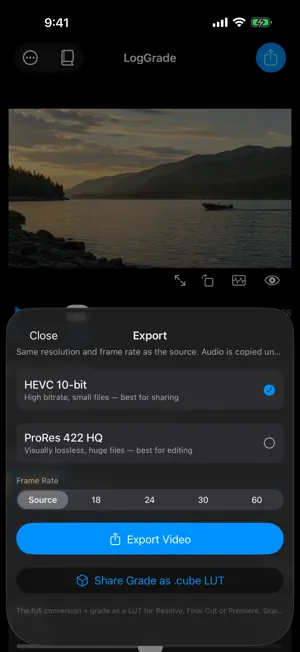

About LogGrade
Log footage in. Graded video out. LogGrade is a focused, on-device color grading workflow for iPhone and iPad. Import log, HDR, or standard video, build a look, and export a finished Rec.709 video without moving footage to a desktop editor. CAMERA AND COLOR PROFILES • Standard iPhone and camera video with no log conversion • Apple Log and Apple Log 2 • iPhone Display P3 SDR, HLG, and PQ/Dolby Vision • DJI D-Log M • GoPro GP-Log • GoPro HERO11 10-bit Protune Flat • Sony Cine4 CREATIVE TOOLS • Fuji-inspired film simulations tuned for both normalized log and standard video • Import, rename, organize, and remove .cube LUTs and Lightroom .xmp presets • Exposure, contrast, highlights, shadows, temperature, tint, saturation, and vibrance • Eight-band HSL color mixer • High-quality adjustable noise reduction and clarity • Adjustable grain, softness, bloom, halation, and vignette • Save complete grades as reusable recipes PRECISE, NON-DESTRUCTIVE EDITING Compare with the original, inspect scopes, scrub and trim, rotate or reframe, and return to saved edits later. Preview is optimized for smooth playback while final export always reopens the original source. INSTAGRAM STORY DELIVERY Build an exact 9:16 Story canvas, scale and position horizontal or vertical video, choose any background color, then create a 1080×1920 H.264/AAC Story file with one tap. PROFESSIONAL EXPORT Export source-resolution HEVC 10-bit or ProRes 422 HQ with audio preserved. Keep the source frame rate or retime to 18, 24, 30, or 60 fps. Batch export up to 25 clips or share the finished grade as a .cube LUT. PRIVATE BY DESIGN Your videos and grades stay on your device. LogGrade has no accounts, advertising, analytics, or tracking.
What’s new
Version 1.6 · Updated September 14, 2026
• Slow motion: conform 60, 120, or 240 fps footage to a 24, 30, or 60 fps timeline, keeping every captured frame • Two built-in looks, Addison and Hudson, ready to use without importing anything • Full-screen editing now reaches every adjustment — color, HSL, film, and audio — by swiping between them • Aspect ratio presets no longer require the Instagram Story canvas • Tap any slider's value to type an exact number • Playback pauses when you touch a control, so the first tap always lands • More accurate film emulsion rendering, with true blacks and a smooth blend from neutral to full strength • The screen stays awake for the whole export • Clearer reporting when a LUT or preset fails to import, and saved recipes can keep your current camera profile • Fixed an export failure affecting some DJI and large action-camera clips Film emulsion rendering is more accurate in this version, so saved grades that use it may look slightly different.
App privacy
The developer, Jack Richmond, reported these privacy practices to Apple.
Data Not Collected
The developer does not collect any data from this app.
Alternatives to LogGrade
Looking for apps like LogGrade? Here are 6 similar apps on the App Store. The highest rated is Lutter: Video Color Grading (5.0/5), and all 6 are free to download.
-
 Color Grading: Video LUTs
-
 LogGate LUTLab
1.0
LogGate LUTLab
1.0
-
 LogBloom: LUT Video Grading
-
 Lutter: Video Color Grading
5.0
Lutter: Video Color Grading
5.0
-
 LUT Designer: Color Grading
4.8
LUT Designer: Color Grading
4.8
-
 ToneLab: Video & Photo Editor
5.0
ToneLab: Video & Photo Editor
5.0
| App | Rating | Price | Last updated | Compare |
|---|---|---|---|---|
| LogGrade | – | Free | September 14, 2026 | |
| Color Grading: Video LUTs | – | Free | Sep 8, 2026 | Compare |
| LogGate LUTLab | 1.0 / 5 (1) | Free | Jul 20, 2026 | Compare |
| LogBloom: LUT Video Grading | – | Free | Aug 20, 2026 | Compare |
| Lutter: Video Color Grading | 5.0 / 5 (4) | Free | Oct 12, 2026 | Compare |
| LUT Designer: Color Grading | 4.8 / 5 (5) | Free | Oct 12, 2026 | Compare |
| ToneLab: Video & Photo Editor | 5.0 / 5 (9) | Free | Oct 7, 2026 | Compare |
Compare LogGrade with the top alternatives: ratings, updates, ASO score and keyword gaps →