

LogBloom: LUT Video Grading
Rodrigo Menezes Photo & Video iPhoneiPadiPod touch
LogBloom: LUT Video Grading is a free Photo & Video app for iPhone and iPad by Rodrigo Menezes. Requires iOS 26.2. Updated August 20, 2026.
- Price
- Free
- on the App Store
- Size
- 9 MB
- Age 4+
- Updated
- Aug 20
- 2026 · v1.2
Screenshots


About LogBloom: LUT Video Grading
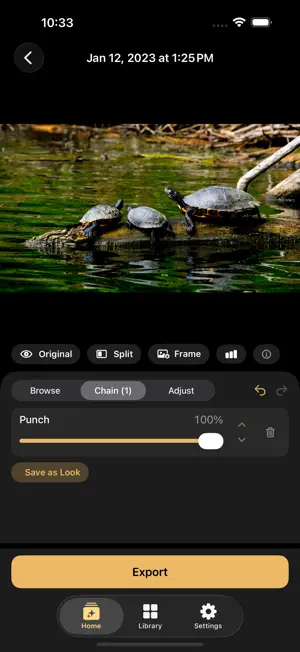
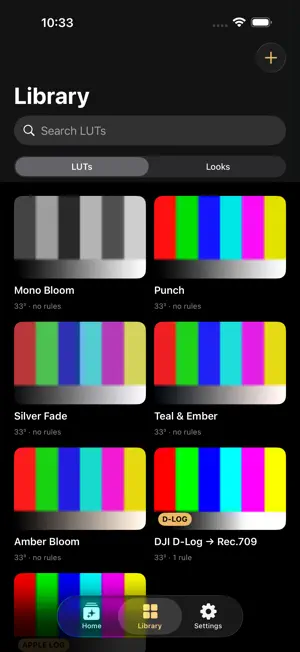
LogBloom turns flat log footage into finished, cinematic color — entirely on your iPhone or iPad. Shoot Apple Log on iPhone or D-Log on a drone, drop the clip in, and get graded video back into Photos without ever opening a desktop editor. No subscription. No cloud upload. Your footage never leaves your device. GRADE WITH LUTs • Apply .cube LUTs to any video or photo • Stack multiple LUTs into a chain, each with its own intensity • Reorder, blend, undo and redo — see every change live on your actual frame • Save any combination as a reusable "Look" BUILT FOR LOG • Built-in Apple Log → Rec.709 and DJI D-Log → Rec.709 conversion, computed from the published color science — not guesswork • LogBloom always applies the log conversion before your creative look, so colors stay correct no matter the order • HDR/HLG clips are tone-mapped to SDR, and the app tells you when that happens FINE-TUNE • Post-grade adjustments: exposure, contrast, saturation, temperature, tint, and vibrance • Hold to compare against the original, or use the split-screen wipe • Built-in histogram scope • Save any frame as a graded HEIC still SMART SUGGESTIONS • LogBloom reads your clip's camera and color profile and surfaces the right conversion LUT first • Works for photos too, using EXIF camera data EXPORT THAT KEEPS YOUR METADATA • Export to Photos or Files as MOV or MP4, HEVC or H.264, up to 4K • Original creation date and GPS location are preserved on the exported clip • Size estimate before you export • Batch mode: grade up to 50 clips, or apply one grade to a whole batch at once PHOTOS TOO • The same LUT pipeline and adjustments work on still photos, with EXIF and GPS preserved YOURS, EVERYWHERE • Your LUTs and Looks sync privately across your devices via iCloud • Share a Look as a single .logbloomlook file — it carries the LUTs inside it • No account, no server, no tracking of your creative work LogBloom is the fastest way to take iPhone and drone log footage from flat to finished, right where you shot it.
What’s new
Version 1.2 · Updated August 20, 2026
This update adds pro exposure tools, support for more cameras, and a much stronger batch workflow. Cameras & Log Formats • Sony S-Log3 and Fujifilm F-Log2 are now detected automatically, with matching conversion LUTs added to your library. • Looks without their own camera rules are now suggested based on the LUTs inside them. Exposure Tools • The histogram is now live — it updates during playback and reflects exactly what's on screen. • New false color and zebra overlays for judging exposure at a glance. Both are preview-only and never affect your export. • A metadata row above the video shows color profile, resolution, frame rate, and codec. Library • Favorite your LUTs and Looks, and organize them with tags — new filter chips narrow the Library instantly. • Thumbnails now show each LUT applied to real footage instead of a color chart. • Open .cube files and shared Looks directly from Files, Safari, or AirDrop. • Deleting a LUT or Look now shows you where it's used first. Batch Grading • Copy and paste grades between clips in the queue, or apply one grade to everything remaining. • Export All replays each clip's own saved grade. • Optionally delete originals after a verified export — with a confirmation first, and a summary of what was deleted or kept. Exports • HEVC exports are now 10-bit by default for cleaner gradients and less banding, with a Compatible mode if you need the previous behavior. • A Format & Quality section collects codec, resolution, and a bitrate override. Editor & Onboarding • Exposure, temperature, and tint now apply before the LUT, so highlights hold detail instead of clipping. • Onboarding can open a bundled sample clip, so you can try a grade before importing anything. • Cleaner editor chrome, a centered layout on iPad, and plainer wording throughout. Reliability • Fixed a playback issue where a clip could refuse to play after switching back and forth between videos. • Fixed a false "Export failed" message and a stuck share screen when LogBloom only had permission to add photos. • Recents now clears itself when a video is deleted from Photos — and keeps your grade if the video was only hidden or is still recoverable. • Imports show progress, can be cancelled, and download iCloud placeholder files automatically. Also • Accessibility and VoiceOver improvements throughout, plus keyboard shortcuts listed in Settings › Help.
App privacy
The developer, Rodrigo Menezes, reported these privacy practices to Apple.
Data Used to Track You
The following data may be used to track you across apps and websites owned by other companies:
- Identifiers: Device ID
- Usage Data: Product Interaction, Advertising Data
Data Linked to You
The following data, which may be collected and linked to your identity, may be used for the following purposes:
- Identifiers: Device ID
- Usage Data: Product Interaction, Advertising Data
Used for: Third-Party Advertising, Developer’s Advertising or Marketing, Analytics, App Functionality
Data Not Linked to You
The following data, which may be collected but is not linked to your identity, may be used for the following purposes:
- Diagnostics: Crash Data, Performance Data, Other Diagnostic Data
Used for: App Functionality
Alternatives to LogBloom: LUT Video Grading
Looking for apps like LogBloom: LUT Video Grading? Here are 6 similar apps on the App Store. The highest rated is Lutter: Video Color Grading (5.0/5), and all 6 are free to download.
-
 LogGrade
-
 Lutter: Video Color Grading
5.0
Lutter: Video Color Grading
5.0
-
 LUT Designer: Color Grading
4.8
LUT Designer: Color Grading
4.8
-
 Color Grading: Video LUTs
-
 LogGate LUTLab
1.0
LogGate LUTLab
1.0
-
 Filmtone: Film LUT Editor
| App | Rating | Price | Last updated | Compare |
|---|---|---|---|---|
| LogBloom: LUT Video Grading | – | Free | August 20, 2026 | |
| LogGrade | – | Free | Sep 14, 2026 | Compare |
| Lutter: Video Color Grading | 5.0 / 5 (4) | Free | Oct 12, 2026 | Compare |
| LUT Designer: Color Grading | 4.8 / 5 (5) | Free | Oct 12, 2026 | Compare |
| Color Grading: Video LUTs | – | Free | Sep 8, 2026 | Compare |
| LogGate LUTLab | 1.0 / 5 (1) | Free | Jul 20, 2026 | Compare |
| Filmtone: Film LUT Editor | – | Free | Jul 13, 2026 | Compare |