

Replay Recorder
QuietCapture LLC Photo & Video iPhoneiPadiPod touch
Replay Recorder is a free Photo & Video app for iPhone and iPad by QuietCapture LLC. Rated 5.0/5 from 2 ratings. Requires iOS 15.0.
- Rating
- 5.0
- 2 ratings
- Price
- Free
- on the App Store
- Size
- 60 MB
- Age 12+
- Updated
- Sep 17
- 2026 · v1.2
Screenshots


About Replay Recorder
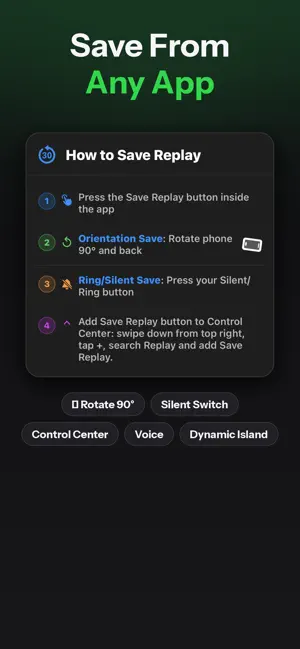
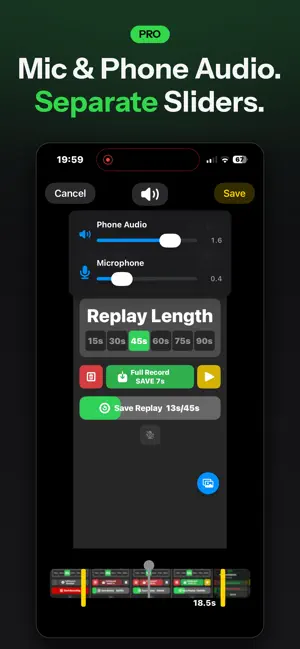
Replay Recorder is the instant replay app iOS has been missing. Catch the moment after it happens — no more starting a recording too late. Replay Recorder constantly buffers your screen so you can save the last 15 to 90 seconds anytime, instantly. INSTANT REPLAY - Save the last 15-90 seconds of your screen with one tap - Choose your replay length: 15, 30, 60, or 90 seconds - Never miss a great play, a funny moment, or a bug you need to report FULL RECORD MODE (PRO) - Record your entire screen like a traditional screen recorder - Pause and resume anytime — the only iOS screen recorder that lets you stop and pick back up without starting a new file DUAL-CHANNEL AUDIO EDITING (PRO) - Adjust microphone and system audio independently after recording - Fine-tune your commentary without losing game or app audio QUALITY OPTIONS - Record at full screen resolution for maximum quality - Or switch to 720p mode to save storage space and reduce file size EXPORT & SHARE - Save directly to Photos or share to any app - Replay Recorder PRO removes watermarks and export limits Replay Recorder PRO unlocks unlimited exports, full recording mode, dual-channel audio editing, and watermark-free clips. Perfect for gamers, streamers, tutorial creators, and anyone who needs to capture what just happened on their screen. Replay Recorder Pro and Replay Recorder Expro are auto-renewable subscriptions. Pro is the full-featured tier; Expro is a lower-cost tier with a reduced feature set. Subscription title, length, and price are shown in the app before you purchase. Payment is charged to your Apple ID at confirmation. Subscriptions auto-renew unless canceled at least 24 hours before the end of the current period; your account is charged for renewal within 24 hours prior to the end of the period. Manage or cancel anytime in your App Store account settings. Terms of Use (EULA): https://quietcapture.com/terms Privacy Policy: https://quietcapture.com/privacy
What’s new
Version 1.2 · Updated September 17, 2026
• Fixed a crash that could close the app during playback. • Improved reliability when saving replays. • Redesigned in-app messages to be clearer and more accurate. • Various polish and fixes throughout the app.
App privacy
The developer, QuietCapture LLC, reported these privacy practices to Apple.
Data Used to Track You
The following data may be used to track you across apps and websites owned by other companies:
- Identifiers: Device ID
Data Linked to You
The following data, which may be collected and linked to your identity, may be used for the following purposes:
- Identifiers: Device ID, User ID
- Usage Data: Product Interaction
- User Content: Customer Support
- Diagnostics: Crash Data, Other Diagnostic Data
Used for: Third-Party Advertising, Analytics, App Functionality
Data Not Linked to You
The following data, which may be collected but is not linked to your identity, may be used for the following purposes:
- Purchases: Purchase History
Used for: Analytics, App Functionality
Alternatives to Replay Recorder
Looking for apps like Replay Recorder? Here are 6 similar apps on the App Store. The highest rated is ClipBack: Instant Replay (5.0/5), and all 6 are free to download.
-
 ReplayNow: Record the last 30s
-
 ClipBack: Instant Replay
5.0
ClipBack: Instant Replay
5.0
-
 Screen Recorder Pro: Rec Video
5.0
Screen Recorder Pro: Rec Video
5.0
-
 Instant Replay Camera Recorder
2.8
Instant Replay Camera Recorder
2.8
-
 KPLAWY - Replay Camera
-
 HypeRecord Screen Recorder Pro
| App | Rating | Price | Last updated | Compare |
|---|---|---|---|---|
| Replay Recorder | 5.0 / 5 (2 ratings) | Free | September 17, 2026 | |
| ReplayNow: Record the last 30s | – | Free | Sep 25, 2025 | Compare |
| ClipBack: Instant Replay | 5.0 / 5 (37) | Free | Sep 18, 2026 | Compare |
| Screen Recorder Pro: Rec Video | 5.0 / 5 (8) | Free | Jul 31, 2026 | Compare |
| Instant Replay Camera Recorder | 2.8 / 5 (4) | Free | Sep 8, 2025 | Compare |
| KPLAWY - Replay Camera | – | Free | Sep 11, 2026 | Compare |
| HypeRecord Screen Recorder Pro | – | Free | Jun 12, 2025 | Compare |
Compare Replay Recorder with the top alternatives: ratings, updates, ASO score and keyword gaps →