

ClipBack: Instant Replay
Cody Renshaw Photo & Video iPhoneiPadiPod touchApple Watch
ClipBack: Instant Replay is a free Photo & Video app for iPhone and iPad by Cody Renshaw. Rated 5.0/5 from 37 ratings. Requires iOS 17.2.
- Rating
- 5.0
- 37 ratings
- Price
- Free
- on the App Store
- Size
- 12 MB
- Age 4+
- Updated
- Sep 18
- 2026 · v2.5.2
Screenshots

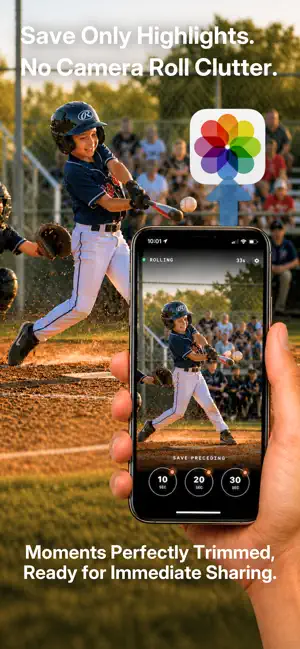


About ClipBack: Instant Replay
Stop recording long videos just to find a few seconds worth keeping. ClipBack keeps a rolling video buffer, so when something great happens, you can tap after the moment and save the last 10, 20, or 30 seconds directly to Photos. Only the special moment, no camera roll clutter. Perfect for youth sports, family milestones, pets, outdoor tricks, trips, lightning storms, and everyday moments you cannot predict. HOW IT WORKS Open ClipBack and watch the moment. When something happens, tap a save button. ClipBack reaches back in time and saves the highlight. No huge camera-roll clutter. No trimming long videos later. No guessing exactly when to hit record. FREE FEATURES Rolling video buffer Save the last 10, 20, or 30 seconds Save directly to Photos Quickly share or favorite your last saved clip Precision one-handed zoom - start on the zoom dial and slide to fine-tune Clean highlight clips without editing PRO INCLUDED FREE FOR 30 DAYS ClipBack's core camera is free. Your first 30 days include Pro access, so you can try the full capture workflow at games, practices, family milestones, trips, and everyday surprises. No auto-renewal. No surprise charge. PRO FEATURES AI Auto Save ClipBack can listen for big moments and save clips automatically while the camera keeps rolling. Video Quality Use 1080p for reel-ready clips, turn on 60fps for smoother fast action and better slow motion, and enable 4K for cropping and TV viewing. 4K and 60fps can now be toggled independently. Still Photo Button Take photos while the rolling buffer keeps running. Remote Trigger Save clips from Apple Watch, Bluetooth camera remotes, or the iPhone volume-up button. Custom Clip Durations Set the three save buttons to the moments you actually need, from quick reactions to longer sequences. Team Logo Add a team logo to saved clips. Built-in background remover helps your logos look great. Enhanced Zoom Get 50% extra reach when the action is far away and framing matters. Custom Startup Zoom Open the camera already framed at your preferred zoom, every time you launch. Grid Lines Frame the field, court, stage, trail, or subject with a simple rule-of-thirds guide. Slo-Mo / Fast-Mo Export clips slower for review or faster for quick recaps. Mute Audio Remove background noise from clips before sharing. Front Camera Flip Flip to the front camera to record your own reaction or commentary without leaving the app. Endurance Mode Dim the screen and cap quality so your phone lasts an all-day tournament. Buffer Timer Show how many seconds are currently held in the rolling buffer. Focus Lock Press and hold to lock focus and exposure on the action, so someone walking past can't pull focus. Lens Lock Pin the camera to one lens so it never switches on its own, even up close. Multi-lens iPhones only. Auto-Trim on Raise Starts your saved clip where you lifted the phone, so it doesn't open on seconds of grass before the action. Whether it's a winning goal, a first step, a puppy doing something ridiculous, or a moment no one saw coming, ClipBack helps you save it after it happens. Watch the moment. Save the highlight. SUBSCRIPTION INFORMATION ClipBack Pro is optional. Monthly and annual subscriptions renew automatically unless canceled at least 24 hours before the end of the current period. You can manage or cancel subscriptions in your Apple Account settings. A lifetime purchase is also available. Terms of Use: https://www.apple.com/legal/internet-services/itunes/dev/stdeula/
Ratings & reviews
5.0
37 ratings
What’s new
Version 2.5.2 · Updated September 18, 2026
Fixes a bug where closing Settings reset your zoom to 0.5x and cleared the footage ClipBack was holding. You can now open Settings mid-game without losing your zoom level or the play you were about to save.
App privacy
The developer, Cody Renshaw, reported these privacy practices to Apple.
Data Not Linked to You
The following data, which may be collected but is not linked to your identity, may be used for the following purposes:
- Usage Data: Product Interaction
- Diagnostics: Crash Data
Used for: Analytics
Alternatives to ClipBack: Instant Replay
Looking for apps like ClipBack: Instant Replay? Here are 6 similar apps on the App Store. The highest rated is Flashback: Sports Replay Cam (5.0/5), and all 6 are free to download.
-
 ReplayNow: Record the last 30s
-
 Video Buffer Pre-Recorder 4K
4.5
Video Buffer Pre-Recorder 4K
4.5
-
 Instant Replay Camera Recorder
2.8
Instant Replay Camera Recorder
2.8
-
 Flashback: Sports Replay Cam
5.0
Flashback: Sports Replay Cam
5.0
-
 Video Pre-Recorder
5.0
Video Pre-Recorder
5.0
-
 Ok Camera
| App | Rating | Price | Last updated | Compare |
|---|---|---|---|---|
| ClipBack: Instant Replay | 5.0 / 5 (37 ratings) | Free | September 18, 2026 | |
| ReplayNow: Record the last 30s | – | Free | Sep 25, 2025 | Compare |
| Video Buffer Pre-Recorder 4K | 4.5 / 5 (45) | Free | Oct 11, 2026 | Compare |
| Instant Replay Camera Recorder | 2.8 / 5 (4) | Free | Sep 8, 2025 | Compare |
| Flashback: Sports Replay Cam | 5.0 / 5 (3) | Free | Mar 16, 2026 | Compare |
| Video Pre-Recorder | 5.0 / 5 (3) | Free | May 20, 2026 | Compare |
| Ok Camera | – | Free | Jun 3, 2026 | Compare |