

Zpent
JOAO PAULO SEDER Finance iPhoneiPadiPod touch
Zpent is a free Finance app for iPhone and iPad by JOAO PAULO SEDER. Requires iOS 15.1. Updated October 23, 2026.
- Price
- Free
- on the App Store
- Size
- 40 MB
- Age 4+
- Updated
- Oct 23
- 2026 · v1.4.2
Screenshots


About Zpent
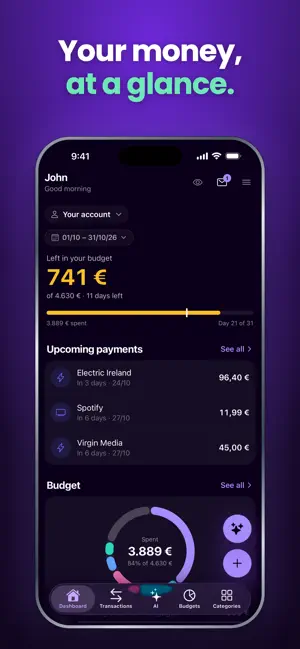
Stop manually categorizing transactions. Zpent does it instantly. Categorizing transactions is one of those tasks everyone knows they should do — and nobody wants to. It's tedious, time-consuming, easy to fall behind on. Zpent makes it disappear. Import a PDF, CSV, XLS, XLSX, OFX, or QFX from any bank, and Zpent's AI categorizes every transaction in seconds. 17 smart defaults, unlimited custom categories, and the model learns from your corrections. What used to take an hour now takes seconds — and seeing your spending actually organized feels surprisingly satisfying. SAFE TO SPEND One clear number: exactly how much you can comfortably spend right now, factoring in your monthly budget and upcoming commitments. No spreadsheet, no math. Just a glance. EXPENSE HEATMAP A color-coded calendar of your spending patterns. Spot which days and weeks actually drain your wallet — at a glance. AI ASSISTANT Ask plain-English questions: "How much did I spend on restaurants last month?" or "Am I on track with my grocery budget?" Instant answers, grounded in your real data. BUDGETS THAT LEARN FROM YOU AI-suggested limits based on your actual spending history. Adjust as you go, copy from previous months, get visual breakdowns by category. UNIVERSAL IMPORT PDF, CSV, XLS, XLSX, OFX, QFX. Any format from any bank in 150+ currencies, with automatic format, currency, and date detection. SCHEDULED PAYMENTS Track recurring payments — subscriptions, rent, salary — with calendar reminders, "due this week" alerts, and the ability to skip individual occurrences. PRIVACY, FIRST CLASS Encrypted in transit (TLS 1.2+) and at rest (AES-256). GDPR compliant. SOC 2 Type II infrastructure. Your financial data is never used to train AI models. Ever. FAMILY & COLLABORATORS Share view-or-edit access with a partner, accountant, or family member. Everyone stays on the same page. Privacy policy: https://zpent.io/privacy Terms of use: https://zpent.io/terms Support: [email protected]
What’s new
Version 1.4.2 · Updated October 23, 2026
Import from a photo: take or pick a photo or screenshot of a bank statement, card bill or receipt, and Zpent reads the transactions from it. Links opened while signed out now take you to sign in first. Plus steadier sign-in and sign-out, and small fixes.
App privacy
The developer, JOAO PAULO SEDER, reported these privacy practices to Apple.
Data Linked to You
The following data, which may be collected and linked to your identity, may be used for the following purposes:
- Financial Info: Other Financial Info
- Contact Info: Email Address, Name
- User Content: Photos or Videos
- Identifiers: User ID
Used for: App Functionality
Data Not Linked to You
The following data, which may be collected but is not linked to your identity, may be used for the following purposes:
- Usage Data: Product Interaction, Other Usage Data
- Diagnostics: Performance Data, Other Diagnostic Data, Crash Data
- User Content: Other User Content
Used for: Analytics, App Functionality
Alternatives to Zpent
Looking for apps like Zpent? Here are 6 similar apps on the App Store. The highest rated is The Smart Budget (5.0/5), and all 6 are free to download.
-
 Ledgr-Journal
-
 Keepi: Mindful finance tracker
-
 AI Spend Tracker: RetroBudget
3.0
AI Spend Tracker: RetroBudget
3.0
-
 Fiscify: Smart Expense Tracker
-
 SnapBudget: One-Tap Spending
-
 The Smart Budget
5.0
The Smart Budget
5.0
| App | Rating | Price | Last updated | Compare |
|---|---|---|---|---|
| Zpent | – | Free | October 23, 2026 | |
| Ledgr-Journal | – | Free | Aug 18, 2026 | Compare |
| Keepi: Mindful finance tracker | – | Free | Jul 15, 2026 | Compare |
| AI Spend Tracker: RetroBudget | 3.0 / 5 (2) | Free | Aug 18, 2026 | Compare |
| Fiscify: Smart Expense Tracker | – | Free | Oct 28, 2026 | Compare |
| SnapBudget: One-Tap Spending | – | Free | Mar 25, 2026 | Compare |
| The Smart Budget | 5.0 / 5 (2) | Free | Oct 20, 2026 | Compare |
Compare Zpent with the top alternatives: ratings, updates, ASO score and keyword gaps →