

Ledgr-Journal
KUN YAO Finance iPhoneiPadiPod touchApple Watch
Ledgr-Journal is a free Finance app for iPhone and iPad by KUN YAO. Requires iOS 26.2. Updated August 18, 2026.
- Price
- Free
- on the App Store
- Size
- 12 MB
- Age 4+
- Updated
- Aug 18
- 2026 · v1.4
Screenshots


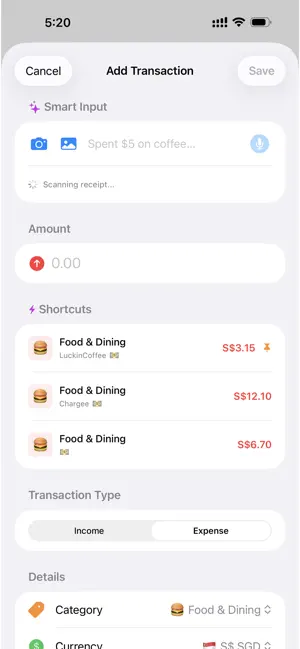

About Ledgr-Journal
Ledgr is a smart finance journal powered by on-device AI. Scan receipts with your camera, analyze bank statements with AI, speak transactions out loud, or type in plain English — Ledgr understands it all, entirely on your device with zero cloud dependency. WHAT MAKES LEDGR DIFFERENT ◆ AI BANK STATEMENT ANALYZER Import a PDF bank statement, snap a photo, or pick from your library. Ledgr's on-device AI reads every transaction, categorizes your spending with visual breakdowns, flags unusual charges, and generates personalized saving tips. No upload, no subscription — everything runs locally using Apple Intelligence. ◆ 4-WAY SMART INPUT Add transactions your way: - Point your camera at a receipt — AI extracts amount, merchant, and category instantly - Pick a receipt photo from your library - Hold the mic and speak: "Spent twelve dollars on lunch at Subway" - Or just type naturally: "$5 coffee starbucks" ◆ AI SPENDING INSIGHTS Your Statistics tab comes alive with AI-generated analysis — spending patterns, locale-aware saving tips, and trend commentary based on your real data. ◆ LIVE GOOGLE SHEETS SYNC Connect your Google account via OAuth and sync transactions directly to a spreadsheet you own. Not a CSV export — a live sync with conflict resolution, deduplication, sync history, and traffic stats. ◆ TRUE MULTI-CURRENCY Log transactions in 20+ currencies. Ledgr converts amounts using real-time exchange rates so your totals, statistics, and trends are always accurate — even across countries. ◆ CROSS-PLATFORM WITH iCLOUD Works seamlessly on iPhone, iPad, and Mac. All data syncs automatically via iCloud CloudKit. ◆ PRIVACY-FIRST No account required. No third-party servers. No tracking. Built with 100% Apple-native frameworks — SwiftUI, SwiftData, CloudKit, Vision, and Foundation Models. Zero external dependencies. Your data stays yours. Also includes: GPS location tagging, transaction shortcuts, customizable categories with emoji, account management, advanced search with filters, and spending trend charts. Key changes from your old description: - Opens with AI capabilities, not "track income and expenses" - Statement Analyzer is front and center (your strongest differentiator) - "4-Way Smart Input" positions the multi-modal entry as a feature, not just buttons - "AI Spending Insights" highlighted as its own feature - Google Sheets described as "live sync" not just "export" - Basic features (categories, search, charts) pushed to a single line at the bottom - Every bullet answers "why is this not just another expense tracker?"
What’s new
Version 1.4 · Updated August 18, 2026
• Fixed editing a subscription — tapping a subscription now opens it for editing instead of a blank "Add Subscription" form. • Fixed edits to subscription-generated transactions (including notes) being reverted by Google Sheets sync. • Fixed income subscriptions losing their category when reopened. • Added a Done key to the amount keypad so it no longer covers the fields below it.
App privacy
The developer, KUN YAO, reported these privacy practices to Apple.
Data Not Collected
The developer does not collect any data from this app.
Alternatives to Ledgr-Journal
Looking for apps like Ledgr-Journal? Here are 6 similar apps on the App Store. The highest rated is The Smart Budget (5.0/5), and all 6 are free to download.
-
 Zpent
-
 AI Spend Tracker: RetroBudget
3.0
-
 Fiscify: Smart Expense Tracker
-
 The Smart Budget
5.0
-
 Expense Tracker Genius
5.0
-
 Lode: AI Expense Tracker
5.0
| App | Rating | Price | Last updated | Compare |
|---|---|---|---|---|
| Ledgr-Journal | – | Free | August 18, 2026 | |
| Zpent | – | Free | Oct 23, 2026 | Compare |
| AI Spend Tracker: RetroBudget | 3.0 / 5 (2) | Free | Aug 18, 2026 | Compare |
| Fiscify: Smart Expense Tracker | – | Free | Oct 24, 2026 | Compare |
| The Smart Budget | 5.0 / 5 (2) | Free | Oct 20, 2026 | Compare |
| Expense Tracker Genius | 5.0 / 5 (1) | Free | Sep 20, 2026 | Compare |
| Lode: AI Expense Tracker | 5.0 / 5 (8) | Free | Oct 10, 2026 | Compare |
Compare Ledgr-Journal with the top alternatives: ratings, updates, ASO score and keyword gaps →